
Introduction
The V-Guard EiPower 950 Inverter is designed to provide reliable power backup for your home. This unit features a microcontroller-based digitally controlled operation, delivering a pseudo sine wave output. It incorporates intelligent audio and visual indications for operational status and warnings. Key features include a triac-based smart charger with a quick charging mode, a soft start facility, and comprehensive safety protections such as smart overload, short circuit, battery overcharge, and deep discharge protection. This manual provides essential information for the safe and efficient installation, operation, and maintenance of your inverter.
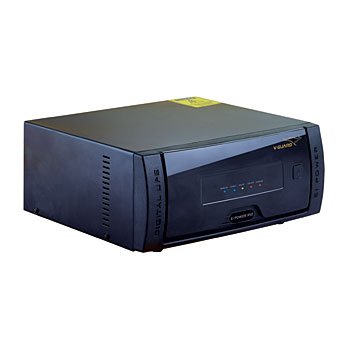
Image of the V-Guard EiPower 950 Inverter unit.
Safety Instructions
- Electrical Safety: Always ensure the inverter is properly grounded. Do not open the inverter casing; refer servicing to qualified personnel. Avoid contact with live terminals.
- Ventilation: Install the inverter in a well-ventilated area to prevent overheating. Ensure adequate clearance around the unit for airflow.
- Battery Handling: Batteries contain corrosive acid. Wear protective gear (gloves, eye protection) when handling batteries. Ensure battery terminals are clean and securely connected.
- Location: Install the inverter in a dry, cool place, away from direct sunlight, heat sources, flammable materials, and moisture. This inverter is designed for indoor use only.
- Load Capacity: Do not overload the inverter beyond its specified capacity (900VA). Overloading can damage the unit and connected appliances.
- Children and Pets: Keep the inverter and its connections out of reach of children and pets.
Package Contents
Upon unpacking, please verify that the following items are included:
- V-Guard EiPower 950 Inverter Unit
- User Manual
No additional accessories are included in the standard package.
Setup
- Choose a Suitable Location: Select a cool, dry, and well-ventilated area for installation. Ensure the surface is flat and stable. Maintain at least 15 cm of clear space around the inverter for proper airflow.
- Battery Connection: Connect the battery cables to the inverter's battery terminals. Ensure correct polarity: red cable to the positive (+) terminal and black cable to the negative (-) terminal. Tighten the terminal nuts securely to prevent loose connections, which can cause sparking or overheating.
- AC Input Connection: Plug the inverter's AC input cord into a properly grounded wall outlet. Ensure the mains supply is within the inverter's specified voltage range.
- Load Connection: Connect your appliances (lights, fans, etc.) to the output sockets of the inverter. Do not exceed the inverter's rated capacity.
- Initial Power-On: After all connections are secure, switch on the inverter's main power switch. The inverter will perform a self-test, and indicators will illuminate to show its status.
Operating Instructions
- Turning On/Off: Use the main power switch located on the inverter to turn the unit on or off.
- Mains Mode: When the mains power is available, the inverter will charge the connected battery and supply power to the connected loads directly from the mains. The 'Mains On' indicator will be lit.
- Backup Mode (Inverter Mode): In the event of a power outage, the inverter will automatically switch to battery power, supplying electricity to the connected loads. The 'Inverter On' indicator will be lit, and an audible alarm may sound to indicate the power cut.
- Battery Charging: The EiPower 950 features a smart charger with a quick charging mode. The inverter will automatically detect the battery level and initiate charging when connected to mains power. The 'Charging' indicator will be lit during this process.
- Audio and Visual Indications: Pay attention to the inverter's indicators and audible alarms. These provide crucial information about the inverter's operational status, battery level, and any potential faults (e.g., overload, low battery). Refer to the inverter's front panel for a legend of these indicators.
Maintenance
- Battery Maintenance: For lead-acid batteries, regularly check the electrolyte level (every 1-2 months) and top up with distilled water if necessary. Keep battery terminals clean and free from corrosion. Apply petroleum jelly to terminals to prevent corrosion.
- Cleaning: Keep the inverter unit clean and free from dust. Use a dry, soft cloth to wipe the exterior. Do not use liquid cleaners or solvents. Ensure ventilation openings are not blocked by dust or debris.
- Ventilation: Periodically check that the inverter's ventilation openings are clear and unobstructed to ensure proper heat dissipation.
- Connections: Occasionally inspect all electrical connections (battery terminals, AC input, load output) to ensure they are secure and free from damage or corrosion.
- Storage: If storing the inverter for an extended period, ensure the battery is fully charged, then disconnect it. Store the inverter in a cool, dry place. Recharge the battery every 3-6 months to prevent deep discharge.
Troubleshooting
| Problem | Possible Cause | Solution |
|---|---|---|
| Inverter not turning on | No mains power; Battery discharged; Loose battery connections; Main switch off | Check mains supply; Charge battery; Secure battery connections; Turn on main switch |
| No output in backup mode | Battery discharged; Overload; Inverter fault | Allow battery to charge; Reduce connected load; Contact V-Guard service |
| Battery not charging | Mains power off; Loose AC input; Battery fault; Charger fault | Check mains supply; Secure AC input; Check battery condition; Contact V-Guard service |
| Overload alarm | Too many appliances connected | Disconnect some appliances to reduce the load below the inverter's capacity |
| Short circuit alarm | Short circuit in connected load or wiring | Disconnect all loads and check for faulty wiring or appliances. Reconnect one by one. |
If the problem persists after attempting these solutions, please contact V-Guard customer support for assistance. Do not attempt to repair the inverter yourself.
Specifications
- Brand: V-Guard
- Model: EiPower 950 (EIP950)
- Capacity: 900VA
- Output Waveform: Pseudo Sine Wave (Modified Sine Wave)
- Frequency: 50 Hz
- Power Source: Battery Powered
- Recommended Uses: Home
- Control Mechanism: Microcontroller-based digitally controlled
- Charger Type: Triac-based smart charger with quick charging mode
- Protection Features: Smart overload, short circuit, battery overcharge, deep discharge protection
- Manufacturer: V-GUARD
- ASIN: B07FLL3KKZ
Warranty and Support
For warranty information, terms, and conditions, please refer to the warranty card provided with your product or visit the official V-Guard website. In case of any issues, technical support, or service requests, please contact V-Guard customer care. Ensure you have your product model number (EIP950) and purchase details ready when contacting support.
V-Guard Customer Support: Please refer to the contact information provided on the V-Guard official website or your product documentation for the most up-to-date support channels.


