Introduction
This manual provides comprehensive instructions for the operation, maintenance, and troubleshooting of your Naviforce Analog-Digital Blue Dial Men's Watch, Model NF9128. Please read this manual carefully to ensure proper use and to maximize the lifespan of your timepiece.

Figure 1: Front view of the Naviforce Analog-Digital Blue Dial Men's Watch (NF9128), showcasing its blue dial, rose gold-tone case, and blue leather strap.
Product Overview and Components
The Naviforce NF9128 combines traditional analog timekeeping with modern digital functionalities. Understanding its key components is essential for operation.
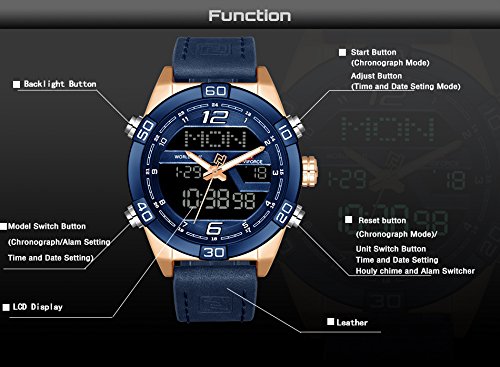
Figure 2: Diagram illustrating the various buttons and display areas of the Naviforce NF9128 watch. Key components include the Start Button, Adjust Button, Backlight Button, Model Switch Button, Reset Button, Unit Switch Button, LCD Display, and Leather strap.
- Analog Display: Traditional hour, minute, and second hands.
- Digital Display: Shows time, date, day, and other digital functions.
- Buttons: Multiple pushers for various functions (e.g., setting time, operating chronograph, activating backlight).
- Crown: Used for setting analog time.
- Luminous Hands: Hands glow in the dark after absorbing light.
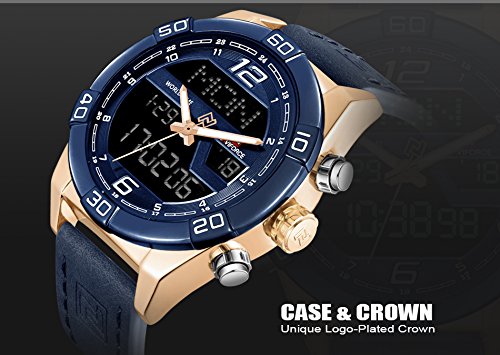
Figure 3: Close-up view of the Naviforce NF9128 watch case and its unique logo-plated crown, highlighting the robust construction.
Setup
Initial Time Setting
- Setting Analog Time:
- Pull out the crown located on the right side of the watch case.
- Rotate the crown to move the hour and minute hands to the correct time.
- Push the crown back in to secure the time setting.
- Setting Digital Time and Date:
- Refer to Figure 2 for button identification.
- Press the "Model Switch Button" (bottom left) repeatedly to cycle through modes (Time, Alarm, Chronograph, etc.) until the digital time display flashes.
- Use the "Adjust Button" (top right) to change the flashing value (e.g., hours, minutes).
- Use the "Unit Switch Button" (bottom right) to move between different setting parameters (e.g., hours to minutes, minutes to year, month, day).
- Once all settings are correct, press the "Model Switch Button" again to exit setting mode.
Operating Instructions
Digital Display Modes
Press the "Model Switch Button" (bottom left) to cycle through the following modes:
- Time Mode: Displays current digital time (hour, minute, second), day of the week, and date.
- Chronograph (Stopwatch) Mode:
- Press the "Start Button" (top left) to start/stop the chronograph.
- Press the "Reset Button" (top right) to reset the chronograph to zero when stopped.
- Alarm Mode: Allows setting a daily alarm.
- In Alarm Mode, use the "Adjust Button" and "Unit Switch Button" to set the alarm time.
- Press the "Start Button" to toggle the alarm ON/OFF.
- Hourly Chime: Can be activated or deactivated in a specific mode (often combined with alarm setting).
Backlight Function
Press the "Backlight Button" (top left, often the same as Start Button in Time Mode) to illuminate the digital display for easy viewing in low light conditions. The backlight will typically stay on for a few seconds.
Maintenance and Care
Water Resistance
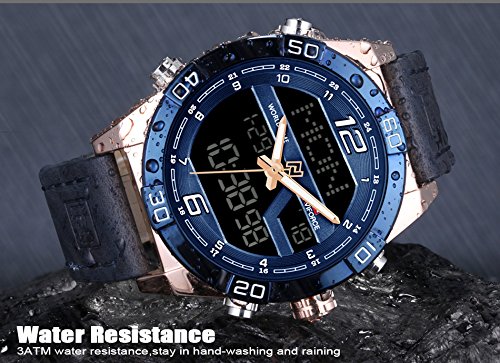
Figure 4: Image demonstrating the water resistance of the Naviforce NF9128 watch. The watch is rated for 3ATM water resistance, suitable for hand-washing and light rain exposure.
Your Naviforce NF9128 watch is water resistant to 30 meters (3 ATM / 99 feet). This means it is suitable for daily use and can withstand splashes of water or brief immersion, such as during hand-washing or light rain. It is NOT suitable for showering, bathing, swimming, diving, or any prolonged water activities. Do not operate buttons while the watch is wet or submerged.
General Care
- Clean the watch regularly with a soft, dry cloth. For stubborn dirt, a slightly damp cloth can be used, followed by drying.
- Avoid exposing the watch to extreme temperatures (hot or cold) or sudden temperature changes.
- Keep the watch away from strong magnetic fields, as this can affect the accuracy of the quartz movement.
- Avoid contact with chemicals such as solvents, detergents, perfumes, and cosmetics, as they can damage the case, strap, or seals.
- If the watch glass fogs up or moisture appears inside, have it checked by a qualified watch repair technician immediately.
Troubleshooting
| Problem | Possible Cause | Solution |
|---|---|---|
| Analog hands not moving | Battery depleted; Crown pulled out; Mechanical issue. | Check if crown is pushed in. Replace battery. Consult service center. |
| Digital display blank or dim | Battery depleted. | Replace battery. |
| Digital time/date incorrect | Not set correctly; Accidental button press. | Refer to "Setting Digital Time and Date" section to reset. |
| Moisture inside watch | Exposure to excessive water; Damaged seal. | Stop using the watch immediately. Seek professional repair to prevent further damage. |
If the problem persists after attempting the solutions above, please contact customer support or a qualified watch repair technician.
Specifications
| Feature | Detail |
|---|---|
| Brand | Naviforce |
| Model Number | NF9128 |
| Movement Type | Quartz (Analog-Digital) |
| Dial Color | Blue |
| Case Material | Alloy and Stainless Steel |
| Case Diameter | 47 millimeters |
| Case Thickness | 17 millimeters |
| Band Material | Leather |
| Band Color | Blue |
| Band Width | 23 millimeters (approx.) |
| Dial Glass Material | Mineral Crystal Glass |
| Water Resistance Depth | 30 meters (3 ATM / 99 feet) |
| Item Weight | 160 g |
Warranty and Support
Your Naviforce NF9128 watch comes with a 1-year manufacturer warranty from the date of purchase. This warranty covers manufacturing defects under normal use. It does not cover damage resulting from improper use, accidents, unauthorized repairs, or normal wear and tear.
For warranty claims, technical support, or any inquiries regarding your watch, please contact the retailer or the official Naviforce customer service channel where the product was purchased. Please retain your proof of purchase for warranty validation.
For more information, you may visit the official Naviforce website or refer to the contact details provided with your purchase documentation.


