
1. Introduction
The Godox AD600B is a powerful outdoor studio flash designed for professional photography. It features a robust 600Ws output, TTL autoflash capabilities, and a built-in 2.4G wireless X system for versatile control. Its high-speed sync functionality up to 1/8000s allows for creative control over ambient light. The unit is powered by a high-capacity lithium battery, providing extended usage for on-location shoots. The Bowens mount ensures compatibility with a wide range of light modifiers.

Figure 1.1: Godox AD600B Outdoor Studio Flash with standard reflector attached.
2. Setup
2.1 Package Contents
Before beginning, ensure all components are present in the package:
- AD600B Main Flash Unit
- Lithium Battery (WB87, 11.1V/8700mAh)
- Lampshade (Standard Reflector)
- Flashtube
- Charger Adapter
- Power Cable
- Cleaning Cloth

Figure 2.1: The replaceable flashtube for the AD600B unit.
2.2 Battery Installation
The AD600B is powered by a dedicated lithium battery pack. To install:
- Locate the battery compartment on the rear of the flash unit.
- Align the battery pack (WB87) with the compartment, ensuring the contacts match.
- Gently push the battery into place until it clicks securely.
- To remove, press the release button (if present) and slide the battery out.

Figure 2.2: Rear view of the Godox AD600B showing the installed WB87 battery pack.
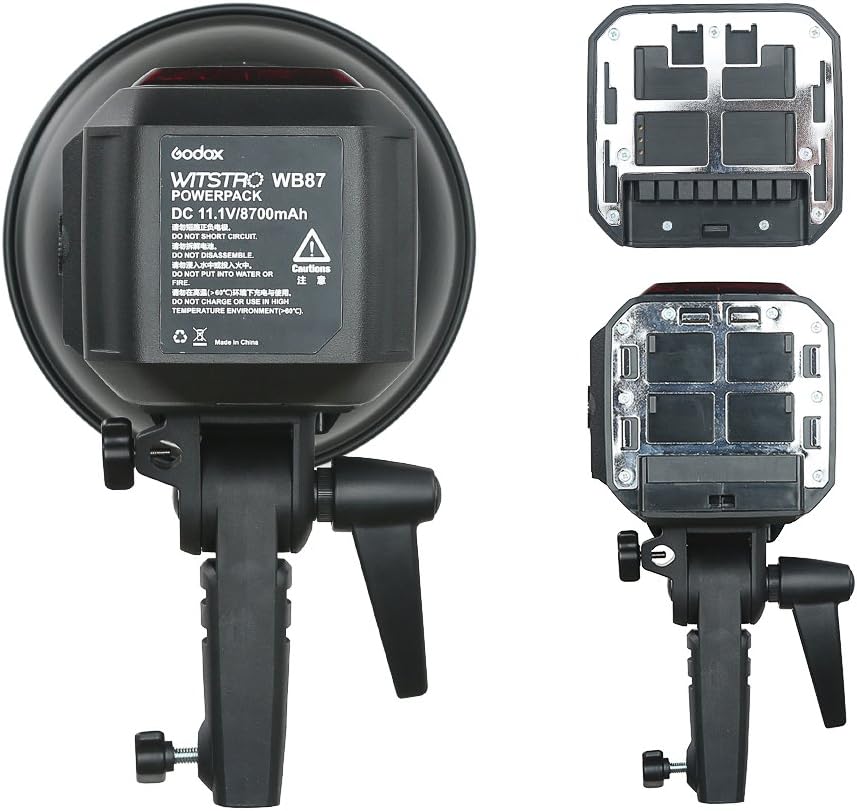
Figure 2.3: The Godox WB87 Lithium Battery Pack, providing power for the AD600B.
2.3 Attaching Light Modifiers (Bowens Mount)
The AD600B features a Bowens mount for attaching various light modifiers such as reflectors, softboxes, and beauty dishes.
- Align the modifier's mounting ring with the Bowens mount on the flash head.
- Insert the modifier and rotate it clockwise until it locks into place.
- To remove, press the release lever on the Bowens mount and rotate the modifier counter-clockwise.
3. Operation
3.1 Powering On/Off
Press and hold the power button located on the control panel to turn the unit on or off. The LCD panel will illuminate upon activation.

Figure 3.1: Front view of the Godox AD600B showing the control panel and LCD screen.
3.2 Flash Modes and Functions
The AD600B supports various flash modes and advanced functions:
- TTL Autoflash: Automatically adjusts flash output for correct exposure.
- Manual Flash (M): Allows precise control over flash power (1/1 to 1/256 in 25 steps).
- Multi Flash (Stroboscopic): Fires a series of rapid flashes for capturing multiple movements in one image.
- High-Speed Sync (HSS): Enables flash synchronization at shutter speeds up to 1/8000s, useful for overpowering ambient light.
- First-Curtain Sync & Second-Curtain Sync: Controls when the flash fires relative to the shutter curtains.
- Flash Exposure Compensation (FEC): Adjusts TTL flash output.
- C.Fn Custom Functions: Personalize various settings.
3.3 Wireless Control (Godox 2.4G Wireless X System)
The built-in Godox 2.4G wireless X system allows for remote control of the AD600B. This system enables wireless triggering, power level adjustments, and other functions when used with a compatible Godox X-series transmitter (e.g., X1, XPro).
- Set the flash unit and the transmitter to the same channel and group.
- Refer to your Godox X-series transmitter manual for detailed pairing and operation instructions.
3.4 Modeling Lamp
The AD600B features a 10W LED modeling lamp to assist with light positioning and previewing light effects. The brightness of the modeling lamp can be adjusted in three steps via the control panel.
4. Maintenance
4.1 Cleaning
- Use a soft, dry cloth to clean the flash unit.
- For stubborn marks, a slightly damp cloth with mild detergent can be used, followed by a dry cloth.
- Do not use solvents or abrasive cleaners.
- Regularly clean the flashtube and reflector to ensure optimal light output.
4.2 Storage
- Store the flash unit in a cool, dry place away from direct sunlight and excessive humidity.
- Remove the battery pack if the unit will not be used for an extended period.
- Protect the flashtube from impact during storage and transport.
4.3 Firmware Updates
The AD600B supports USB firmware upgrades. Periodically check the official Godox website for the latest firmware versions to ensure optimal performance and compatibility with new camera models or features.
5. Troubleshooting
If you encounter issues with your Godox AD600B, refer to the following common problems and solutions:
| Problem | Possible Cause | Solution |
|---|---|---|
| Flash does not fire. | Low battery; Unit not powered on; Incorrect trigger settings; Flash in sleep mode. | Charge battery; Power on unit; Check wireless channel/group; Press test button to wake. |
| Flash output is inconsistent. | Battery low; Overheating protection; Dirty flashtube. | Recharge battery; Allow unit to cool down; Clean flashtube. |
| High-Speed Sync (HSS) not working. | Camera/transmitter not set to HSS; Firmware outdated. | Enable HSS on camera/transmitter; Update flash firmware. |
| Wireless control issues. | Incorrect channel/group; Interference; Transmitter not compatible. | Verify channel/group settings; Move away from interference sources; Ensure compatible Godox X-series transmitter. |
If the problem persists after attempting these solutions, please contact Godox customer support.
6. Specifications
Key technical specifications for the Godox AD600B Outdoor Studio Flash:
| Feature | Detail |
|---|---|
| Model | AD600B |
| Flash Power | 600Ws |
| Guide Number (GN) | 87 (m ISO 100, with AD-R7 standard reflector) |
| Color Temperature | 5600K ± 200K |
| Power Adjustment | 25 steps (1/1 to 1/256) |
| Flash Modes | TTL, M, Multi |
| High-Speed Sync | Up to 1/8000s |
| Wireless System | Built-in Godox 2.4G Wireless X System |
| Battery Type | Lithium Battery Pack (11.1V/8700mAh) |
| Full Power Flashes | Approx. 500 |
| Recycle Time | 0.01-2.5 seconds |
| Modeling Lamp | 10W LED (3 adjustable steps) |
| Mount Type | Bowens Mount |
| Dimensions (Package) | 14.88 x 8.74 x 8.39 inches |
| Item Weight | 8.16 pounds |
7. Warranty & Support
7.1 Warranty Information
Godox products are manufactured to high quality standards. For specific warranty terms and conditions, please refer to the warranty card included with your product or visit the official Godox website. Keep your purchase receipt as proof of purchase for warranty claims.
7.2 Customer Support
For technical assistance, troubleshooting beyond this manual, or service inquiries, please contact Godox customer support. Contact information can typically be found on the official Godox website or on your product packaging.
Manufacturer: Godox
Official Website: www.godox.com