
1. Product Overview
The Mustpoint Mini PCIe WWAN Card to USB Adapter is designed to convert a 3G/4G wireless Mini-Card into a USB port for use with desktop or embedded systems. This adapter facilitates testing and diagnosis of WWAN cards.
Key Features:
- Converts Mini PCIe WWAN cards to USB.
- Supports 30mm x 50mm Mini PCIe cards.
- Includes a SIM 6pin/8pin card connector.
- Supports Plug & Play and Hot-Swapping.
- No additional power required for operation.
- Compatible with various operating systems (OS-independent).
Important Note:
This adapter is exclusively for WWAN (Wireless Wide Area Network) cards. It is not compatible with mSATA SSDs or WLAN cards.
2. Setup and Installation
Follow these steps to properly set up your Mini PCIe WWAN Card to USB Adapter:
2.1. Installing the Mini PCIe Module
- Carefully insert your USB Bus type Mini-Card (such as GSM, HSPA, GPS, LTE cards) into the Mini PCIe slot on the adapter. Ensure proper alignment.
- Secure the Mini PCIe module in place using the provided fasteners or clips on the adapter.
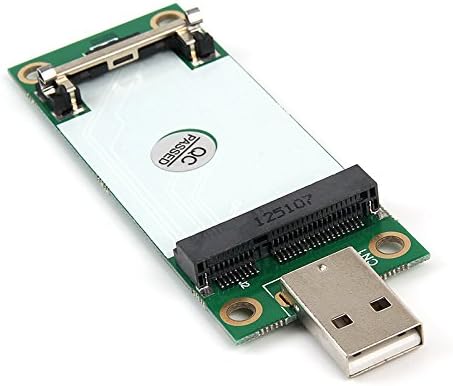
Figure 1: Mini PCIe module installed on the adapter.
Video 1: Installation process of a Mini PCI-E module onto the USB adapter, demonstrating how to secure the module and install a SIM card.
2.2. Installing the SIM Card
- Locate the SIM card slot on the adapter.
- Insert a standard SIM card into the slot. Pay close attention to the orientation of the SIM card as indicated on the adapter.

Figure 2: Inserting a SIM card into the adapter's dedicated slot.
2.3. Connecting to a USB Port
- Remove the USB dust cap from the adapter.
- Plug the adapter into an available USB port on your desktop or laptop PC.

Figure 3: The adapter plugged into a computer's USB port.
2.4. Driver Installation
The adapter itself supports Plug & Play and does not require additional drivers. However, ensure that the necessary software drivers for your specific WWAN card are installed on your computer for proper functionality.
3. Operating Instructions
Once the Mini PCIe module and SIM card are installed, and the adapter is connected to your computer's USB port, the system should recognize the module. You can then configure your network settings through your operating system to establish a connection using the WWAN card.
Video 2: Demonstration of the adapter being recognized by the operating system and establishing a network connection.
4. Troubleshooting
- Adapter Not Recognized: Ensure the adapter is firmly seated in the USB port. Verify that your Mini PCIe WWAN card is correctly installed and its drivers are up-to-date on your computer.
- No Network Connection: Check if the SIM card is properly inserted and activated with your network carrier. Confirm that your WWAN card has the necessary drivers installed.
- Incorrect Card Type: This adapter is designed exclusively for WWAN cards. If you are attempting to use an mSATA SSD or WLAN card, it will not function.
- SIM Card Insertion Difficulty: Ensure you are using a standard-sized SIM card and inserting it in the correct orientation. Avoid forcing the SIM card to prevent damage.
5. Specifications
| Feature | Detail |
|---|---|
| Brand | Mustpoint |
| Model Number | 8541554282 |
| Item Weight | 0.423 ounces (12 Grams) |
| Package Dimensions | 5.04 x 2.13 x 1.26 inches |
| Color | Black, Silver |
| Hardware Interface | PCI, USB |
| Compatible Devices | Desktop, Laptop |
| Data Link Protocol | USB |
| Compatible Operating System Family | Android, Linux, Windows |
| UPC | 661585242874 |
6. Maintenance
To ensure optimal performance and longevity of your adapter:
- Keep the adapter clean and free from dust. Use a soft, dry cloth for cleaning.
- Avoid exposing the adapter to extreme temperatures or humidity.
- Handle the adapter and any installed modules with care to prevent physical damage.
- When not in use, store the adapter in a safe, dry place.
7. Warranty and Support
For warranty information, technical support, or further assistance, please refer to the official Mustpoint website or contact their customer service directly. Details are typically provided with your product packaging or on the manufacturer's official channels.