
1. Introduction
This instruction manual provides comprehensive information for the Wiska Combi Junction Box, Model PL13429. This product is designed as a robust electrical enclosure, offering IP66 protection for various installations. Please read this manual carefully before installation and operation to ensure safe and efficient use of the product.
2. Product Overview
The Wiska Combi Junction Box is a durable electrical distribution box, measuring 85 x 85 x 51 mm. It is constructed from high-quality polypropylene (PP) and features an IP66 protection rating, making it suitable for demanding environments where protection against dust and powerful water jets is required. Its black finish ensures discreet integration into various settings.
Key Features:
- Compact dimensions: 85 x 85 x 51 mm (Outer depth: 85mm, Outer height: 51mm, Outer width: 85mm).
- High protection rating: IP66, offering excellent resistance to dust and water.
- Durable material: Made from Polypropylene (PP) for long-lasting performance.
- Versatile application: Suitable for various electrical installations requiring a robust enclosure.
- Black body color for discreet installation.
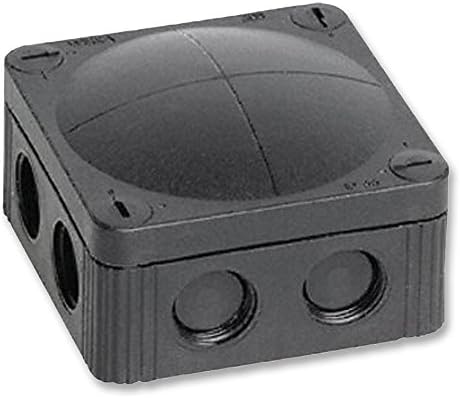
Figure 2.1: Front view of the Wiska Combi Junction Box, showing its compact black design and sealed entry points.
Figure 2.2: Angled view of the Wiska Combi Junction Box, highlighting its robust construction and screw-down lid.
3. Setup and Installation
Installation of the Wiska Combi Junction Box should be performed by a qualified electrician in accordance with local electrical codes and regulations.
Installation Steps:
- Safety First: Ensure all power to the installation area is disconnected before beginning any work.
- Mounting: Select a suitable, stable surface for mounting. The box can be secured using appropriate screws through the designated mounting points (if applicable, or external mounting tabs).
- Cable Entry: Utilize the pre-formed or designated cable entry points. Ensure proper cable glands or seals are used to maintain the IP66 rating.
- Wiring: Route and connect electrical wires inside the box according to your circuit design. Ensure all connections are secure and insulated.
- Sealing: After wiring, ensure the lid is properly seated and all screws are tightened to maintain the IP66 seal. Do not overtighten.
Note: The IP66 rating is dependent on correct installation and sealing of all cable entries and the lid.
4. Operation
The Wiska Combi Junction Box is a passive electrical enclosure designed to protect internal wiring and connections from environmental factors. Once properly installed and sealed, it requires no active operation. Its function is to provide a secure and protected environment for electrical junctions.
5. Maintenance
Regular maintenance is minimal for this product, but periodic checks can help ensure its longevity and continued performance.
- Visual Inspection: Periodically inspect the exterior of the box for any signs of physical damage, cracks, or degradation due to UV exposure (if installed outdoors).
- Seal Integrity: Check the integrity of the lid seal and cable gland seals. If any signs of wear or damage are present, consider replacing the seals to maintain the IP66 rating.
- Cleaning: Clean the exterior of the box with a damp cloth. Avoid using harsh chemicals or abrasive cleaners that could damage the plastic material.
- Internal Check (if necessary): If opening the box for internal inspection or modification, ensure power is disconnected and re-seal the box properly upon completion.
6. Troubleshooting
As a passive enclosure, the junction box itself typically does not malfunction. Most issues relate to installation or external factors.
| Problem | Possible Cause | Solution |
|---|---|---|
| Water or dust ingress | Improperly sealed lid or cable glands; damaged seal. | Ensure lid screws are tightened evenly. Check and replace damaged cable glands or lid seals. Re-seal all entry points. |
| Physical damage to box | Impact, excessive force during installation, or environmental stress. | If structural integrity is compromised, replace the box to ensure continued protection. |
| Electrical fault within box | Loose connections, short circuits, or incorrect wiring. | Disconnect power immediately. Have a qualified electrician inspect and rectify wiring. |
For issues not listed here, or if you are unsure about any electrical work, please consult a qualified electrician.
7. Technical Specifications
| Attribute | Value |
|---|---|
| Model Number | PL13429 |
| Brand | HQ Bargain (Manufacturer: WISKA) |
| Dimensions (Outer) | 85 mm (Width) x 85 mm (Depth) x 51 mm (Height) |
| Material | Polypropylene (PP) |
| Protection Rating | IP66 (Dust tight, protected against powerful water jets) |
| Color | Black |
| Item Weight | 104.33 grams |
| Surface Type | Painted |
8. Warranty and Support
For information regarding product warranty, returns, or technical support, please refer to the purchase documentation or contact the seller, HQ Bargain Limited, directly. Keep your proof of purchase for any warranty claims.
For further assistance, you may also visit the official website of the manufacturer, WISKA, or consult their authorized distributors.


