1. Introduction
This manual provides instructions for the installation, operation, and maintenance of the POSX 2-line Customer Display, Model EVO-RD6-LCM. This display is designed to integrate with the EVO TP6 Point-of-Sale (POS) system, providing clear, two-line transaction information to customers.
2. Safety Information
- Ensure the device is connected to a stable power source as specified by the EVO TP6 system.
- Do not expose the display to excessive moisture, dust, or extreme temperatures.
- Avoid dropping or subjecting the device to strong impacts.
- Do not attempt to open or repair the device yourself. Refer all servicing to qualified personnel.
- Keep away from strong magnetic fields.
3. Package Contents
Verify that all items are present in the package:
- POSX 2-line Customer Display (EVO-RD6-LCM)
- Mounting Bracket (pre-attached or separate)
- Connection Cable (integrated or separate)
- This User Manual
4. Setup
Follow these steps to properly install your POSX 2-line Customer Display with the EVO TP6 system:
- Unpack the Display: Carefully remove the customer display from its packaging.
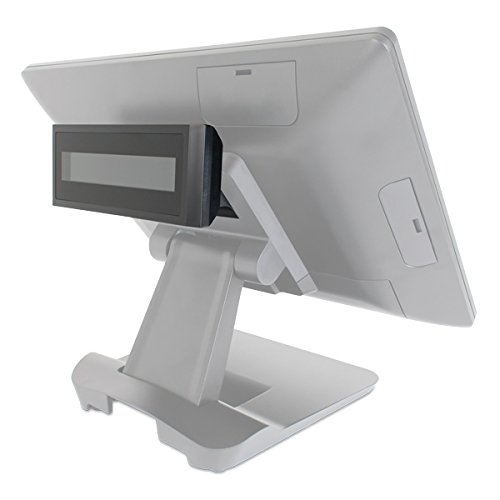
- Attach to EVO TP6: The display is designed for integrated mounting with the EVO TP6. Secure the display using the provided plastic mounting bracket to the designated port on your EVO TP6 terminal. Ensure it is firmly attached.
- Connect Cable: Connect the display's communication cable to the appropriate port on the EVO TP6 terminal. Refer to your EVO TP6 manual for specific port locations if needed.
- Power On: Once securely mounted and connected, power on your EVO TP6 system. The customer display should initialize automatically.
- Software Configuration: Access your POS software settings to configure the customer display. Select the appropriate display type (e.g., 2x20 VFD/LCM) and communication settings (e.g., COM port, baud rate) as required by your POS application.
5. Operating Instructions
The POSX 2-line Customer Display is designed for automatic operation in conjunction with your POS software. It will display transaction details as processed by the EVO TP6 system.
- Clear Display: The display provides two lines of information, typically used for item descriptions, prices, totals, and change due.
- Software Compatibility: This display supports various software emulations, including ESC/POS and CD5220. Ensure your POS software is configured to use one of these compatible modes for proper communication.
- Visibility: Position the display to ensure clear visibility for customers.
6. Maintenance
To ensure the longevity and optimal performance of your customer display, follow these maintenance guidelines:
- Cleaning: Gently wipe the display screen and casing with a soft, damp cloth. Do not use abrasive cleaners, solvents, or harsh chemicals, as these can damage the surface.
- Dust Removal: Use a soft brush or compressed air to remove dust from vents and crevices.
- Cable Inspection: Periodically check all cables for signs of wear or damage. Replace any damaged cables immediately to prevent malfunction.
7. Troubleshooting
If you encounter issues with your customer display, try the following solutions:
- Display Not Lighting Up:
- Ensure the EVO TP6 system is powered on.
- Check that the display cable is securely connected to both the display and the EVO TP6.
- Verify that the display is enabled and configured correctly in your POS software settings.
- Incorrect Characters or Garbled Text:
- Confirm that the correct emulation mode (e.g., ESC/POS, CD5220) is selected in your POS software.
- Check the communication settings (e.g., baud rate, data bits, parity) in your POS software to match the display's requirements.
- Display Freezes or Responds Slowly:
- Restart the EVO TP6 system and the POS software.
- Ensure there are no loose cable connections.
If problems persist after attempting these steps, contact POS-X support for further assistance.
8. Specifications
| Model Number | EVO-RD6-LCM |
| Brand | POSX |
| Manufacturer | POS-X LLC |
| Display Type | 2-line, 2x20 character LCM (Liquid Crystal Module) |
| Item Weight | 1 pounds (approximately 0.45 kg) |
| Package Dimensions | 10 x 6 x 6 inches (approximately 25.4 x 15.2 x 15.2 cm) |
| Compatibility | Designed for EVO TP6 systems; supports ESC/POS, CD5220 emulation. |
9. Warranty and Support
The POSX 2-line Customer Display comes with a 3-Year Advance Replace Warranty. This warranty includes:
- Advance Replacement: If an issue cannot be resolved over the phone, a replacement unit will be shipped to arrive within two business days.
- Support: Access to POS-X 24/7 US-based technical support.
Upgrades to overnight shipping and/or extended 5-year warranty options may be available. Refer to POS-X documentation or contact support for details (Part #s: ZOE-BMP3, ZOE-BMP5, ZWE-BMP).
For technical assistance or warranty claims, please contact POS-X support directly.
10. Disposal Information
When the product reaches the end of its service life, it should not be disposed of with general household waste. Please dispose of this device in accordance with local environmental regulations for electronic waste. This helps protect the environment and human health.