
VINABTY BN59-01289A
VINABTY BN59-01289A Replacement Remote Control User Manual
For Samsung 6 Series MU6290 Smart 4K UHD TVs
Introduction
This manual provides instructions for the VINABTY BN59-01289A replacement remote control. This remote is designed to function with various Samsung 6 Series MU6290 Smart 4K UHD TV models without requiring any programming.
Please read this manual thoroughly to ensure proper use and to familiarize yourself with the remote's features and functions.
1. Setup
1.1 Battery Installation
The VINABTY BN59-01289A remote control requires two AAA batteries for operation. Follow these steps to install the batteries:
- Locate the battery compartment cover on the back of the remote control.
- Slide the cover downwards or press the latch (if present) to open the compartment.
- Insert two AAA batteries, ensuring the positive (+) and negative (-) terminals align correctly with the indicators inside the compartment.
- Close the battery compartment cover by sliding it back into place until it clicks securely.
Note: This remote control does not require any programming or pairing with your Samsung TV. It is ready for use once batteries are installed.

Image 1.1: Front view of the VINABTY BN59-01289A remote control, showing its button layout.
2. Operating Instructions
The VINABTY BN59-01289A remote control provides full functionality for compatible Samsung Smart 4K UHD TVs. Below is a guide to the main buttons and their functions.

Image 2.1: A user operating the remote control to navigate the Smart Hub menu on a Samsung TV.
2.1 Button Functions
- Power (●): Turns the TV on or off.
- Source: Changes the input source (e.g., HDMI 1, HDMI 2, TV).
- Number Pad (0-9): Directly enters channel numbers or other numerical inputs.
- PRE-CH: Returns to the previous channel.
- Volume (+/-): Adjusts the TV's volume level.
- Mute: Mutes or unmutes the TV's audio.
- Channel (CH ▲/▼): Changes the TV channel up or down.
- CH LIST: Displays the channel list.
- E-MANUAL: Accesses the electronic manual (if supported by the TV).
- Home (⌂): Opens the Smart Hub or main menu.
- Sleep: Sets the TV's sleep timer.
- Settings: Opens the TV's settings menu.
- Info (i): Displays information about the current program or input.
- Navigation Buttons (◀ ▲ ▶ ▼): Navigates through menus and options.
- Enter/OK: Confirms a selection.
- Return (↶): Returns to the previous screen or menu.
- Exit: Exits the current menu or application.
- Color Buttons (A, B, C, D): Provide access to specific functions within certain applications or menus (functions vary by TV model and app).
- P.SIZE: Adjusts picture size/aspect ratio.
- CC/DVD: Activates Closed Captions or controls DVD functions (if connected).
- REC: Initiates recording (if supported by the TV and connected storage).
- Playback Controls (◀◀, ▶, ∎, ▶▶): Control media playback (rewind, play/pause, stop, fast forward).
3. Maintenance
3.1 Battery Replacement
Replace the AAA batteries when the remote's response becomes sluggish or stops working. Always replace both batteries at the same time with new ones. Do not mix old and new batteries, or different types of batteries.
3.2 Cleaning
To clean the remote control, use a soft, dry cloth. Do not use liquid cleaners, sprays, or abrasive materials, as these can damage the remote's surface or internal components.
4. Troubleshooting
- Remote not responding:
- Ensure the batteries are correctly installed with the correct polarity.
- Replace old batteries with new AAA batteries.
- Check for any obstructions between the remote control and the TV's infrared receiver.
- Point the remote directly at the TV.
- Specific buttons not working:
- This may indicate a faulty button. If other buttons work, contact customer support.
- TV not turning on/off:
- Verify the TV is plugged into a working power outlet.
- Try using the power button on the TV itself to rule out a TV issue.
5. Specifications
| Feature | Detail |
|---|---|
| Model Number | BN59-01289A |
| Brand | VINABTY |
| Compatibility | Samsung 6 Series MU6290 Smart 4K UHD TVs (e.g., UN40MU6290, UN43MU6290, UN49MU6290, UN50MU6290, UN55MU6290, UN65MU6290, UN75MU6290, TM1240A, MU6070) |
| Power Source | 2 x AAA Batteries (not included) |
| Dimensions | 7 x 2 x 0.5 inches (17.78 x 5.08 x 1.27 cm) |
| Item Weight | 1.98 ounces (56 grams) |
| Special Feature | No Programming Required |

Image 5.1: The remote control displaying its approximate dimensions.
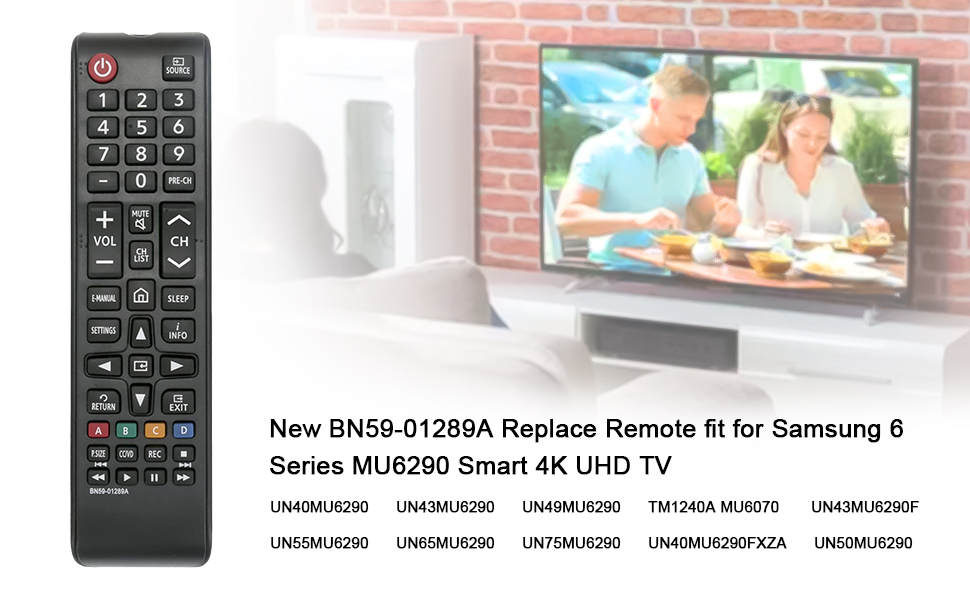
Image 5.2: Visual representation of the remote control and a list of compatible Samsung TV models.
6. Warranty and Support
For warranty information or technical support regarding your VINABTY BN59-01289A replacement remote control, please refer to the documentation provided with your purchase or contact the seller directly. Specific warranty terms may vary.
Ask a question about this manual
Ask about setup, troubleshooting, compatibility, parts, safety, or missing instructions. Manuals+ will review the question and use this page’s manual context to help answer it.