
beFree Sound BFS-555X
beFree Sound Rechargeable 12 Inch Bluetooth Portable Party Speaker
Model: BFS-555X
Product Overview
The beFree Sound BFS-555X is a versatile and portable party speaker designed for robust audio performance and dynamic visual effects. It features a 12-inch woofer and 4-inch tweeters, both equipped with integrated party lights, delivering powerful, clear sound with vibrant illumination. This speaker offers multiple connectivity options including Bluetooth, USB, TF card, and AUX inputs, along with an FM radio. For enhanced portability, it includes hard-mounted top handles, an extendable handle, and caster wheels. The system comes complete with a wireless microphone and a remote control, making it ideal for various audio applications, from music playback to public address.

Figure 1: The beFree Sound BFS-555X Portable Party Speaker, showcasing its main unit, wireless microphone, and remote control.
Safety Information
Please read all safety instructions carefully before using this product. Retain this manual for future reference.
- Do not expose the unit to rain or moisture to prevent fire or electric shock.
- Do not open the speaker enclosure. There are no user-serviceable parts inside. Refer all servicing to qualified personnel.
- Ensure proper ventilation around the unit. Do not block any ventilation openings.
- Use only the power adapter supplied with the unit.
- Keep the unit away from heat sources such as radiators, heat registers, stoves, or other apparatus (including amplifiers) that produce heat.
- Clean only with a dry cloth.
- This product contains chemicals known to the State of California to cause cancer and birth defects or other reproductive harm.
What's in the Box
Verify that all items are present upon unpacking:
- beFree Sound BFS-555X Portable Party Speaker
- Wireless Microphone
- Remote Control
- Power Adapter
- User Manual (this document)
Features
- Powerful Audio Output: Equipped with a 12-inch woofer and 4-inch tweeters for strong, clear sound.
- Dynamic Party Lights: Integrated LED lights on both the woofer and tweeters that react to music.
- Multiple Connectivity Options: Supports Bluetooth wireless streaming, USB drive playback, TF (microSD) card playback, and AUX input.
- FM Radio: Built-in FM tuner for radio station listening.
- Microphone Input: Includes one wireless microphone and an additional wired microphone input for dual microphone use.
- Portable Design: Features hard-mounted top handles, an extendable handle, and caster wheels for easy transport.
- Adjustable Sound Controls: Independent controls for treble, bass, echo, and master volume.
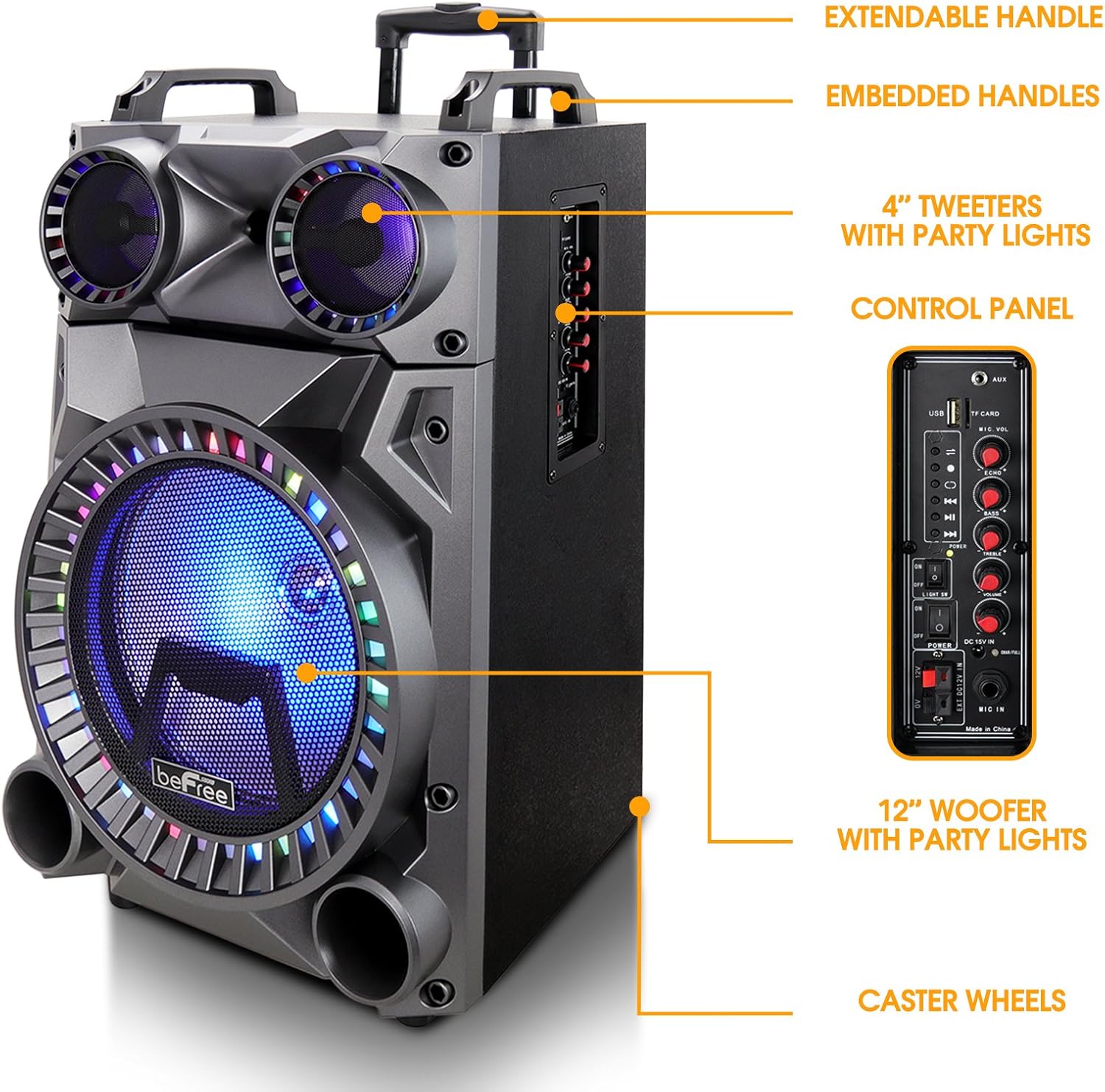
Figure 2: Side view highlighting key components such as the extendable handle, embedded handles, 4-inch tweeters with party lights, control panel, 12-inch woofer with party lights, and caster wheels for portability.
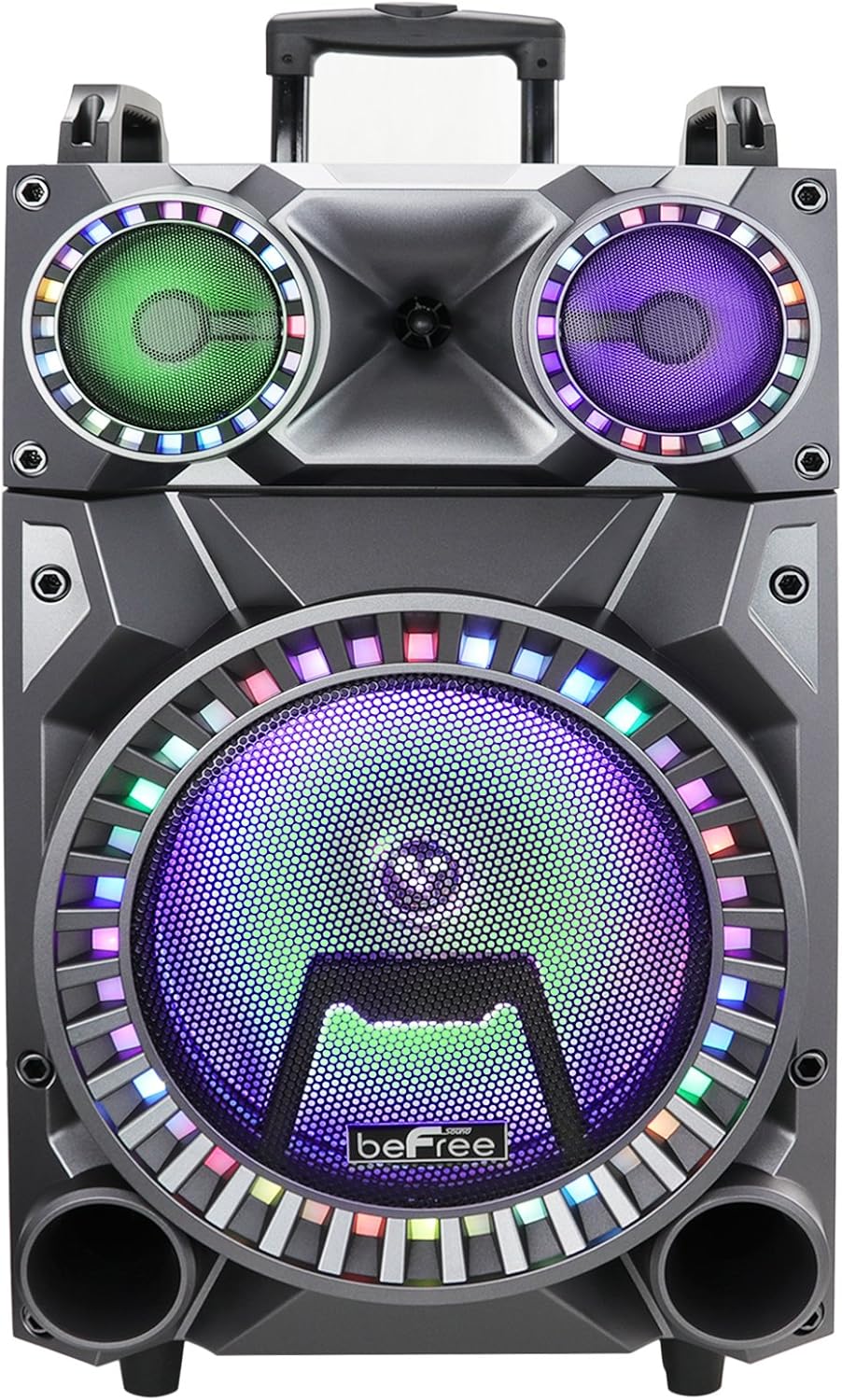
Figure 3: Close-up front view of the speaker's illuminated woofer and tweeters, showcasing the vibrant party lights.
Setup
1. Unpacking and Placement
Carefully remove the speaker and all accessories from the packaging. Place the speaker on a stable, flat surface. Ensure there is adequate space around the unit for ventilation.
2. Charging the Speaker
Before first use, fully charge the speaker's internal battery. Connect the supplied power adapter to the DC IN port on the speaker's control panel and plug the other end into a standard wall outlet. The charging indicator light will illuminate. Once fully charged, the light may change color or turn off, depending on the model. A full charge typically takes several hours.
3. Powering On/Off
Locate the POWER switch on the control panel. Flip the switch to the "ON" position to power on the speaker. To power off, flip the switch to the "OFF" position.
4. Connecting the Wireless Microphone
The included wireless microphone is pre-paired with the speaker. Ensure the microphone has fresh batteries installed. Turn on the microphone. The speaker should automatically detect and connect to the microphone. Adjust the microphone volume using the "MIC VOL" knob on the control panel.
Operating Instructions
1. Bluetooth Pairing
- Power on the speaker. The speaker will automatically enter Bluetooth pairing mode, indicated by a flashing Bluetooth indicator or an audible prompt.
- On your mobile device (smartphone, tablet, laptop), enable Bluetooth and search for available devices.
- Select "beFree Sound" or "BFS-555X" from the list of devices.
- Once paired, the speaker will confirm with an audible tone, and the Bluetooth indicator will stop flashing.
- You can now play audio from your device through the speaker.
2. USB/TF Card Playback
- Insert a USB flash drive or TF (microSD) card into the respective port on the control panel.
- The speaker will automatically switch to USB/TF mode and begin playing compatible audio files (e.g., MP3).
- Use the playback controls (Play/Pause, Next/Previous Track) on the speaker or remote control to manage your music.
3. AUX Input
- Connect an external audio device (e.g., MP3 player, computer) to the AUX IN port on the speaker using a 3.5mm audio cable (not included).
- The speaker will automatically switch to AUX mode.
- Control playback from your connected device.
4. FM Radio
- Press the "MODE" button on the control panel or remote control until "FM" mode is selected.
- Press and hold the "Play/Pause" button to initiate an automatic scan for FM stations. The speaker will save all found stations.
- Use the "Next/Previous Track" buttons to navigate between saved stations.
5. Microphone Usage
In any mode, the microphone can be used simultaneously with music playback. Adjust the "MIC VOL" knob for microphone volume and "ECHO" knob for echo effect.
6. Light Control
The party lights can be toggled on or off using the "LIGHT ON/OFF" switch on the control panel.
7. Sound Adjustments
Use the dedicated knobs on the control panel to adjust:
- MASTER VOL: Overall speaker volume.
- TREBLE: Adjusts high-frequency sounds.
- BASS: Adjusts low-frequency sounds.
- ECHO: Controls the echo effect for the microphone.
Maintenance
1. Cleaning
Wipe the speaker's exterior with a soft, dry cloth. Do not use abrasive cleaners, waxes, or solvents as they may damage the finish. Avoid spraying liquids directly onto the speaker.
2. Storage
When not in use for extended periods, store the speaker in a cool, dry place, away from direct sunlight and extreme temperatures. It is recommended to partially charge the battery every few months to maintain its health.
3. Battery Care
To prolong battery life, avoid fully discharging the battery frequently. Recharge the speaker when the low battery indicator appears or when sound quality degrades. Do not leave the speaker uncharged for very long periods.
Troubleshooting
| Problem | Possible Cause | Solution |
|---|---|---|
| No power | Battery is depleted; Power switch is off; Power adapter not connected. | Charge the speaker; Ensure power switch is ON; Check power adapter connection. |
| No sound | Volume is too low; Incorrect input mode selected; Device not connected properly. | Increase MASTER VOL; Press MODE button to select correct input (Bluetooth, USB, AUX, FM); Reconnect device. |
| Bluetooth not pairing | Speaker not in pairing mode; Device too far; Bluetooth disabled on device. | Ensure speaker is in Bluetooth mode (flashing indicator); Move device closer to speaker; Enable Bluetooth on your device. |
| Microphone not working | Microphone is off; Batteries are low/dead; MIC VOL is too low. | Turn on microphone; Replace microphone batteries; Increase MIC VOL knob. |
| Party lights not working | Light switch is off. | Ensure LIGHT ON/OFF switch is in the ON position. |
Specifications
| Feature | Detail |
|---|---|
| Model Number | BFS-555X |
| Speaker Size | 12-inch Woofer, 4-inch Tweeters |
| Connectivity Technology | Bluetooth, AUX, USB, TF Card, FM Radio |
| Audio Inputs | USB, TF, AUX, Microphone (XLR/Aux type) |
| Power Source | Corded Electric (Rechargeable Battery) |
| Material | Metal, Plastic |
| Item Weight | 26 Pounds (approx. 11.8 kg) |
| Package Dimensions | 30.6 x 18.2 x 16.9 inches (approx. 77.7 x 46.2 x 42.9 cm) |
| Color | Black |
| Compatible Devices | Smartphone, Tablet, Laptop |
| Included Accessories | Wireless Microphone, Remote Control |

Figure 4: Approximate dimensions of the beFree Sound BFS-555X speaker: 27 inches (height), 15 inches (width), and 12 inches (depth).
Warranty and Support
For warranty information and technical support, please contact beFree Sound customer service. Details can typically be found on the manufacturer's official website or on the product packaging.
Please have your model number (BFS-555X) and purchase information ready when contacting support.
Ask a question about this manual
Ask about setup, troubleshooting, compatibility, parts, safety, or missing instructions. Manuals+ will review the question and use this page’s manual context to help answer it.