
Introduction
This manual provides comprehensive instructions for the SKAGEN Connected Smartwatch, model SKT1104. It covers essential information for initial setup, daily operation, maintenance, and troubleshooting to ensure optimal performance and longevity of your device. Please read this manual thoroughly before using your smartwatch.

Setup
1. Unboxing and Initial Inspection
Carefully remove the smartwatch and all accessories from the packaging. Inspect the watch for any visible damage. Ensure all components, including the watch, quick start guide, and any included tools, are present.
2. App Installation
The SKAGEN Connected Smartwatch requires the official SKAGEN Connected app to function. Download the app from your smartphone's app store (App Store for iOS or Google Play Store for Android).
- Search for "SKAGEN Connected" in your app store.
- Install the app on your smartphone.
3. Pairing Your Smartwatch
Follow these steps to pair your SKT1104 smartwatch with your smartphone:
- Ensure your smartphone's Bluetooth is enabled.
- Open the SKAGEN Connected app.
- Follow the on-screen instructions within the app to create an account or log in.
- Select "Add New Device" or a similar option in the app.
- The app will guide you through the pairing process, which typically involves pressing a button on your watch to initiate the connection.
- Once paired, the watch's time will automatically synchronize with your phone's time.
Operating
Basic Timekeeping
The SKT1104 displays the current time using traditional hour and minute hands. The small sub-dial on the watch face indicates progress towards a daily goal (e.g., step count percentage) or can be configured for other functions via the app.
Smart Features Overview
Your SKAGEN Connected Smartwatch offers a range of smart functionalities:
- Activity Tracking: Monitors steps, distance, and calories burned throughout the day.
- Sleep Tracking: Analyzes sleep patterns, including light and deep sleep.
- Notification Alerts: Provides subtle vibrations for incoming calls, text messages, and app notifications from your paired smartphone.
- Customizable Buttons: The watch features three physical buttons on the side that can be assigned various functions through the SKAGEN Connected app. Common functions include:
- Controlling music playback (play/pause, skip track).
- Taking photos remotely from your phone.
- Finding your phone (triggers an audible alert on your phone).
- Tracking a specific goal (e.g., water intake).
- Alarm Function: Set silent alarms that vibrate on your wrist.
- Second Time Zone: View a second time zone on the sub-dial.
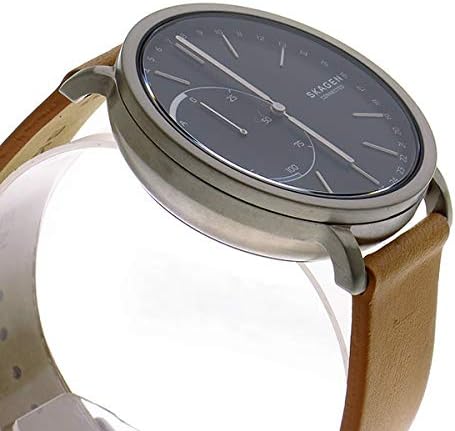
Button Functions
The three buttons on the right side of the watch case (top, middle, bottom) are customizable via the SKAGEN Connected app. Refer to the app's settings to assign your preferred functions to each button.
Maintenance
Battery Replacement
The SKT1104 uses a standard coin cell battery (typically a CR2430) that can be replaced by the user. When the battery is low, the app will notify you. To replace the battery:
- Carefully remove the watch back using a suitable watch case opener tool.
- Remove the old battery.
- Insert a new CR2430 battery with the positive (+) side facing up.
- Replace the watch back, ensuring it is securely fastened to maintain water resistance.

Cleaning Your Smartwatch
To keep your smartwatch in good condition:
- Wipe the watch case and crystal with a soft, damp cloth. Avoid harsh chemicals.
- For leather straps, avoid prolonged exposure to water and direct sunlight. Clean with a specialized leather cleaner if necessary.
Water Resistance
The SKT1104 is rated for 30 meters (3 ATM) of water resistance. This means it is suitable for everyday use and can withstand splashes or brief immersion in water, such as washing hands or rain. It is not suitable for swimming, showering, or diving.
Storage
When not in use for extended periods, store your smartwatch in a cool, dry place away from direct sunlight and extreme temperatures.
Troubleshooting
If you encounter issues with your SKAGEN Connected Smartwatch, refer to the following common solutions:
- Watch not connecting to phone: Ensure Bluetooth is on, the app is open, and the watch battery is not depleted. Try restarting both your phone and the watch.
- Notifications not working: Check app permissions on your phone to ensure the SKAGEN Connected app has access to notifications. Verify notification settings within the app.
- Time incorrect: Ensure the watch is properly paired with your phone. The time should synchronize automatically. If not, try re-pairing.
- Activity tracking inaccurate: Ensure the watch is worn snugly on your wrist. Calibrate activity tracking within the app if available.
- Battery life issues: Ensure you are using a fresh, genuine CR2430 battery. Excessive notifications or frequent use of smart functions can reduce battery life.
Resetting the Watch
If issues persist, you may need to reset your smartwatch. Consult the SKAGEN Connected app's help section or the official SKAGEN support website for specific instructions on how to perform a factory reset for your SKT1104 model.
Specifications
| Model Number | SKT1104 |
| Brand | SKAGEN |
| Case Diameter | 42 millimeters |
| Case Material | Stainless Steel |
| Band Material | Leather Band |
| Band Color | Brown |
| Dial Color | Black |
| Movement | Quartz |
| Display Type | Multi-needle Analog |
| Water Resistance | 30 meters (Daily life waterproof) |
| Clasp | Buckle |
| Crystal Material | Hardlex Crystal Glass |
Warranty and Support
Warranty Information
Your SKAGEN Connected Smartwatch is covered by a limited warranty against defects in materials and workmanship. The specific terms and duration of the warranty may vary by region and retailer. Please refer to the warranty card included with your product or visit the official SKAGEN website for detailed warranty information.
Customer Support
For further assistance, technical support, or to inquire about repairs, please visit the official SKAGEN support website or contact their customer service directly. You can typically find contact information and FAQs on the SKAGEN brand website.
- Official SKAGEN Website: www.skagen.com