
1. Introduction and Overview
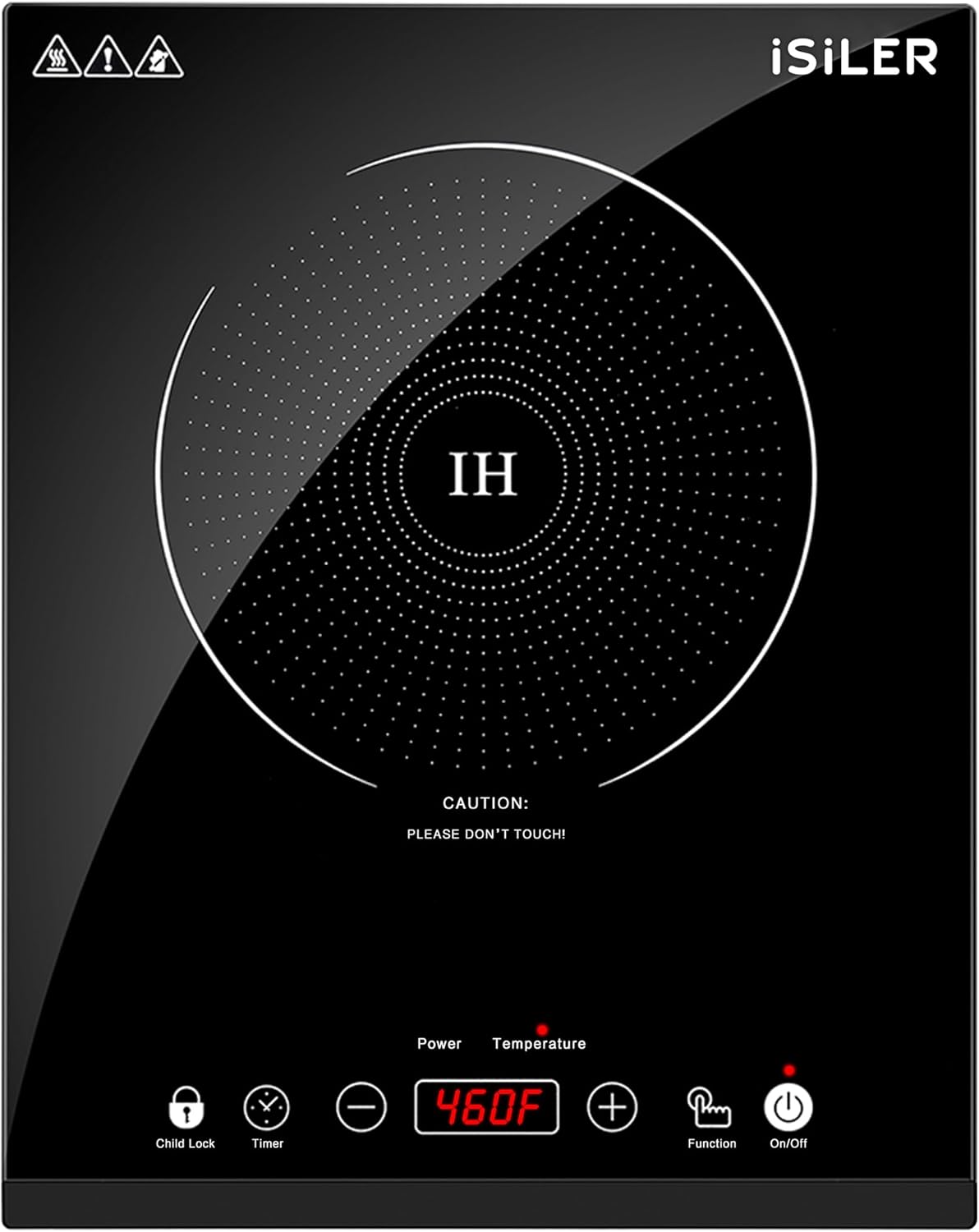
Thank you for choosing the iSiLER 1800W Sensor Touch Electric Induction Cooktop. This portable countertop burner is designed for efficient and precise cooking, offering a range of power and temperature settings for various culinary needs. Its compact design and safety features make it suitable for home kitchens, dorms, RVs, and other spaces with limited room.
2. Safety Information
Please read all safety instructions carefully before using the appliance to prevent injury or damage. Keep this manual for future reference.
- Ensure the cooktop is placed on a stable, flat, and heat-resistant surface.
- Do not immerse the appliance in water or any other liquid.
- Use only induction-compatible cookware. Non-magnetic cookware will not heat.
- Keep children away from the cooktop during operation due to potential heat from cookware and the child safety lock feature.
- Do not touch the cooktop surface immediately after use, as residual heat from the cookware may still be present.
- Ensure proper ventilation around the unit during operation.
- Unplug the cooktop when not in use and before cleaning.
3. Product Features
- 18 Power Levels: Quickly choose your desired power from 100W to 1800W in 100W increments (long press for 300W).
- 17 Preset Temperature Levels: Adjustable temperature ranging from 140°F (60°C) to 460°F (238°C), settable in 20°F increments (long press for 60°F).
- Wide Applications & Portable: Compact and lightweight (2.3in / 6cm thickness) for easy transport and storage. Suitable for areas with limited space.
- Long 3-Hour Timer & Safety Lock: Set the timer in 1-minute increments (long press for 10 min). Features overheating protection and a child lock for ultimate safety.
- Wear Resistance & Easy Maintenance: Premium glass surface ensures excellent wear resistance and easy cleaning.


4. Setup
- Unpack: Carefully remove the cooktop from its packaging and ensure all components are present.
- Placement: Place the cooktop on a dry, stable, non-metallic, and heat-resistant surface. Ensure there is adequate ventilation around the unit (at least 4 inches of clear space on all sides).
- Power Connection: Plug the power cord into a standard 120V AC electrical outlet.
- Cookware Placement: Place an induction-compatible pot or pan centrally on the cooking zone.
5. Operating Instructions
The iSiLER Induction Cooktop features sensor touch controls for easy operation.
- Power On: Press the On/Off button to turn on the cooktop. The display will illuminate.
- Select Mode: Press the Function button to switch between Power mode (watts) and Temperature mode (°F/°C).
- Adjust Settings: Use the + and - buttons to adjust the power level or temperature. Long press for larger increments.
- Timer Function: Press the Timer button, then use + and - to set the desired cooking time (up to 3 hours).
- Child Lock: Press and hold the Child Lock button to activate or deactivate the child lock, preventing accidental changes to settings.
- Power Off: Press the On/Off button to turn off the cooktop after use. The fan may continue to run for a short period to cool the unit.
Demonstration Videos
6. Compatible Cookware
The iSiLER Induction Cooktop requires cookware with a magnetic base. To check if your cookware is compatible, simply hold a magnet to the bottom. If the magnet sticks, the cookware is suitable for induction cooking.
- Compatible: Cast iron, stainless steel with a magnetic base, enameled iron, and steel.
- Incompatible: Aluminum, ceramic, copper, glass, or cookware with a concave base.
- The cookware base should have a diameter of no less than 3.9 inches (10 cm) and no more than 8.6 inches (22 cm).

7. Maintenance and Cleaning
Regular cleaning ensures the longevity and optimal performance of your cooktop.
- Always unplug the cooktop and allow it to cool completely before cleaning.
- Wipe the glass ceramic surface with a soft, damp cloth and mild detergent. For stubborn stains, use a non-abrasive cleaner specifically designed for glass cooktops.
- Do not use abrasive pads, harsh chemicals, or steel wool, as these can scratch the surface.
- Clean the fan vents regularly to prevent dust buildup, which can affect performance.
- Ensure the cooktop is completely dry before plugging it back in or storing it.

8. Troubleshooting
If you encounter any issues with your iSiLER Induction Cooktop, please refer to the following common problems and solutions:
| Problem | Possible Cause | Solution |
|---|---|---|
| Cooktop does not turn on. | No power, power cord not plugged in, or circuit breaker tripped. | Check power connection, ensure outlet is functional, reset circuit breaker if necessary. |
| Cooktop beeps and displays an error code (e.g., "E0"). | Incompatible cookware, no cookware on the surface, or cookware not centered. | Use induction-compatible cookware, place cookware on the cooking zone, ensure it is centered. |
| Food is not heating properly. | Incorrect power/temperature setting, or cookware is too small/large. | Adjust power/temperature. Ensure cookware diameter is between 3.9-8.6 inches (10-22 cm). |
| Fan is noisy during operation. | Normal operation for cooling, or vents are blocked. | This is normal. Ensure vents are clear of obstructions. |
| Cooktop surface is warm after use. | Residual heat from the hot cookware. | This is normal. Allow the surface to cool completely before touching. |
9. Specifications
| Feature | Detail |
|---|---|
| Brand | ISILER |
| Model Number | CHK-CCA02 |
| Wattage | 1800 watts |
| Power Source | Electric, Induction |
| Heating Elements | 1 |
| Control Type | Button, Sensor Touch |
| Heater Surface Material | Glass Ceramic |
| Product Dimensions (D x W x H) | 0.87"D x 5.59"W x 4.57"H |
| Item Weight | 5.7 Pounds |
| UPC | 615517572638 |
10. Warranty and Support
For warranty information or customer support, please refer to the product packaging or contact iSiLER customer service directly. Keep your purchase receipt as proof of purchase.
iSiLER is committed to delivering high-quality small appliances and strives for the finest user experience. For further assistance, please visit the official iSiLER website or contact their support team.