
1. Introduction
This manual provides instructions for the Wohome S18 2.1 Channel Sound Bar with wireless Bluetooth and a wired subwoofer. This system is designed to enhance your audio experience for televisions, music players, and other compatible devices. Please read this manual thoroughly before operating the device and retain it for future reference.

Image 1.1: The Wohome S18 Sound Bar, wired subwoofer, and remote control.
2. What's in the Box
Carefully unpack all components and ensure the following items are included:
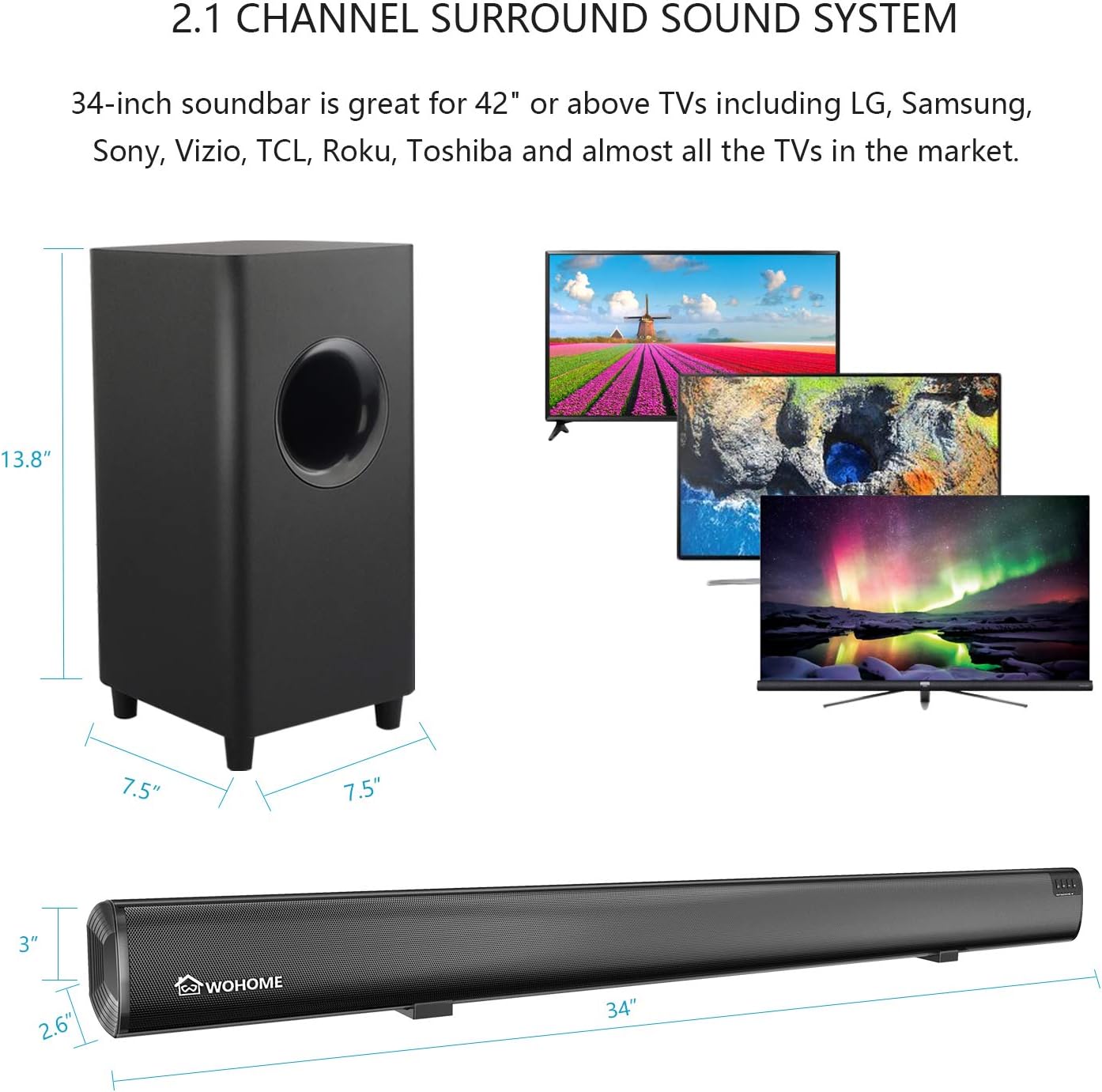
Image 2.1: All components included in the Wohome S18 Sound Bar package.
- Wohome S18 Sound Bar
- Wired Subwoofer
- Remote Control
- AC Power Cord
- Power Adapter
- 3.5mm to 3.5mm Audio Cable
- Stereo RCA to 3.5mm Audio Cable
- Digital Optical Cable
- Mounting Screws (for wall mounting)
- User Manual
3. Setup
3.1 Placement Options
The Wohome S18 Sound Bar and subwoofer can be placed in two primary configurations:
- Tabletop Placement: Position the sound bar on a flat surface below your television. Ensure the subwoofer is placed on the floor near the sound bar for optimal bass response.
- Wall Mounting: The sound bar can be mounted on a wall using the provided screws. Ensure the wall can support the weight of the sound bar.

Image 3.1: Examples of wall-mounted and tabletop placement for the sound bar and subwoofer.
3.2 Connecting the Sound Bar
The sound bar offers multiple connectivity options:

Image 3.2: Rear panel connections of the sound bar, illustrating USB, Optical, AUX, and Subwoofer output ports.
- Optical Connection: Connect the digital optical cable from your TV's optical output to the OPT port on the sound bar. Select 'OPT' input on the sound bar.
- AUX Connection: Use the 3.5mm to 3.5mm audio cable or the Stereo RCA to 3.5mm audio cable to connect your device to the AUX1 or AUX2 port on the sound bar. Select 'AUX1' or 'AUX2' input.
- USB Connection: Insert a USB drive containing audio files into the USB port. The sound bar will automatically switch to USB input and begin playback.
- Bluetooth Connection:
- Power on the sound bar.
- Press the 'BT' button on the remote or the sound bar's control panel to switch to Bluetooth mode. The indicator light will flash.
- Enable Bluetooth on your device (e.g., smartphone, tablet) and search for 'S18'.
- Select 'S18' to pair. Once connected, the indicator light will stop flashing.
- Subwoofer Connection: Connect the wired subwoofer to the 'SUB OUT' port on the sound bar using the dedicated subwoofer cable.
4. Operating the Sound Bar
4.1 Control Panel and Remote Control
The sound bar can be operated using the buttons on the unit's control panel or the included remote control.

Image 4.1: The remote control and the button control panel on the sound bar for adjusting settings.
Remote Control Functions:
- Power Button: Turns the sound bar on or off.
- Input Selection: Buttons for AUX1, AUX2, OPT, USB, BT (Bluetooth) to select the audio source.
- Volume Up/Down: Adjusts the main volume.
- Bass Up/Down: Adjusts the subwoofer bass level.
- Mute: Mutes or unmutes the audio.
- Sound Modes: Buttons for MUSIC, MOVIE, NORMAL to select preset equalizer settings.
Control Panel Functions:
- Power Button: Turns the sound bar on or off.
- Input Button: Cycles through available input sources (AUX1, AUX2, OPT, USB, BT).
- Volume Up/Down: Adjusts the main volume.
4.2 Sound Modes
The Wohome S18 offers three distinct sound modes to optimize your listening experience:
- MUSIC Mode: Enhances musical playback with balanced highs and lows.
- MOVIE Mode: Provides a dynamic soundstage with emphasized bass for cinematic content.
- NORMAL Mode: Offers a flat frequency response, suitable for general TV viewing and clear dialogue.

Image 4.2: The sound bar's internal design featuring four 15W drivers and two bass reflex tubes for enhanced audio output.

Image 4.3: A detailed view of the 5.5-inch, 60W wired subwoofer, designed to provide powerful bass.
5. Maintenance
To ensure the longevity and optimal performance of your Wohome S18 Sound Bar, follow these maintenance guidelines:
- Cleaning: Use a soft, dry cloth to clean the surfaces of the sound bar and subwoofer. Do not use liquid cleaners or abrasive materials, as they may damage the finish.
- Ventilation: Ensure the sound bar and subwoofer have adequate ventilation. Do not block any vents.
- Environment: Avoid exposing the unit to extreme temperatures, humidity, or direct sunlight. Keep it away from sources of heat and moisture.
- Cables: Periodically check all cables for any signs of damage. Replace damaged cables immediately to prevent malfunction or safety hazards.
6. Troubleshooting
If you encounter issues with your Wohome S18 Sound Bar, refer to the following common problems and solutions:
| Problem | Possible Cause | Solution |
|---|---|---|
| No power | Power cord not connected; power outlet not active. | Ensure power cord is securely connected to the sound bar and a working power outlet. |
| No sound | Incorrect input source; volume too low; cables not connected properly. | Select the correct input source. Increase volume. Check all audio cables for secure connection. |
| Bluetooth pairing fails | Sound bar not in pairing mode; device too far; interference. | Ensure sound bar is in Bluetooth pairing mode. Move device closer. Turn off other Bluetooth devices. |
| Remote control not working | Batteries depleted; obstruction between remote and sound bar. | Replace remote control batteries. Ensure no obstructions block the remote sensor on the sound bar. |
| Distorted sound | Volume too high; poor audio source quality; incorrect cable connection. | Lower the volume. Try a different audio source. Check cable connections. |
7. Specifications
Detailed technical specifications for the Wohome S18 Sound Bar system:

Image 7.1: Dimensions of the Wohome S18 Sound Bar and its accompanying subwoofer.
| Feature | Detail |
|---|---|
| Model | S18 |
| Channel Configuration | 2.1 Channel |
| Total Output Power | 120 Watts (Sound Bar: 60W, Subwoofer: 60W) |
| Sound Bar Drivers | 4 x 15W Full-Range Speakers |
| Subwoofer Diameter | 5.5 inches |
| Connectivity | Bluetooth 5.0, Optical, AUX (3.5mm), USB |
| Wireless Communication Technology | Bluetooth |
| Control Method | Remote Control, On-unit Buttons |
| Sound Modes | Music, Movie, Normal |
| Material | Metal, ABS |
| Mounting Type | Wall Mountable |
| Power Source | Corded Electric |
| Product Dimensions (Sound Bar) | Approximately 8.9cm (D) x 86.4cm (W) x 8.9cm (H) (3.5" D x 34" W x 3.5" H) |
| Product Dimensions (Subwoofer) | Approximately 19.1cm (D) x 19.1cm (W) x 35.1cm (H) (7.5" D x 7.5" W x 13.8" H) |
| Weight | Approximately 11 lbs (total system) |
8. Warranty and Support
Wohome provides a 100% satisfaction service, which includes lifetime technical support for the S18 Sound Bar. If you require assistance or have any questions, please contact Wohome customer service through the Amazon message system or refer to the service email provided in the user manual included in your product packaging.


