
1. Product Overview
The SKIL 5 Amp Corded Jig Saw, model JS313101, is designed for precise cutting across various materials. It features a 4-stage orbital function for smooth cutting, variable speed control for optimal cutting speed, and a dust blowing function to maintain a clear view of the cutting line. This tool is suitable for both straight and curved cuts.
Key Features:
- 4-Stage Orbital Function: Allows for smooth cutting across different materials and applications.
- Variable Speed Control: Provides optimal cutting speed for various applications.
- Brake Function: Assists in achieving a precise finish.
- Shoe Bevel Adjustment: Enables angled cuts.
- Dust Blower Switch: Clears debris from the cutting line for improved visibility.
- Tool-Free Blade Change: Facilitates quick replacement of saw blades.

2. Important Safety Information
Always observe basic safety precautions to reduce the risk of fire, electric shock, and personal injury when operating power tools. Read and understand all instructions before using this product.
General Power Tool Safety Warnings:
- Work Area Safety: Keep your work area clean and well-lit. Cluttered or dark areas invite accidents. Do not operate power tools in explosive atmospheres, such as in the presence of flammable liquids, gases, or dust.
- Electrical Safety: Power tool plugs must match the outlet. Never modify the plug in any way. Do not use any adapter plugs with earthed (grounded) power tools. Avoid body contact with earthed or grounded surfaces.
- Personal Safety: Always wear eye protection. Use hearing protection when operating for extended periods. Dress properly; avoid loose clothing or jewelry. Secure long hair. Do not overreach. Maintain proper footing and balance at all times.
- Tool Use and Care: Do not force the power tool. Use the correct power tool for your application. Disconnect the plug from the power source before making any adjustments, changing accessories, or storing power tools. Store idle power tools out of the reach of children.
- Service: Have your power tool serviced by a qualified repair person using only identical replacement parts.
Specific Jig Saw Safety Warnings:
- Hold the tool by insulated gripping surfaces when performing an operation where the cutting accessory may contact hidden wiring or its own cord.
- Secure the workpiece. Use clamps or other practical ways to secure and support the workpiece to a stable platform.
- Keep hands away from the cutting area. Never reach underneath the workpiece.
- Ensure the blade is sharp and free from damage before use.
3. Product Components
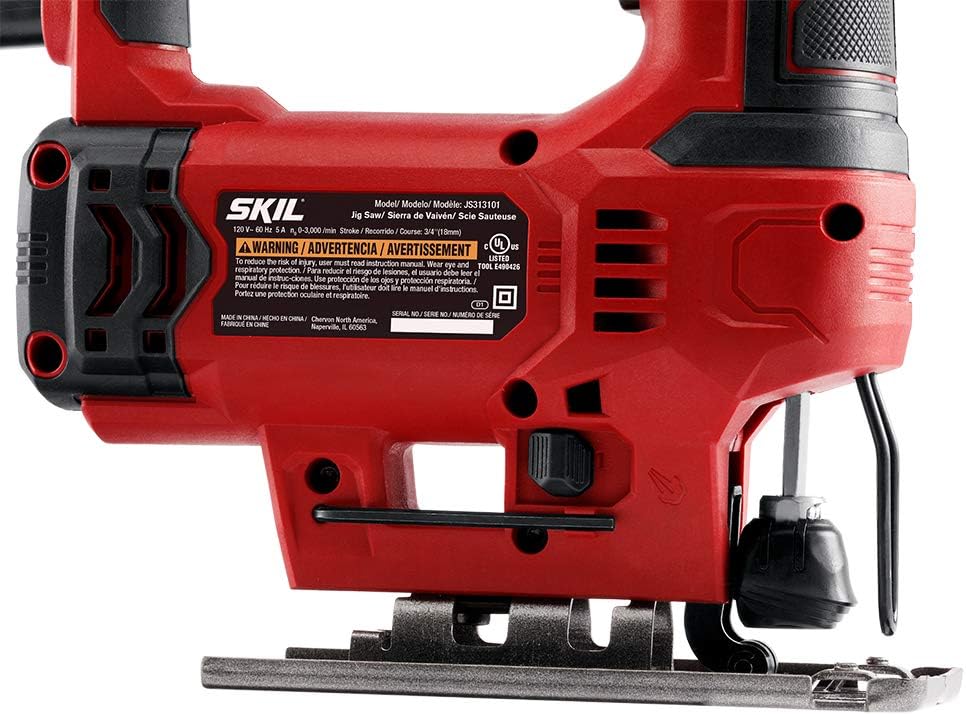
Familiarize yourself with the various parts of your SKIL Jig Saw to ensure safe and effective operation.
- Trigger Switch: Activates and deactivates the tool.
- Variable Speed Dial: Adjusts the cutting speed.
- Orbital Action Selector: Controls the orbital movement of the blade.
- Tool-Free Blade Clamp: Secures the blade without additional tools.
- Shoe/Base Plate: Supports the tool on the workpiece and can be adjusted for bevel cuts.
- Dust Blower Switch: Turns the dust clearing function on or off.
- Power Cord: Connects the tool to an electrical outlet.

4. Setup and Assembly
4.1 Blade Installation
- Ensure the jig saw is unplugged from the power source.
- Locate the tool-free blade clamp lever.
- Push the lever to open the blade clamp.
- Insert the blade into the clamp with the teeth facing forward. Ensure the back edge of the blade fits into the blade guide roller.
- Release the lever to secure the blade. Gently pull on the blade to confirm it is firmly seated.
4.2 Shoe Bevel Adjustment
The shoe can be adjusted to make bevel cuts up to 45 degrees. An Allen key (included) is required for this adjustment.
- Unplug the tool.
- Loosen the shoe retaining screw located on the underside of the shoe using the Allen key.
- Adjust the shoe to the desired angle (e.g., 15°, 30°, 45°).
- Tighten the shoe retaining screw firmly to secure the shoe in position.
5. Operating Instructions
Before operating, ensure the workpiece is securely clamped and you are wearing appropriate safety gear.
5.1 Variable Speed Control
The variable speed dial allows you to match the cutting speed to the material and blade type. Higher speeds are generally used for softer materials like wood, while lower speeds are suitable for harder materials like metal or plastics.
- Rotate the variable speed dial to select the desired speed setting before starting the cut.
- The trigger switch also provides variable speed control; pressing it further increases the speed up to the dial's set maximum.
5.2 4-Stage Orbital Function
The orbital action moves the blade forward and backward in addition to its up and down motion, allowing for faster cutting in certain materials. There are four settings:
- Setting 0 (No Orbital Action): For fine, precise cuts in wood, metal, and plastics.
- Settings 1-3 (Increasing Orbital Action): For faster cutting in wood and softer materials. Higher settings provide more aggressive cutting.
Adjust the orbital action selector to the desired setting based on the material and desired cut speed.

5.3 Dust Blower Function
The integrated dust blower helps keep the cutting line clear of sawdust and debris, improving visibility and accuracy.
- Locate the dust blower switch on the tool.
- Toggle the switch to the 'ON' position to activate the dust blower during operation.
5.4 Making Cuts
- Mark your cutting line clearly on the workpiece.
- Place the front edge of the shoe flat on the workpiece, ensuring the blade is not touching the material.
- Start the saw by pressing the trigger switch. Allow the blade to reach full speed before beginning the cut.
- Slowly guide the saw along the marked line, applying steady, even pressure. Do not force the tool.
- Upon completing the cut, release the trigger switch and allow the blade to stop completely before lifting the tool from the workpiece.

6. Maintenance
Regular maintenance ensures the longevity and optimal performance of your jig saw.
6.1 Cleaning
- Always unplug the tool before cleaning.
- Use a soft brush or compressed air to clean dust and debris from the ventilation openings and around the blade clamp area.
- Do not use water or chemical cleaning agents, as these can damage the tool.
6.2 Blade Care
- Inspect blades regularly for sharpness and damage. Dull or damaged blades can cause inefficient cutting and increased strain on the tool.
- Replace blades as needed. Use only blades appropriate for the material being cut.
- Store blades in a protective case to prevent damage and ensure safety.
7. Troubleshooting
Refer to the table below for common issues and their solutions.
| Problem | Possible Cause | Solution |
|---|---|---|
| Saw does not start | Power cord unplugged or no power at outlet | Check power connection; test outlet with another device |
| Blade not cutting effectively | Dull blade, incorrect blade type for material | Replace blade; ensure appropriate blade for material |
| Blade breaks frequently | Incorrect orbital setting, excessive force, or damaged blade | Adjust orbital setting; reduce pressure; replace damaged blade |
| Inaccurate or crooked cuts | Loose blade, shoe not properly adjusted, or worn blade guide | Ensure blade is securely clamped; adjust shoe bevel; inspect blade guide |
| Excessive vibration | Loose or damaged blade, worn internal components | Check blade for damage and security; if problem persists, seek professional service |
8. Technical Specifications
Detailed specifications for the SKIL 5 Amp Corded Jig Saw JS313101.
| Specification | Detail |
|---|---|
| Brand | Skil |
| Model Number | JS313101 |
| Power Source | Corded Electric |
| Voltage | 120 Volts (AC) |
| Wattage | 500 watts |
| Amperage | 5 Amp |
| Strokes Per Minute (SPM) | 0-3000 |
| Stroke Length | 3/4 inch |
| Blade Material | High Speed Steel (HSS) |
| Blade Length | 5 Inches |
| Product Dimensions | 9.53"L x 2.68"W x 8.19"H |
| Item Weight | 4.52 Pounds |
| Included Components | 5A Jig Saw, Allen Key, Metal Cutting Blade, Wood Cutting Blade |
| Special Features | Brake, Variable Speed, Orbital Action, Dust Blower |
| Surface Recommendation | Wood |
| UPC | 039725996404 |
9. Warranty and Customer Support
9.1 Warranty Information
This SKIL Jig Saw JS313101 comes with a 1-year limited warranty from the date of purchase. This warranty covers defects in material and workmanship under normal use. It does not cover damage resulting from misuse, abuse, alteration, or unauthorized repair.
Please retain your proof of purchase for warranty claims.
9.2 Customer Support
For technical assistance, warranty service, or to order replacement parts, please contact SKIL Customer Service. Refer to the official SKIL website or your product packaging for the most current contact information.
When contacting support, please have your model number (JS313101) and serial number (if applicable) ready.