
1. Introduction
This manual provides essential instructions for the safe and effective use of your Levana Oma Sense Portable Baby Breathing Movement Monitor. The Oma Sense is designed to monitor a baby's abdominal movement and provide alerts if no movement is detected, offering reassurance to caregivers.
2. Product Overview
2.1. Package Contents
- Levana Oma Sense Monitor
- Carrying Case
- Quick Start Guide (QSG)
- 1 Lithium Metal Battery (pre-installed or included separately)
2.2. Key Features
- Wakeup Technology: Continuously monitors abdominal movement.
- Gentle Stimulation: If no movement is detected for 15 seconds, a series of vibrations attempts to rouse the baby.
- Audible Alarm: If movement is not re-established after 5 seconds of vibration, a loud alarm sounds.
- Zero Skin Contact: Clips onto clothing, requiring no direct contact with baby's skin.
- No Wireless Frequencies: Operates without Wi-Fi, radio, or Bluetooth.
- Medical Grade Materials: Constructed from biocompatible, hypoallergenic, non-toxic materials.

Image: The Levana Oma Sense monitor and its retail packaging, highlighting key features like zero skin contact and vibration alerts.
3. Important Safety Information
- The Oma Sense is intended for infants aged 0-6 months. Discontinue use when your baby begins to roll onto their stomach, as this can affect monitor accuracy.
- Do not use the Oma Sense while your baby is in a swing, car seat, or similar device. External movements can interfere with the monitor's ability to detect abdominal movement accurately.
- This device is not a medical device and is not intended to diagnose, treat, mitigate, cure, or prevent any disease or condition.
- Ensure the monitor is securely clipped to the baby's clothing to prevent detachment and potential choking hazards.
- Keep the monitor and all its components out of reach of children when not in use.
4. Setup
4.1. Battery Installation
The Levana Oma Sense monitor comes with a Lithium Metal battery. If not pre-installed, open the battery compartment (refer to the Quick Start Guide for specific instructions) and insert the battery, ensuring correct polarity. Close the compartment securely.
4.2. Initial Placement
Before first use, familiarize yourself with the correct placement of the monitor on your baby's clothing. The monitor should be clipped onto the baby's diaper, pants, or a buttoned-up onesie, positioned over the navel area where abdominal movement is most prominent. Ensure the clothing is snug enough to keep the monitor in place but not overly tight to restrict movement.

Image: The Levana Oma Sense monitor correctly clipped onto a baby's diaper, positioned over the navel area.
5. Operating Instructions
5.1. Powering On/Off
- To turn on: Press and hold the ON button until the indicator light illuminates.
- To turn off: Press and hold the OFF button until the indicator light turns off.

Image: A hand holding the Levana Oma Sense monitor, showing the green indicator light when powered on.
5.2. Monitor Placement
Carefully clip the Oma Sense monitor onto your baby's clothing (diaper, pants, or onesie) so that the sensor is positioned directly over the navel area. Ensure the clothing is taut enough to maintain contact with the baby's abdomen without being restrictive. The monitor should be positioned to detect abdominal movements effectively.

Image: The Levana Oma Sense monitor clipped to a baby's clothing, demonstrating proper placement for monitoring abdominal movements.
5.3. Understanding Alerts
- Flashing Blue Light: A flashing blue light indicates that the monitor is actively detecting abdominal movement and functioning correctly.
- Vibration Alert: If no abdominal movement is detected for 15 seconds, the monitor will initiate a series of gentle vibrations to stimulate the baby.
- Audible Alarm: If abdominal movement is not re-established within 5 seconds after the vibration alert, a loud 60dB emergency alarm will sound to alert caregivers.

Image: The Levana Oma Sense monitor displaying a red light and wavy lines, indicating a vibration alert.

Image: The Levana Oma Sense monitor displaying a red light and sound waves, indicating an audible alarm.
6. Maintenance
6.1. Cleaning
Wipe the monitor with a soft, damp cloth. Do not use abrasive cleaners or immerse the device in water. Ensure the monitor is completely dry before use.
6.2. Battery Replacement
When the battery indicator shows low power, replace the Lithium Metal battery. Refer to the Quick Start Guide for detailed instructions on opening the battery compartment and replacing the battery. Dispose of used batteries according to local regulations.
7. Troubleshooting
| Problem | Possible Cause | Solution |
|---|---|---|
| Monitor gives false alarms. | Incorrect placement, loose clothing, baby rolling onto stomach, external vibrations. | Ensure monitor is securely clipped over the navel area. Tighten clothing if necessary. Discontinue use if baby consistently rolls onto their stomach. Avoid using in swings or car seats. |
| Monitor does not turn on. | Dead battery, incorrect battery installation. | Replace the battery. Check battery polarity. |
| Blue light not flashing. | Monitor not detecting movement, incorrect placement, battery low. | Verify correct placement. Check battery level and replace if necessary. Ensure baby is within the recommended age range (0-6 months). |
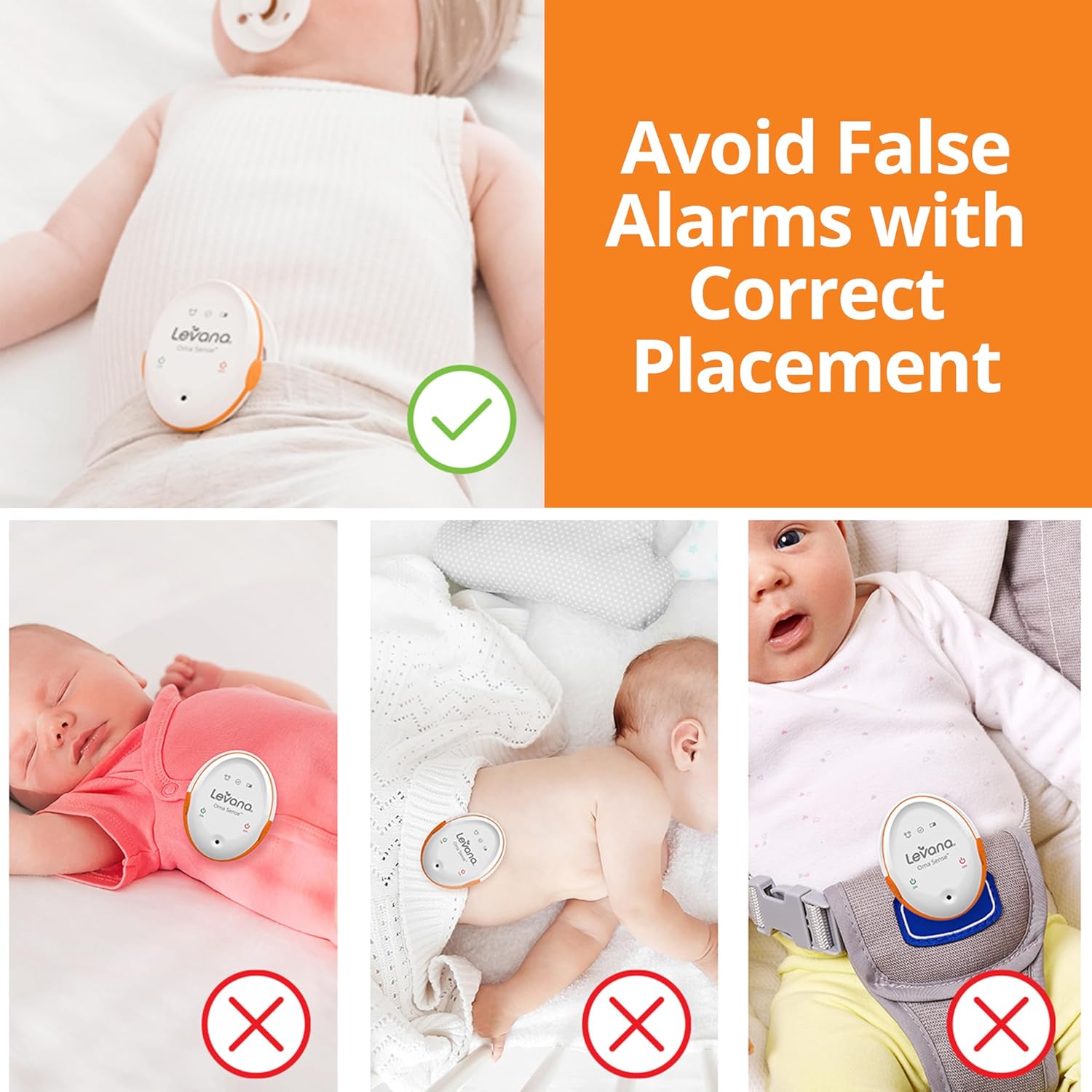
Image: Visual guide illustrating correct monitor placement (over the navel) and incorrect placements (on the side, on loose clothing, in a car seat) to prevent false alarms.
8. Specifications
- Brand: Levana
- Model: Oma Sense
- Product Dimensions: 2.5"L x 1"W x 1.94"H
- Item Weight: 170 Grams (approx. 6 ounces)
- Material: Biocompatible, Hypoallergenic, Medical Grade, Non-Toxic
- Color: White
- Sensor Type: Wearable
- Power Source: Battery
- Battery Type: Lithium-Ion (1 required, included)
- UPC: 061783264003
- Manufacturer: Empowerment Technologies Inc.
9. Warranty and Support
For warranty information and customer support, please refer to the documentation included with your product or visit the official Levana website. Keep your proof of purchase for warranty claims.


