Introduction
The Samsung SmartThings Multipurpose Sensor (Model GP-U999SJVLAAA) is a versatile device designed to enhance your smart home system. It provides real-time monitoring for various aspects of your home environment, including door and window status, temperature, and vibration. This manual provides instructions for setup, operation, maintenance, and troubleshooting to ensure optimal performance of your sensor.
Product Features
- Door & Window Monitoring: Detects open/close status of doors, windows, and drawers.
- Temperature Sensing: Monitors ambient temperature in any room.
- Vibration Detection: Built-in accelerometer detects vibrations, useful for monitoring knocks or appliance cycles.
- Zigbee Connectivity: Integrates with your SmartThings Hub or compatible Zigbee devices.
- Compact Design: Small and discreet for easy placement.

Image: The SmartThings Multipurpose Sensor highlights its ability to monitor open/close states, tilt, vibration, and temperature, making it a comprehensive smart home device.
Package Contents
Verify that all items are present in the package:
- Samsung SmartThings Multipurpose Sensor (Main Unit)
- Magnet (for contact sensing)
- CR2 Battery (pre-installed or included separately)
- Quick Start Guide (QSG)
- Health and Safety Guide (HSG)
- 3M Adhesive Strips (for mounting)

Image: The main unit of the Samsung SmartThings Multipurpose Sensor, a compact white device.
Setup and Installation
- Prepare Your SmartThings Hub: Ensure your SmartThings Hub is powered on and connected to your network.
- Install the SmartThings App: Download and install the SmartThings app on your smartphone or tablet if you haven't already.
- Add the Sensor to the App:
- Open the SmartThings app.
- Tap the "Add device" or "+" icon.
- Select "Sensor" or "Multipurpose Sensor" from the list, or scan for nearby devices.
- Follow the on-screen instructions to pair the sensor. You may need to pull the battery tab or press a button on the sensor to activate pairing mode.
- Mount the Sensor:
- Choose a clean, dry surface on a door, window, or drawer.
- Use the included 3M adhesive strips to attach the main sensor unit to the stationary part of the frame.
- Attach the smaller magnet unit to the moving part (door, window, drawer) directly adjacent to the main sensor. Ensure the gap between the main unit and the magnet is within 1.6 inches when closed.
- Test the Installation: Open and close the door/window/drawer to verify that the SmartThings app registers the open and closed states correctly.

Image: The SmartThings Multipurpose Sensor installed on a door, with the main unit on the frame and the magnet on the door itself, demonstrating proper placement for contact detection.
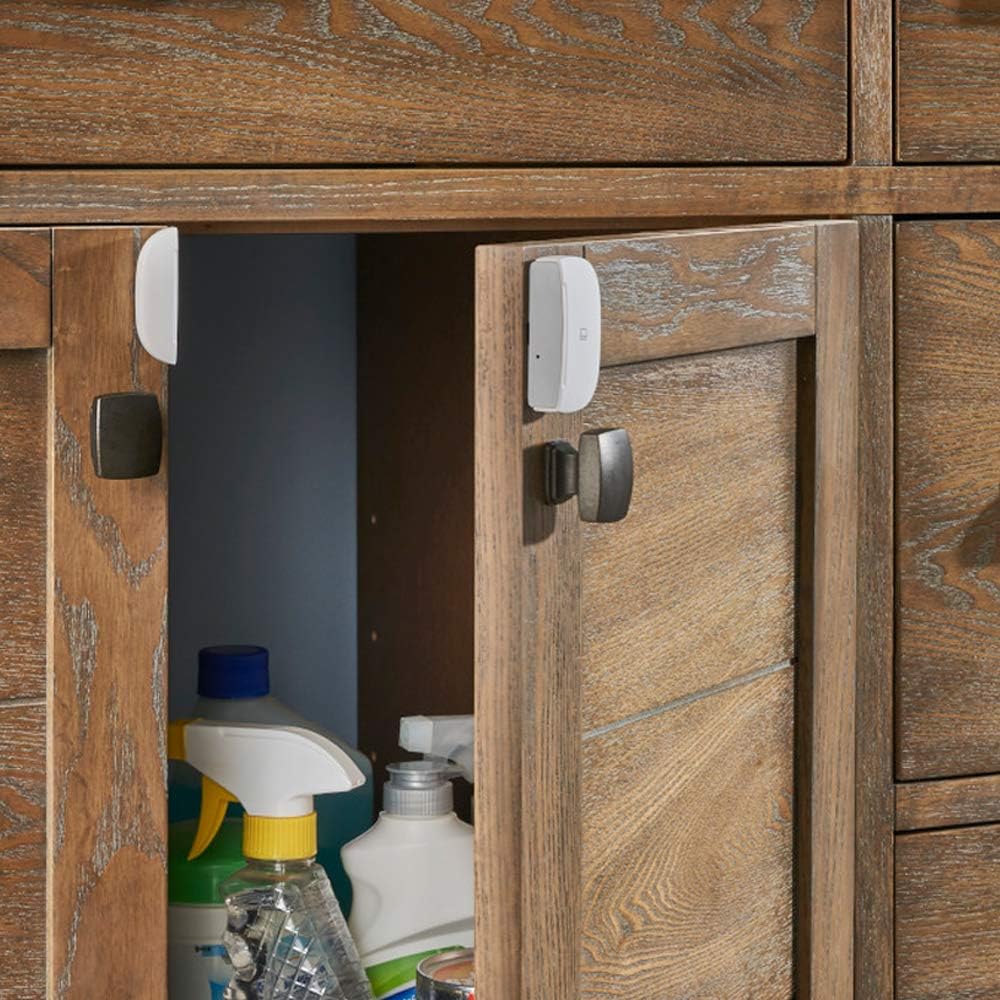
Image: The SmartThings Multipurpose Sensor installed on a cabinet door, illustrating its use for monitoring drawers or cabinets.
Operating the Sensor
Once installed and paired, the sensor operates automatically. You can monitor its status and configure automations through the SmartThings app.
- Open/Close Detection: The sensor reports "open" when the magnet separates from the main unit and "closed" when they are in proximity.
- Temperature Monitoring: The app displays the current temperature detected by the sensor. You can set up alerts or automations based on temperature thresholds.
- Vibration Detection: The sensor detects physical vibrations. This can be used to trigger alerts for knocks or to monitor the operational status of appliances.
- Tilt Detection: For specific applications like garage doors, the sensor can detect tilt. This functionality is configured within the SmartThings app.

Image: An example automation showing the SmartThings Multipurpose Sensor triggering connected lights when a door is opened, providing illumination upon entry.

Image: An example automation showing the SmartThings Multipurpose Sensor detecting high temperature and activating a fan connected to a SmartThings Outlet to maintain comfort.

Image: An example automation showing the SmartThings Multipurpose Sensor detecting a closed door and triggering a connected door lock to secure the entrance after a set period.
Maintenance
- Battery Replacement: The sensor uses one CR2 battery. When the battery level is low, the SmartThings app will notify you. To replace, gently open the sensor casing, remove the old battery, and insert a new CR2 battery, observing polarity.
- Cleaning: Wipe the sensor with a soft, dry cloth. Do not use liquid cleaners or aerosols.
- Firmware Updates: Ensure your SmartThings Hub and sensor firmware are kept up-to-date through the SmartThings app for optimal performance and security.
Troubleshooting
- Sensor Not Connecting/Offline:
- Check the battery level in the SmartThings app. Replace the battery if low.
- Ensure the sensor is within range of your SmartThings Hub.
- Try re-pairing the sensor with the SmartThings app.
- Restart your SmartThings Hub.
- Inaccurate Open/Close Readings:
- Verify the magnet and main sensor unit are properly aligned and within the 1.6-inch detection range when closed.
- Ensure the mounting surface is stable and not causing movement.
- Vibration Sensor Too Sensitive/Not Sensitive Enough:
- The vibration sensitivity is generally fixed. Adjusting the mounting location or surface might alter its responsiveness to specific vibrations.
- Temperature Readings Seem Incorrect:
- Ensure the sensor is not placed in direct sunlight or near heat sources/vents that could affect local temperature readings.
Specifications
| Feature | Detail |
|---|---|
| Model Number | GP-U999SJVLAAA |
| Connectivity | Zigbee |
| Power Source | 1 x CR2 Lithium Battery (included) |
| Detection Range (Contact) | Up to 1.6 inches (4 cm) |
| Maximum Wireless Range | 130 Feet (40 meters) |
| Dimensions | 1.72 x 2.04 x 0.54 inches (4.37 x 5.18 x 1.37 cm) |
| Weight | 1.44 ounces (40.8 grams) |
| Material | Plastic |
| Compatible Devices | SmartThings Hub, Alexa (via SmartThings) |
Warranty Information
The Samsung SmartThings Multipurpose Sensor GP-U999SJVLAAA comes with a 1 Year Limited Warranty. For detailed terms and conditions, please refer to the warranty documentation included with your product or visit the official Samsung SmartThings support website.
Support
For further assistance, technical support, or to access additional resources, please visit the official Samsung SmartThings support website or contact their customer service. You can find more information at the Samsung SmartThings Store.