
Bosch SHXM4AY56N
Bosch 24" 100 Series Black Dishwasher User Manual
Model: SHXM4AY56N
Introduction
Welcome to your new Bosch 24" 100 Series Black Dishwasher. This manual provides essential information for the safe and efficient operation, installation, and maintenance of your appliance. Please read it thoroughly before using your dishwasher.
Your Bosch dishwasher is designed for quiet operation and superior cleaning performance, featuring the EcoSilence motor system and RackMatic® adjustable upper rack.
Important Safety Information
Read all instructions before using the appliance.
- This appliance must be properly grounded.
- Do not operate a damaged appliance.
- Keep children away from the dishwasher.
- Use only detergents and rinse aids recommended for automatic dishwashers.
- Sharp items should be loaded with handles up to reduce the risk of cuts.
Setup and Installation
Proper installation is crucial for the performance and longevity of your Bosch dishwasher. It is recommended that installation be performed by a qualified technician.
Unpacking
Carefully remove all packaging materials. Inspect the dishwasher for any shipping damage. Report any damage immediately to your dealer.

Figure 1: Front view of the Bosch 24" 100 Series Black Dishwasher. This image shows the sleek black exterior and the integrated control panel at the top edge of the door.
Electrical Requirements
The dishwasher requires a 120 V, 60 Hz, AC only, 15-amp or 20-amp fused electrical supply.
Water Supply and Drain
Connect the dishwasher to a hot water supply line with a minimum temperature of 120°F (49°C). Ensure proper drain hose connection to prevent leaks.
Leveling
Use the adjustable feet to ensure the dishwasher is level and stable in its cabinet opening.
Operating Instructions
Loading the Dishwasher
For optimal cleaning, load dishes properly. Scrape off large food particles.
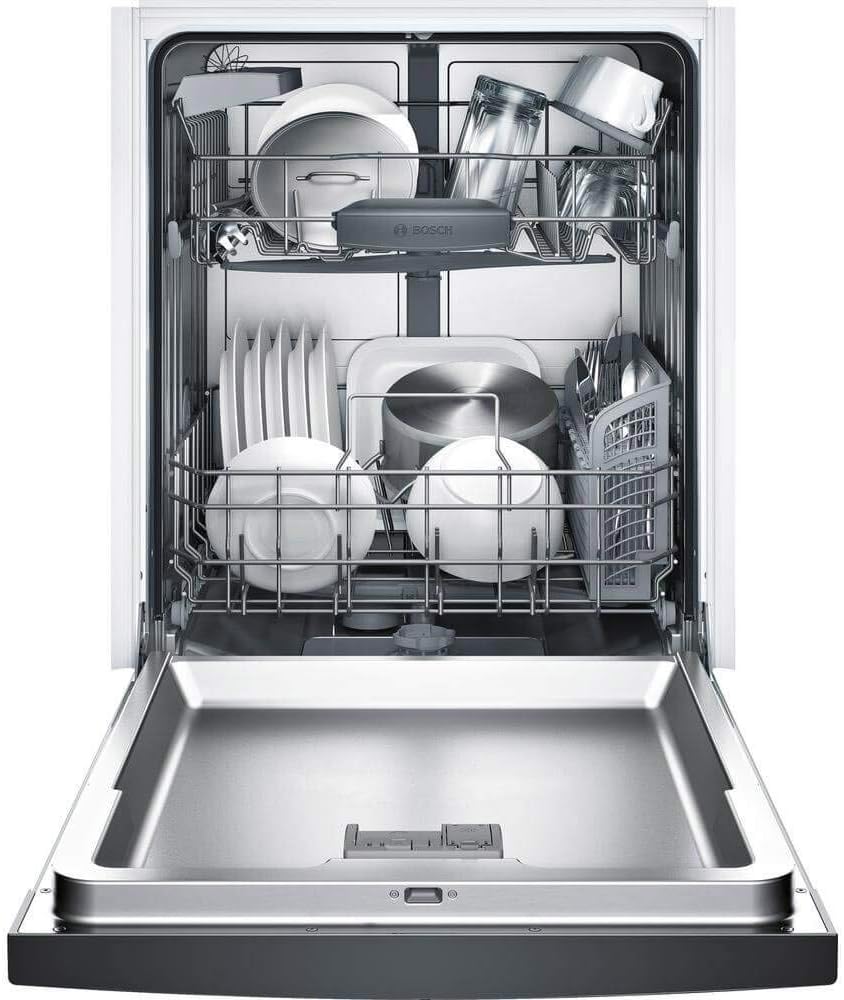
Figure 2: Interior view of the Bosch dishwasher with upper and lower racks loaded with various dishes, including plates, bowls, glasses, and cookware. This demonstrates the spacious and flexible loading capacity.
Upper Rack
The RackMatic® adjustable upper rack allows for flexible loading of taller items. Adjust the height by pressing the levers on either side of the rack.
Lower Rack
Load larger items like plates, serving dishes, and pots in the lower rack.
Cutlery Basket
Place silverware in the cutlery basket with handles up for forks and spoons, and handles down for knives for safety.

Figure 3: A close-up view of the dishwasher's cutlery basket, filled with various forks, spoons, and knives, demonstrating proper loading for effective cleaning.

Figure 4: The utility rack, designed for small, lightweight items such as measuring spoons, small lids, or serving utensils, preventing them from being dislodged during the wash cycle.
Adding Detergent and Rinse Aid
Use only automatic dishwasher detergent. Fill the detergent dispenser according to the manufacturer's instructions and the soil level of your dishes.

Figure 5: A close-up image of the dishwasher's detergent dispenser, showing a detergent tablet placed inside, ready for a wash cycle.
Fill the rinse aid dispenser regularly to ensure spot-free drying.
Selecting a Cycle
Your dishwasher offers several wash cycles. Refer to the control panel for options.

Figure 6: A detailed view of the Bosch dishwasher's top-mounted control panel, displaying buttons for various wash cycles (Heavy, Auto, Normal, Delicate, Rinse), options (Sanitized, Speed60, Delay), and the digital display showing cycle time.
- Heavy: For heavily soiled pots, pans, and dishes.
- Auto: Automatically adjusts cycle time and water usage based on soil level.
- Normal: For everyday dishes with normal soil.
- Delicate: For lightly soiled or delicate items.
- Rinse: For rinsing dishes that will be washed later.
Starting a Cycle
- Load dishes and add detergent/rinse aid.
- Select desired wash cycle.
- Press the "Start" button.
- Close the dishwasher door firmly.
Maintenance and Care
Cleaning the Filters
Regularly clean the filter system to ensure optimal performance. Refer to the detailed instructions in the full user manual for filter removal and cleaning.
Cleaning the Interior
Wipe down the interior with a damp cloth periodically. For stubborn stains, use a dishwasher cleaner.
Cleaning the Exterior
Clean the exterior surfaces with a soft, damp cloth. Avoid abrasive cleaners.
Winterizing
If the dishwasher will be left in an unheated place during winter, it must be winterized by a qualified service person to prevent damage from freezing.
Troubleshooting
| Problem | Possible Cause | Solution |
|---|---|---|
| Dishwasher does not start | Door not closed properly; Power supply issue; Cycle not selected. | Ensure door is latched; Check circuit breaker; Select a wash cycle and press Start. |
| Dishes not clean | Improper loading; Clogged spray arms; Insufficient detergent; Clogged filters. | Reload dishes correctly; Clean spray arm nozzles; Use correct amount of detergent; Clean filter system. |
| Dishwasher is noisy | Items hitting spray arm; Foreign object in pump; Installation issues. | Rearrange dishes; Remove foreign objects; Ensure dishwasher is level and secured. |
| Water not draining | Clogged drain hose; Clogged filter; Air gap issue. | Check and clear drain hose; Clean filter; Check air gap for blockages. |
For more detailed troubleshooting, please refer to the complete user manual or contact Bosch customer service.
Specifications
| Feature | Detail |
|---|---|
| Model Name | Bosch 24'' 100 Series |
| Model Number | SHXM4AY56N |
| Brand | Bosch |
| Installation Type | Built-In |
| Color | Black |
| Product Dimensions (DxWxH) | 22.56"D x 23.56"W x 33.88"H |
| Voltage | 120 Volts (AC) |
| Water Consumption | 2.4 Gallons per cycle |
| Number of Settings | 14 Place Settings |
| Option Cycles | 4 (Heavy, Auto, Normal, Delicate, Rinse) |
| Inner Material | Stainless Steel |
| Special Features | RackMatic® adjustable upper rack, Quiet operation |
| Controls Type | Touch |
| UPC | 825225955351 |
Warranty and Support
Bosch appliances come with a limited warranty. For specific warranty details, please refer to the warranty card included with your appliance or visit the official Bosch website.
For technical assistance, service, or to order parts, please contact Bosch Customer Service.
Online Support: www.bosch-home.com/us/service/contact-us
Phone Support: Refer to your product registration or the Bosch website for the most current contact numbers.