
Introduction
Thank you for choosing the Kizen Instapen Pro Instant Read Meat Thermometer. This device is designed to provide quick and accurate temperature readings for various foods and liquids, ensuring perfectly cooked meals every time. Its waterproof design, backlit display, and voice function make it a versatile tool for any kitchen or outdoor cooking environment.
Please read this manual thoroughly before using the thermometer to ensure proper operation and to maximize its lifespan.
Safety Information
- Probe Tip: The probe tip is sharp. Handle with care to prevent injury.
- High Temperatures: Do not leave the thermometer in an oven or grill while cooking. The plastic body is not designed for prolonged exposure to high heat.
- Cleaning: The thermometer is waterproof (IP65 rated) and can be washed under running water. However, it is not dishwasher safe. Hand wash only.
- Battery Safety: Keep batteries out of reach of children. Dispose of used batteries responsibly according to local regulations.
- Intended Use: This thermometer is intended for measuring food temperatures. Do not use it for purposes other than its intended use.
Product Features
- Ultra-Fast Reading: Provides temperature readings in 2-3 seconds.
- High Accuracy: Accurate to +/-1°F (0.5°C) with a wide temperature range of -58°F to 572°F (-50°C to 300°C).
- Waterproof Design: IP65 rated for easy cleaning under running water.
- Voice Function: Announces temperature readings for convenience, especially in low light or for visually impaired users.
- Backlit LCD Screen: Large, bright blue backlit display for clear readings in any lighting condition.
- Auto On/Off: Automatically turns on when the probe is opened and off when closed or after 10 minutes of inactivity.
- Calibration Function: Allows for easy recalibration to maintain accuracy.
- Magnetic Back & Hanging Hole: For convenient storage on metal surfaces or hanging hooks.
- Durable Construction: Strong ABS plastic body designed to withstand accidental drops.
Parts Identification

Image: Kizen Instapen Pro Thermometer with labeled parts.
- Stainless Steel Probe: For inserting into food to measure temperature.
- LCD Display: Shows temperature readings and settings.
- °C/°F Button: Toggles between Celsius and Fahrenheit.
- VOICE Button: Activates the voice announcement of the current temperature.
- Light/CAL Button: Short press to activate backlight; long press for calibration mode.
- Battery Compartment: Located on the back, holds CR2032 batteries.
- Internal Magnet: On the back for magnetic attachment.
- Hanging Hole: For convenient storage.
Setup
Battery Installation
The Kizen Instapen Pro thermometer comes with one pre-installed CR2032 battery and one spare. If the display is dim or not turning on, replace the battery.
- Locate the battery compartment on the back of the thermometer.
- Use a small coin to twist the battery cover counter-clockwise to open.
- Remove the old battery (if any) and insert a new CR2032 battery with the positive (+) side facing up.
- Replace the battery cover and twist clockwise to secure.
Operating Instructions
Turning On/Off

Image: Thermometer probe folded (off) and extended (on).
- To Turn On: Simply unfold the stainless steel probe. The thermometer will automatically power on and display the current temperature.
- To Turn Off: Fold the probe back into the body of the thermometer. It will automatically power off. The device also features an auto shut-off after 10 minutes of inactivity to conserve battery life.
Taking a Temperature Reading

Image: Kizen Instapen Pro measuring the temperature of a steak.
- Unfold the probe to turn on the thermometer.
- Insert the stainless steel probe into the thickest part of the food, avoiding bone or gristle.
- Hold the probe in place for 2-3 seconds until the temperature stabilizes on the LCD display.
- Remove the probe from the food.

Image: Versatile use of the thermometer for various food items and liquids.
The Kizen Instapen Pro is suitable for a wide range of applications, including:
- Meats (beef, chicken, pork, fish, lamb, turkey)
- Deep frying oil
- Beverages
- Candy making
- Baking
- Baby formula
Switching Temperature Units (°F/°C)
Press the °C/°F button located on the front of the thermometer to switch between Fahrenheit and Celsius display modes.
Using the Backlight

Image: Kizen Instapen Pro with its large backlit LED screen.
Short press the Light/CAL button to activate the blue backlight. This is useful for reading temperatures in low-light conditions, such as inside an oven or during evening outdoor cooking. Press the button again to turn off the backlight.
Using the Voice Function
Press the VOICE button to hear the current temperature reading announced aloud. This feature is particularly helpful for users with visual impairments or when hands are occupied.
Calibration

Image: Step-by-step guide for thermometer recalibration.
To ensure continued accuracy, you can recalibrate your thermometer using an ice bath:
- Fill a glass with crushed ice and cold water. Stir well and let it sit for a few minutes to ensure the water reaches 32°F (0°C).
- Insert the thermometer probe into the center of the ice bath, ensuring the probe tip is fully submerged but not touching the bottom or sides of the glass.
- Wait for the temperature reading to stabilize. It should read close to 32°F (0°C).
- While the probe is in the ice bath, press and hold the Light/CAL button for 5 seconds.
- The display will show "CAL" and then adjust to 32°F (0°C). Recalibration is complete once the screen shows "CAL" and then the corrected temperature.
Maintenance
Cleaning

Image: Waterproof thermometer being cleaned under a faucet.
- After each use, clean the stainless steel probe with a damp cloth or rinse under running water.
- You can use a mild soap for thorough cleaning.
- Wipe the body of the thermometer with a damp cloth.
- Do not immerse the entire thermometer in water for extended periods. While waterproof, it is best to rinse and wipe.
- Do not place in a dishwasher.
- Dry thoroughly before storing.
Storage
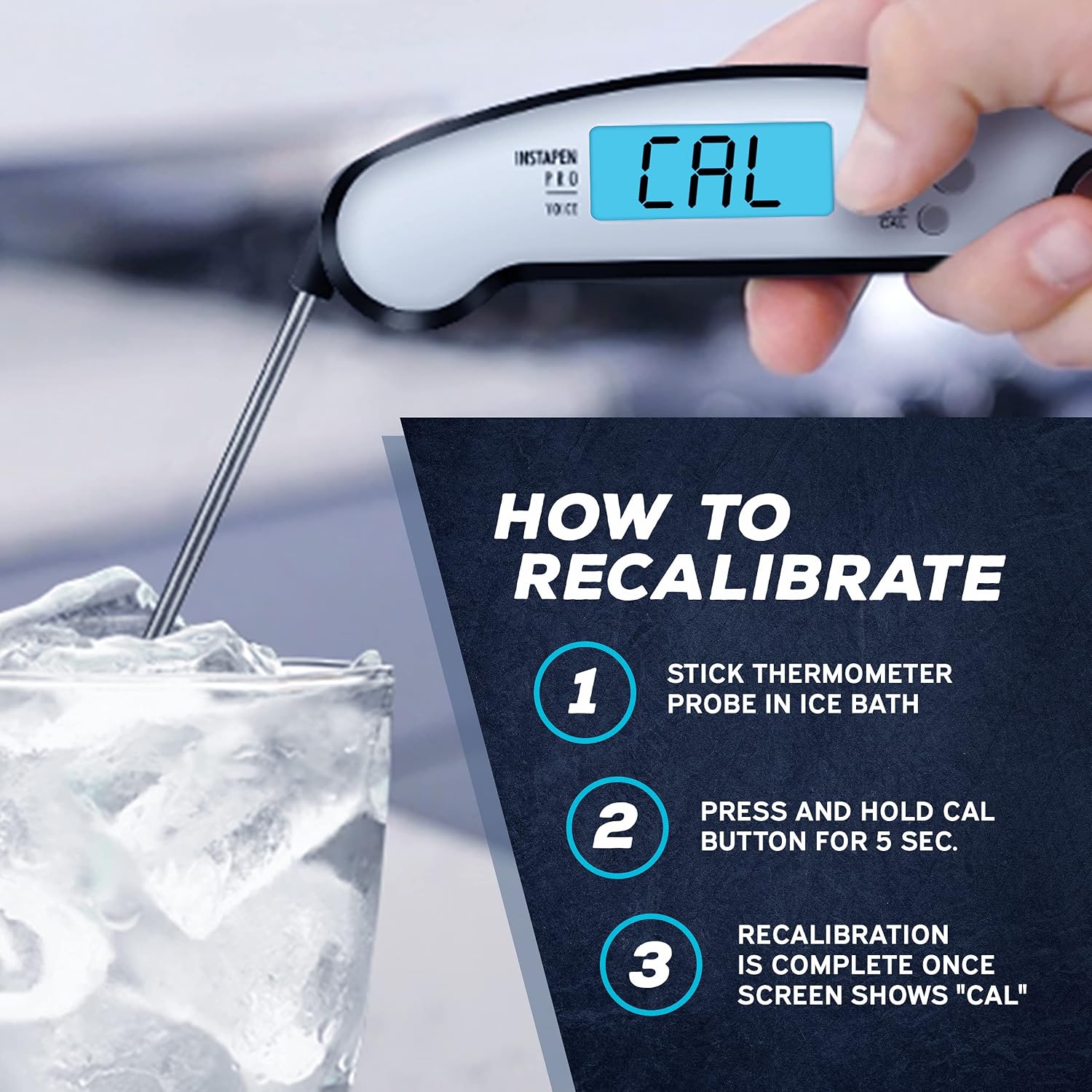
Image: Storage options for the Kizen Instapen Pro: magnetic and hanging.
- Always fold the probe back into the body before storing to protect the probe and turn off the device.
- Utilize the built-in magnet to attach the thermometer to a refrigerator or other metal surface.
- Alternatively, use the hanging hole to store it on a hook.
- Store in a dry place at room temperature.
Troubleshooting
| Problem | Possible Cause | Solution |
|---|---|---|
| Thermometer does not turn on. | Battery is dead or incorrectly installed. | Check battery orientation. Replace with a new CR2032 battery. |
| Inaccurate temperature readings. | Needs calibration; probe not inserted correctly; battery low. | Perform an ice bath calibration. Ensure probe is in the thickest part of food. Replace battery. |
| Display is dim or flickering. | Low battery. | Replace the CR2032 battery. |
| Voice function not working. | Low battery; internal issue. | Replace battery. If problem persists, contact customer support. |
Specifications
- Model: IPPro
- Temperature Range: -58°F to 572°F (-50°C to 300°C)
- Accuracy: ±1°F (±0.5°C)
- Response Time: 2-3 seconds
- Waterproof Rating: IP65
- Display Type: LCD with Backlight
- Power Source: 1 x CR2032 battery (included)
- Auto-Off: 10 minutes of inactivity
- Probe Material: Stainless Steel
- Body Material: ABS Plastic
- Extended Probe Length: Approximately 10.5 inches (26.7 cm)
- Folded Body Length: Approximately 6.2 inches (15.6 cm)
- Certifications: CE, RoHS
Warranty and Support
Kizen stands behind the quality of its products. For warranty information, technical support, or any questions regarding your Instapen Pro thermometer, please refer to the contact information provided with your purchase or visit the official Kizen website.
Please retain your proof of purchase for warranty claims.

