
1. Product Overview
This document provides instructions for the Aquaguard Original I-NOVA Filter Set, designed for specific Eureka Forbes UV water purifier models. The set includes an Activated Carbon Block and a Water Filter Cartridge (DIY Candle) essential for maintaining water purification performance.
Compatibility: This filter set is exclusively designed for Aquaguard UV I-NOVA and Infinity water purifier models.
2. Components Included
- Activated Carbon Block: Filters out organic impurities, chlorine, and improves water taste and odor.
- Water Filter Cartridge (DIY Candle): Acts as a sediment filter, removing suspended particles like dirt, sand, and rust.
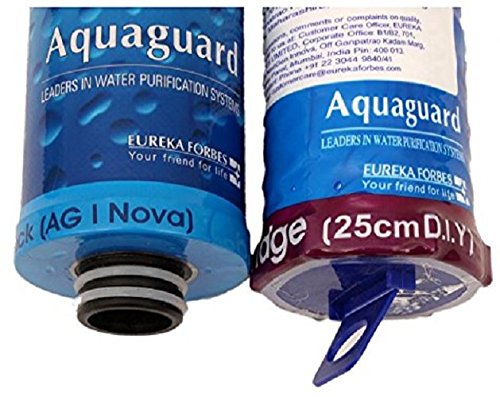
Image 1: The Aquaguard Original I-NOVA Filter Set, featuring both the activated carbon block and the water filter cartridge.
3. Setup and Installation
Replacing the filter cartridges is a DIY process. For detailed steps, always refer to your specific Aquaguard UV I-NOVA or Infinity water purifier's user manual. The general procedure involves:
- Power Off and Disconnect: Ensure the water purifier is switched off and unplugged from the power outlet. Turn off the main water supply to the purifier.
- Drain Water: Open the purified water tap to drain any remaining water from the system.
- Locate Filter Housings: Identify the housings for the Activated Carbon Block and the Water Filter Cartridge within your purifier.
- Remove Old Filters: Carefully unscrew or unclip the filter housings. Remove the used Activated Carbon Block and Water Filter Cartridge. Dispose of them responsibly.
- Insert New Filters: Insert the new Activated Carbon Block and Water Filter Cartridge into their respective housings. Ensure they are seated correctly and securely.
- Secure Housings: Re-attach and tighten the filter housings. Ensure all connections are secure to prevent leaks.
- Restore Water and Power: Slowly turn on the main water supply to the purifier. Check for any leaks. Once confirmed, plug in and switch on the power.
- Flush System: Allow water to run through the purifier for a few minutes (as per your purifier's manual) to flush out any air or carbon fines before consuming.
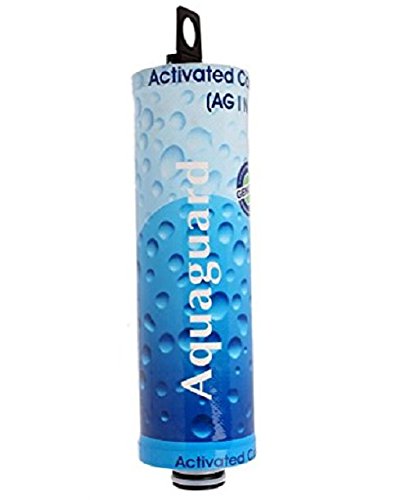
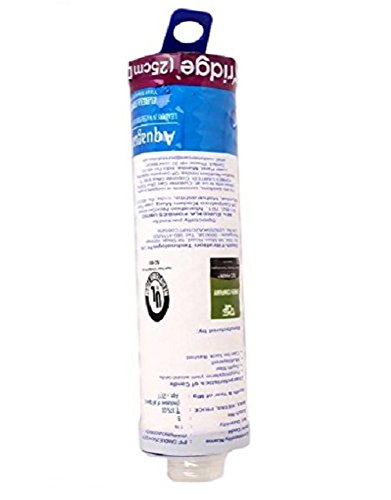
Image 2: Left: Activated Carbon Block. Right: Water Filter Cartridge (DIY Candle).
4. Operating Principles
These filters are integral to the multi-stage purification process of your Aquaguard UV water purifier:
- The Water Filter Cartridge (DIY Candle) typically acts as the first stage, physically removing larger suspended impurities from the incoming water.
- The Activated Carbon Block then processes the pre-filtered water, adsorbing chlorine, organic compounds, pesticides, and other chemicals that can affect water taste and odor. This stage prepares the water for subsequent UV purification.
Together, these filters ensure that the water entering the UV chamber is free from sediment and chemical contaminants, allowing the UV lamp to effectively neutralize microorganisms.
5. Maintenance and Replacement
Regular replacement of these filters is crucial for the optimal performance and longevity of your Aquaguard water purifier and for ensuring safe drinking water.
- Replacement Frequency: The lifespan of the filters depends on the quality of your input water and the volume of water purified. Typically, filters should be replaced every 6 to 12 months, or as indicated by your water purifier's filter change alarm or indicator.
- Signs of Exhausted Filters: Reduced water flow, unusual taste or odor in the purified water, or a visible change in the filter's appearance (for the candle filter) can indicate that replacement is due.
- DIY Replacement: The design of these filters facilitates easy, do-it-yourself replacement. Follow the installation steps outlined in Section 3.
6. Troubleshooting
If you encounter issues after filter replacement, consider the following:
- Reduced Water Flow: Ensure the filters are correctly seated and not clogged. Sometimes, new carbon filters may release air, causing temporary flow reduction. Flush the system thoroughly.
- Leaks: Check all connections and O-rings for proper sealing. Ensure filter housings are tightened securely but not overtightened.
- Unusual Taste/Odor: Flush the system for a longer period (5-10 minutes) to remove any residual carbon fines. If the issue persists, re-check filter installation or consider if the filters might be faulty.
- Purifier Not Functioning: Verify that the power supply is connected and switched on. Ensure the water supply is open.
7. Specifications
| Feature | Detail |
|---|---|
| Brand | Eureka Forbes |
| Set Name | Aquaguard Original I-NOVA Set |
| Model Compatibility | UV I-NOVA/Infinity |
| Material | Carbon (for Activated Carbon Block) |
| Item Weight (Set) | 350 Grams |
| Product Benefits | Removes impurities and contaminants, easy to install and replace |
| Net Quantity | 1 Set |
8. Warranty and Support
Specific warranty information for this filter set is not provided. For any product-related queries, technical assistance, or to purchase genuine replacement parts, please contact Eureka Forbes customer support or visit their official website. Always use genuine Aquaguard replacement filters to ensure optimal performance and to maintain your water purifier's warranty.