
Electron Microscopy Sciences 63702-B10
TruBond™ Adhesion Slides 200 User Manual
Brand: Electron Microscopy Sciences
Model: 63702-B10
1. Introduction
The TruBond™ Adhesion Slides 200 are high-quality microscope slides designed for superior sample adhesion. These slides are engineered to provide reliable performance even under challenging conditions, including high temperatures and varying pH levels, ensuring secure attachment of biological samples for microscopic examination. Each case contains 1000 blue-tinted slides, suitable for a wide range of laboratory applications.
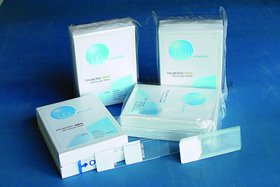
This image displays several boxes of TruBond Adhesion Slides, along with individual slides. The slides are designed for microscopy applications, featuring a blue tint and adhesive properties for secure sample attachment.
2. Setup and Preparation
Proper handling and preparation are crucial for optimal performance of TruBond™ Adhesion Slides. Follow these guidelines:
- Unpacking: Carefully remove the slides from their packaging. Avoid touching the slide surface where the sample will be applied to prevent contamination.
- Storage: Store unused slides in their original packaging in a clean, dry, and dust-free environment at room temperature to maintain their adhesive properties.
- Surface Cleaning: While TruBond™ slides are pre-cleaned, ensure the working surface is clean and free of dust or debris before placing slides.
- Temperature Acclimation: Allow slides to acclimate to room temperature if they have been stored in a cooler environment, to prevent condensation which can affect adhesion.
3. Operating Instructions
TruBond™ Adhesion Slides are designed for straightforward use in various microscopic applications. The adhesive surface ensures samples remain securely attached during staining, washing, and observation processes.
- Sample Application: Apply the biological sample (e.g., tissue section, cell suspension) directly onto the designated adhesive area of the slide. Ensure even distribution for optimal results.
- Drying: Allow the sample to dry completely on the slide. The drying time may vary depending on the sample type and environmental conditions.
- Staining Procedures: Proceed with standard staining protocols. The adhesive properties of the slides are designed to withstand common laboratory reagents and washing steps without sample detachment.
- Mounting: Once staining is complete, apply a coverslip using an appropriate mounting medium.
- Microscopic Observation: The prepared slides are now ready for observation under a microscope.
Note: For specific protocols related to your sample type, consult relevant laboratory guidelines or research papers.
4. Maintenance and Storage
TruBond™ Adhesion Slides are single-use items and do not require maintenance after use. Proper storage before use is essential to preserve their quality.
- Pre-Use Storage: Keep slides in their original sealed packaging until ready for use. Store in a cool, dry place, away from direct sunlight and extreme temperatures.
- Post-Use Disposal: Dispose of used slides according to your laboratory's biohazard waste disposal protocols. Do not reuse slides.
- Contamination Prevention: Always handle slides by the edges to prevent fingerprints or other contaminants from affecting the adhesive surface.
5. Troubleshooting
While TruBond™ Adhesion Slides are designed for reliability, occasional issues may arise. Here are some common problems and their potential solutions:
| Problem | Possible Cause | Solution |
|---|---|---|
| Poor Sample Adhesion |
|
|
| Bubbles under Coverslip |
|
|
| Staining Irregularities |
|
|
6. Specifications
| Attribute | Detail |
|---|---|
| Product Name | TruBond™ Adhesion Slides 200 |
| Model Number | 63702-B10 |
| Brand | Electron Microscopy Sciences |
| Quantity per Case | 1000 slides |
| Color | Blue |
| Key Feature | Proven performance under high temperature and pH conditions |
| ASIN | B07F2S748R |
| Date First Available | May 2, 2014 |
Ask a question about this manual
Ask about setup, troubleshooting, compatibility, parts, safety, or missing instructions. Manuals+ will review the question and use this page’s manual context to help answer it.