1. Introduction
This manual provides essential information for the safe and efficient operation, installation, and maintenance of your Dukers DSM-15R Commercial Single Glass Swing Door Merchandiser Refrigerator. Please read this manual thoroughly before installation and use, and retain it for future reference.
The Dukers DSM-15R is designed to showcase and display various merchandise, maintaining products at optimal temperatures. It features digital temperature controls, LED lighting, and adjustable shelving for versatile use in commercial settings.
2. Safety Information
WARNING: Failure to follow these safety instructions may result in fire, electric shock, property damage, or injury.
- Electrical Safety: Ensure the unit is connected to a properly grounded electrical outlet with the correct voltage (115 Volts) and amperage. Do not use extension cords. Disconnect power before any maintenance or cleaning.
- Ventilation: Maintain adequate clearance around the unit for proper airflow to the compressor. Blocked vents can lead to overheating and reduced efficiency.
- Placement: Place the unit on a level, stable surface capable of supporting its weight (approximately 241 pounds when empty, plus contents). Avoid direct sunlight or heat sources.
- Flammable Materials: Do not store explosive substances or flammable materials inside or near the refrigerator.
- Cleaning: Use only mild, non-abrasive cleaners. Do not spray water directly onto electrical components.
- Children: Keep children away from the unit. Ensure the door cannot be accidentally closed on a child.
3. Unpacking and Installation
3.1. What's in the Box
Upon unpacking, verify that all components are present:
- Dukers DSM-15R Refrigerator Unit
- 5 Wire Shelves
- 9 ft Power Cord
- Casters (pre-installed or requiring attachment)
3.2. Placement
Select a location that is level, dry, and well-ventilated. Avoid placing the unit near heat-generating appliances or in direct sunlight. Ensure sufficient space (at least 4 inches) around the back and sides for proper air circulation.
3.3. Leveling
If casters are not pre-installed, attach them securely. Once in place, ensure the unit is level using a spirit level. Adjust the casters or leveling feet as necessary to prevent door misalignment and ensure proper sealing.
3.4. Power Connection
Before plugging in, allow the unit to stand upright for at least 2 hours to allow compressor oils to settle. Connect the 9 ft power cord to a dedicated, grounded 115V/60Hz electrical outlet. Do not use adapters or extension cords.

Figure 1: Front view of the Dukers DSM-15R Commercial Merchandiser Refrigerator.
4. Operation
4.1. Initial Startup
After connecting to power, the unit will begin cooling. Allow the refrigerator to operate for several hours (e.g., 4-6 hours) empty to reach the desired temperature before loading products.
4.2. Digital Temperature Controls
The unit is equipped with digital temperature controls and an LED display, typically located at the bottom front or inside the unit. The temperature range is 33°F to 41°F (approximately).
- Setting Temperature: Refer to the specific control panel instructions for your unit. Generally, there will be 'SET' button and up/down arrows to adjust the desired temperature.
- Temperature Display: The LED display shows the current internal temperature.
4.3. Loading Products
Distribute products evenly on the adjustable wire shelves. Do not block the internal air vents, as this can impede proper cooling. The unit includes 5 adjustable and removable wire shelves.

Figure 2: Interior view showing products on adjustable shelves.
5. Maintenance
Regular maintenance ensures optimal performance and longevity of your refrigerator.
- Cleaning the Interior: Regularly clean the interior with a mild soap and water solution. Rinse with clean water and dry thoroughly. The removable door gasket facilitates easy cleaning.
- Cleaning the Exterior: Wipe down the exterior surfaces with a soft cloth and mild cleaner. Avoid abrasive materials that could scratch the finish.
- Condenser Coil Cleaning: The condenser coil, located at the bottom, should be cleaned periodically (e.g., every 3 months) to remove dust and debris. This improves efficiency and prevents compressor strain. Disconnect power before cleaning.
- Door Gasket Inspection: Inspect the door gasket for cracks or damage. A tight seal is crucial for maintaining temperature. Replace damaged gaskets promptly.
6. Troubleshooting
Before contacting service, review these common issues and solutions:
| Problem | Possible Cause | Solution |
|---|---|---|
| Unit does not power on | No power to the unit; power cord unplugged; circuit breaker tripped. | Check power connection; reset circuit breaker. |
| Unit not cooling properly | Temperature setting too high; condenser coil dirty; door not sealing; excessive door openings. | Adjust temperature; clean condenser coil; check door gasket; minimize door openings. |
| Excessive noise | Unit not level; loose components; fan obstruction. | Level the unit; inspect for loose parts; check for fan obstructions. |
| Water on floor (leakage) | Drain pan overflowing; drain line clogged. | Empty and clean drain pan; clear drain line. |
If issues persist after attempting these solutions, contact qualified service personnel.
7. Specifications
Detailed technical specifications for the Dukers DSM-15R model:
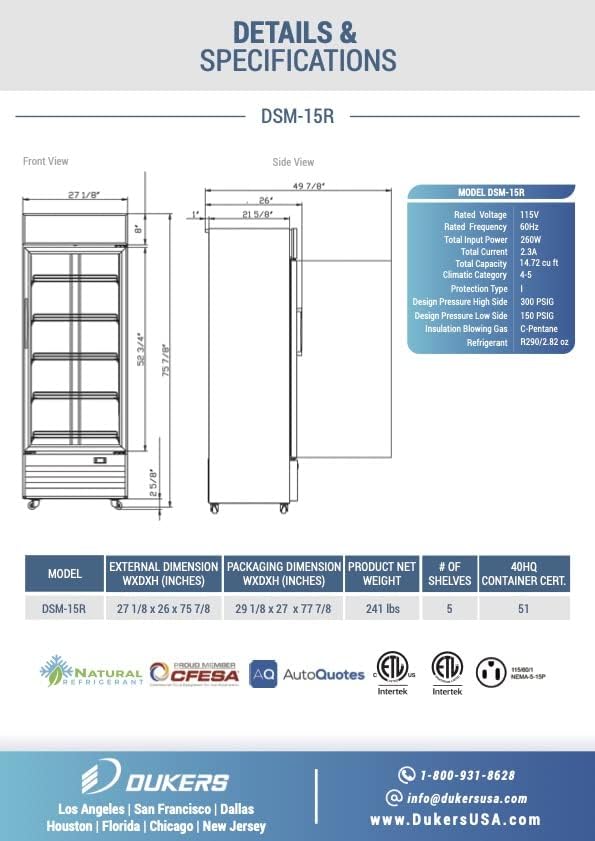
Figure 3: Technical drawing and specifications for the DSM-15R.
| Feature | Detail |
|---|---|
| Brand Name | Dukers |
| Model Info | DSM-15R |
| Item Weight | 241 pounds |
| Product Dimensions (W x D x H) | 27.2" x 26" x 76.3" (approx. 27 1/8" x 26" x 76 3/8") |
| Capacity | 14.72 Cubic Feet |
| Temperature Range | 33°F to 41°F |
| Voltage | 115 Volts |
| Wattage | 260 Watts |
| Defrost System | Automatic |
| Number of Doors | 1 |
| Shelf Type | Wire (5 shelves included) |
| Material Type | Aluminum, Glass, Coated Steel |
| Compressor | Bottom mounted 1/4 HP |
| Certification | NSF, ETL |
8. Warranty and Support
8.1. Manufacturer Warranty
The Dukers DSM-15R comes with a manufacturer warranty for commercial locations only:
- 2-Year: Parts and Labor
- 5-Year: On Compressor
Please retain your proof of purchase for warranty claims.
8.2. Customer Support
For technical assistance, warranty inquiries, or parts, please contact Dukers customer support:
- Phone: 1-800-931-8628
- Email: info@dukersusa.com
- Website: www.dukersusa.com


