
Introduction
This manual provides detailed instructions for the proper use and maintenance of your Infyniti Mobile BM-300 Professional Digital Scale. Please read this manual thoroughly before operating the device to ensure accurate measurements and extend the product's lifespan. Keep this manual for future reference.

Image 1: The Infyniti BM-300 Digital Scale displayed alongside its retail packaging.
Safety Precautions
- Do not overload the scale beyond its maximum capacity of 300 grams.
- Avoid exposing the scale to extreme temperatures, humidity, or direct sunlight.
- Keep the scale away from strong electromagnetic fields.
- Handle the scale with care; avoid dropping or subjecting it to sudden impacts.
- Clean the scale with a soft, damp cloth. Do not use abrasive cleaners or immerse it in water.
- Remove batteries if the scale will not be used for an extended period.
Package Contents
Verify that all items are present in the package:
- Infyniti Mobile BM-300 Digital Scale
- Protective Cover / Weighing Tray
- User Manual (this document)
- Batteries (typically AAA, but not specified, so keep it general)
Component Identification
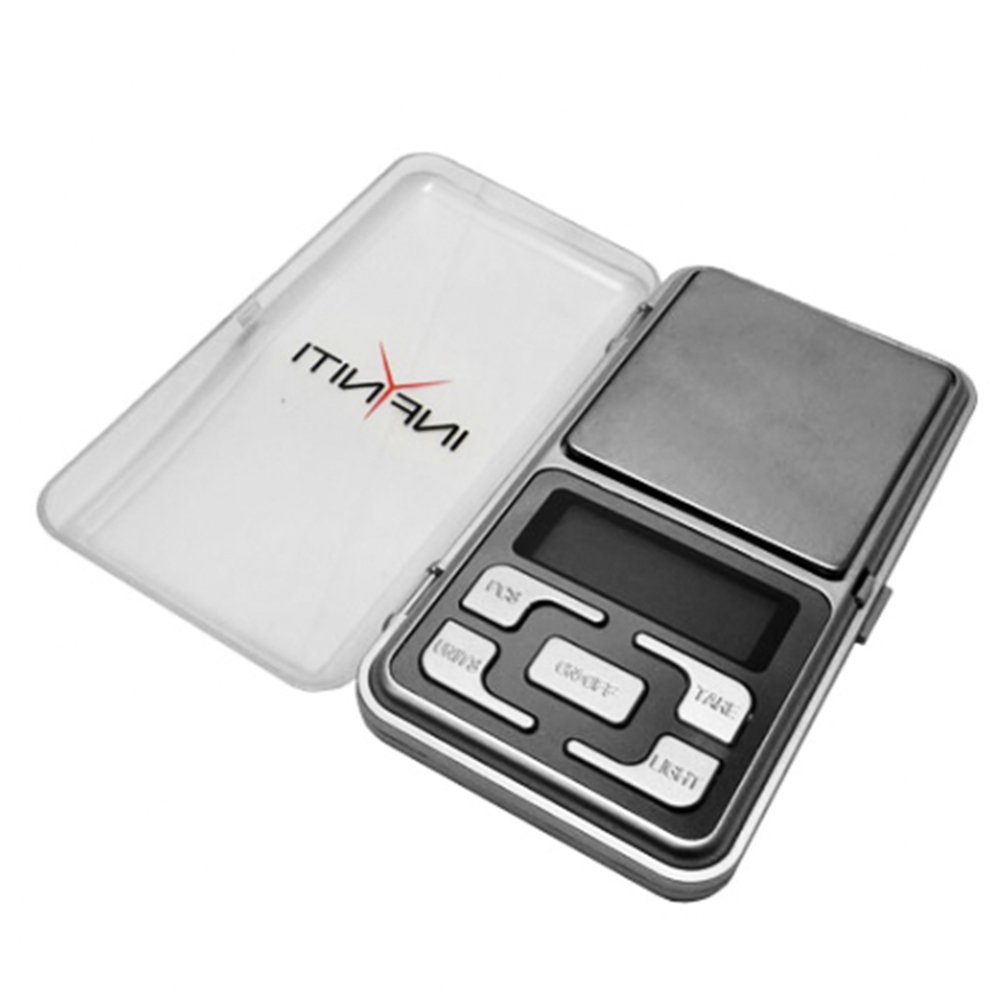
Image 2: The Infyniti BM-300 Digital Scale shown with its protective cover open, revealing the weighing platform and control buttons.
- Weighing Platform: The stainless steel surface where items are placed for weighing.
- LCD Display: Digital screen with backlight for displaying weight readings and units.
- Buttons:
- ON/OFF: Powers the scale on or off.
- MODE: Changes the weighing unit (g, oz, ozt, dwt, ct, gn).
- TARE: Resets the display to zero, useful for weighing items in a container.
- LIGHT: Activates or deactivates the backlight.
- Protective Cover: Doubles as a weighing tray.
- Battery Compartment: Located on the underside of the scale.
Setup
1. Battery Installation
- Open the battery compartment cover on the underside of the scale.
- Insert the specified batteries (e.g., 2 x AAA batteries) according to the polarity indicators (+/-).
- Close the battery compartment cover securely.
2. Initial Placement
- Place the scale on a hard, flat, and stable surface. Uneven surfaces can affect accuracy.
- Ensure the scale is away from vibrations, drafts, and rapid temperature changes.
Operating Instructions
1. Power On/Off
- Press the ON/OFF button to turn the scale on. The display will show "88888" then "0.00g".
- Press and hold the ON/OFF button for a few seconds to turn the scale off. The scale will also automatically shut off after a period of inactivity to conserve battery life.
2. Weighing Procedure
- Turn on the scale and wait for it to display "0.00g".
- Gently place the item to be weighed onto the center of the weighing platform.
- Read the stable weight displayed on the LCD screen.
3. Tare Function
The Tare function allows you to subtract the weight of a container, so only the weight of the contents is measured.
- Place an empty container on the weighing platform. The display will show its weight.
- Press the TARE button. The display will reset to "0.00g".
- Place the items to be weighed into the container. The display will show the net weight of the items.
4. Unit Conversion
To change the weighing unit:
- Press the MODE button repeatedly to cycle through the available units: grams (g), ounces (oz), troy ounces (ozt), pennyweights (dwt), carats (ct), and grains (gn).
- The selected unit will be indicated on the display.
5. Backlight Control
The scale features a backlit display for improved readability in various lighting conditions.
- Press the LIGHT button to turn the backlight on or off.
Calibration
The scale is factory calibrated, but periodic calibration may be necessary to maintain accuracy. A 200g calibration weight is typically required (not included).
- Turn the scale ON and wait for "0.00g" to appear.
- Press and hold the MODE button until "CAL" appears, then release.
- Press MODE again. The display will flash the required calibration weight (e.g., "200.00g").
- Place the exact calibration weight (e.g., 200g) onto the center of the weighing platform.
- Wait for the display to show "PASS" and then return to normal weighing mode. Calibration is complete.
- Remove the calibration weight.
Note: If "FAIL" appears, repeat the calibration process. Ensure the calibration weight is accurate and the scale is on a stable surface.
Maintenance
Cleaning
- Wipe the scale surface with a soft, slightly damp cloth.
- Do not use harsh chemicals, abrasive cleaners, or immerse the scale in water.
- Ensure the scale is completely dry before storage or next use.
Storage
- Store the scale in a clean, dry environment at room temperature.
- Keep the protective cover on when not in use to prevent dust and damage.
- Remove batteries if storing for extended periods to prevent leakage.
Troubleshooting
| Problem | Possible Cause | Solution |
|---|---|---|
| Scale does not turn on. | Low or dead batteries; incorrect battery installation. | Replace batteries; ensure correct polarity. |
| Inaccurate readings. | Unstable surface; scale not tared; overload; needs calibration. | Place on a stable, flat surface; use Tare function; do not exceed 300g; perform calibration. |
| "O_Ld" or "EEEE" displayed. | Overload. | Remove item immediately; do not exceed 300g. |
| Display flickers or is unstable. | Low battery; unstable environment (drafts, vibrations). | Replace batteries; move scale to a stable, draft-free location. |
Specifications
- Model: BM-300
- Capacity: 300g
- Accuracy: 0.01g
- Units: g, oz, ozt, dwt, ct, gn
- Display: LCD with Backlight
- Power: 2 x AAA Batteries
- Platform Material: Stainless Steel
- UPC: 807172038394
Warranty and Support
Infyniti products are manufactured to high-quality standards. For warranty information or technical support, please refer to the contact details provided with your purchase documentation or visit the official Infyniti website. Please retain your proof of purchase for any warranty claims.


