1. Introduction and Product Overview
This manual provides essential information for the proper use and maintenance of your Easytry123 replacement remote control. This remote is designed as an infrared replacement for specific AlpicAir AC Air Conditioner models. Please ensure your original remote control closely matches the appearance of this replacement unit for optimal compatibility.
While this replacement remote aims to replicate the core functions of your original unit, it may not possess every single advanced feature or programming capability found on some original equipment manufacturer (OEM) remotes. Its primary purpose is to provide reliable control over essential air conditioner functions.
2. Setup and Battery Installation
2.1 Battery Requirements
The remote control requires two (2) AAA batteries (not included) for operation. Use new, high-quality alkaline batteries for best performance and longevity.
2.2 Installing Batteries
- Locate the battery compartment on the back of the remote control.
- Slide the battery compartment cover downwards or in the direction indicated by an arrow to open it.
- Insert two AAA batteries, ensuring the positive (+) and negative (-) terminals align correctly with the markings inside the compartment. Incorrect insertion can prevent the remote from functioning.
- Slide the battery compartment cover back into place until it clicks securely.
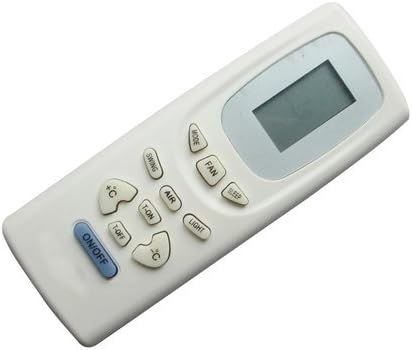
Figure 1: Front view of the remote control, showing the display and various function buttons.

Figure 2: Back view of the remote control, illustrating the battery compartment cover.
2.3 First Use
Once batteries are installed, the remote is ready for use. Point the remote directly at the infrared receiver on your AlpicAir AC unit. There is typically no pairing or programming required for this type of infrared replacement remote.
3. Operating Instructions
Familiarize yourself with the buttons on your remote control. The layout and functions are designed to be intuitive and similar to standard AC remote controls.
- ON/OFF Button: Press to turn the air conditioner unit on or off.
- MODE Button: Cycles through operating modes such as Auto, Cool, Dry, Fan, and Heat (if supported by your AC unit).
- FAN Button: Adjusts the fan speed (e.g., Auto, Low, Medium, High).
- TEMP +/- Buttons (↑C / ↓C): Increases or decreases the desired temperature setting.
- SWING Button: Controls the vertical swing of the air deflector blades.
- AIR Button: May activate or deactivate specific air purification or circulation features.
- LIGHT Button: Toggles the display light on the indoor unit.
- SLEEP Button: Activates the sleep mode, which typically adjusts temperature and fan speed for comfortable sleep.
- T-ON / T-OFF Buttons: Used to set timer functions for automatic power on (T-ON) or power off (T-OFF) of the AC unit. Refer to your AC unit's manual for detailed timer programming.
Note: Not all buttons or functions may be applicable to every AlpicAir AC model. Functionality depends on the features present in your specific air conditioner unit.
4. Maintenance
4.1 Cleaning the Remote
To clean the remote control, gently wipe its surface with a soft, dry cloth. For stubborn dirt, a slightly damp cloth with mild soap can be used, followed by a dry wipe. Do not use abrasive cleaners, solvents, or immerse the remote in water.
4.2 Battery Replacement
Replace batteries when the remote's response becomes sluggish, the display fades, or the AC unit no longer responds reliably. Always replace both batteries at the same time with new ones. Remove batteries if the remote will not be used for an extended period to prevent leakage.
4.3 Storage
Store the remote control in a cool, dry place, away from direct sunlight, extreme temperatures, and high humidity. Avoid dropping the remote or exposing it to strong impacts.
5. Troubleshooting
If you experience issues with your remote control, please refer to the following common troubleshooting steps:
| Problem | Possible Cause | Solution |
|---|---|---|
| Remote not responding to AC unit. | Dead or low batteries. Obstruction between remote and AC unit. Remote not compatible with AC unit. | Replace batteries with new ones. Ensure clear line of sight to AC unit's infrared receiver. Verify your AC model is listed as compatible. |
| Some functions do not work. | Feature not present on your specific AC model. Replacement remote may not support all original functions. | Consult your AC unit's original manual for supported features. Understand that this is a replacement remote and may have limited functionality compared to OEM. |
| Remote display is dim or blank. | Low batteries. | Replace batteries. |
6. Specifications
| Feature | Detail |
|---|---|
| Model Number | Easytry0893 |
| Brand | Easytry123 |
| Connectivity Technology | Infrared (IR) |
| Controller Type | Button Control |
| Power Source | 2 x AAA Batteries (not included) |
| Color | White |
| ASIN | B07F2FMK7L |
7. Warranty and Support
This product is a replacement remote control. For any issues or questions regarding its functionality or compatibility, please contact the seller directly through the platform where the purchase was made. Please have your order details and the product model number (Easytry0893) ready when contacting support.
As this is a replacement part, specific warranty terms may vary. Refer to the seller's return and warranty policy at the time of purchase for detailed information.