
1. Introduction
This manual provides instructions for the safe and efficient operation of your Mksutary XF-608 and XF-508 series two-way radios. Please read this manual thoroughly before using the device and retain it for future reference.
2. Safety Information
- Do not use the device in rain or wet conditions. The interphone is not waterproof.
- Use only specified batteries (3x AA batteries per unit, not included).
- Keep the device away from extreme temperatures and direct sunlight.
- Do not attempt to disassemble or modify the device.
- Dispose of batteries properly according to local regulations.
3. Package Contents
The package typically includes:
- 2 x Mksutary Two-Way Radios (XF-608/XF-508 series)
- 2 x Belt Clips
- 1 x User Manual (this document)
- 1 x Adapter (if included in specific variation)
4. Product Overview
Familiarize yourself with the components and controls of your two-way radio.

Figure 4.1: Labeled components of the Mksutary XF-638 Two-Way Radio. Key components include the Antenna, Talk Button (PTT), Power Button, Menu Button, Up/Down Buttons, and Call Button.
- Antenna: For transmitting and receiving signals.
- Talk Button (PTT): Press and hold to transmit your voice. Release to listen.
- Power Button (ON/OFF): Press and hold to turn the radio on or off.
- Menu Button: Accesses menu options and settings.
- Up/Down Buttons: Navigate menu options, adjust volume, or change channels.
- Call Button (MON): Sends a call tone to other radios on the same channel. Also used for monitoring.
- LCD Display: Shows channel number, battery status, and other indicators.
- Speaker/Microphone: For audio output and input.
5. Setup
5.1 Battery Installation
Each radio requires 3 AA batteries (not included). Ensure correct polarity when inserting batteries.
- Locate the battery compartment cover on the back of the radio.
- Slide or unclip the cover to open the compartment.
- Insert 3 AA batteries, matching the + and - symbols inside the compartment.
- Replace the battery compartment cover, ensuring it clicks securely into place.

Figure 5.1: Battery compartment and belt clip attachment. Insert 3 AA batteries into each unit.
5.2 Attaching the Belt Clip
Attach the provided belt clip to the back of the radio for convenient carrying.
- Align the belt clip with the designated slot on the back of the radio.
- Slide the clip down until it locks into place.
6. Operating Instructions
6.1 Power On/Off
- To turn on: Press and hold the Power Button until the LCD screen illuminates.
- To turn off: Press and hold the Power Button until the LCD screen turns off.
6.2 Adjusting Volume
Use the Up and Down buttons to adjust the listening volume when the radio is on and not in menu mode.
6.3 Channel Selection
Your radio has 8 PMR446 channels. To communicate, all radios must be on the same channel and private code.
- Press the Menu Button once. The channel number will flash on the LCD display.
- Use the Up or Down buttons to select the desired channel (1-8).
- Press the Menu Button again to confirm the channel selection, or wait a few seconds for it to set automatically.
6.4 Private Code (CTCSS/DCS) Selection
The radio supports 121 CTCSS/DCS private codes to reduce interference from other users on the same channel.
- Press the Menu Button twice. The private code setting will flash.
- Use the Up or Down buttons to select the desired private code (0-121). Code 0 means no private code is active.
- Press the Menu Button again to confirm, or wait for it to set automatically.
6.5 Transmitting and Receiving
To communicate, ensure all radios are on the same channel and private code.
- To Transmit: Press and hold the Talk Button (PTT). Speak clearly into the microphone, holding the radio approximately 5-10 cm from your mouth.
- To Receive: Release the Talk Button (PTT). The radio will automatically receive incoming transmissions on the selected channel.

Figure 6.1: Demonstrating communication with the two-way radios. Users speak into the microphone and listen for responses.
6.6 Call Tone
Press the Call Button (MON) briefly to send an audible call tone to other radios on the same channel, alerting them to an incoming transmission.
6.7 Monitor Function
Press and hold the Call Button (MON) to temporarily disable the squelch and listen for weak signals on the current channel. Release the button to return to normal operation.
6.8 Hands-Free Communication (VOX)
The radio supports hands-free communication (VOX) which allows transmission without pressing the PTT button. This feature is useful when your hands are occupied.
- Press the Menu Button multiple times until the VOX icon flashes on the display.
- Use the Up or Down buttons to select the VOX sensitivity level (e.g., 1-3, with 3 being most sensitive) or turn VOX off.
- Press the Menu Button again to confirm, or wait for it to set automatically.
7. Maintenance
- Cleaning: Wipe the radio with a soft, damp cloth. Do not use harsh chemicals or abrasive cleaners.
- Storage: If storing the radio for an extended period, remove the batteries to prevent leakage. Store in a cool, dry place.
- Battery Care: Replace all 3 AA batteries at the same time. Do not mix old and new batteries or different types of batteries.
8. Troubleshooting
| Problem | Possible Cause | Solution |
|---|---|---|
| Radio does not turn on. | Batteries are dead or incorrectly installed. | Replace batteries with new ones, ensuring correct polarity. |
| Cannot communicate with other radios. | Radios are on different channels or private codes. Out of range. | Ensure all radios are set to the same channel and private code. Move closer to the other radio. |
| Poor sound quality or static. | Weak signal, interference, or low battery. | Move to an open area. Check battery level and replace if low. Adjust volume. |
| PTT button feels stuck or unresponsive. | Physical obstruction or internal issue. | Ensure no debris is around the button. If the issue persists, contact customer support. |
9. Specifications
- Model: XF-608, XF-508 (also referred to as XF-638 in some variations)
- Brand: Mksutary
- Channels: 8 PMR446 Channels
- Private Codes: 121 CTCSS / DCS
- Frequency: PMR446
- Range: Up to 3 km (1.9 miles) in open field without obstacles
- Power Source: 3 x AA batteries (not included) per unit
- Dimensions: Approximately 160 x 55 x 28 mm (6.3 x 2.17 x 1.1 inches)
- Weight: Approximately 84 g (0.18 lbs) per unit (without batteries)
- Display: LCD with backlight
- Features: Adjustable volume, automatic squelch, call tone, VOX (hands-free), battery status indicator.
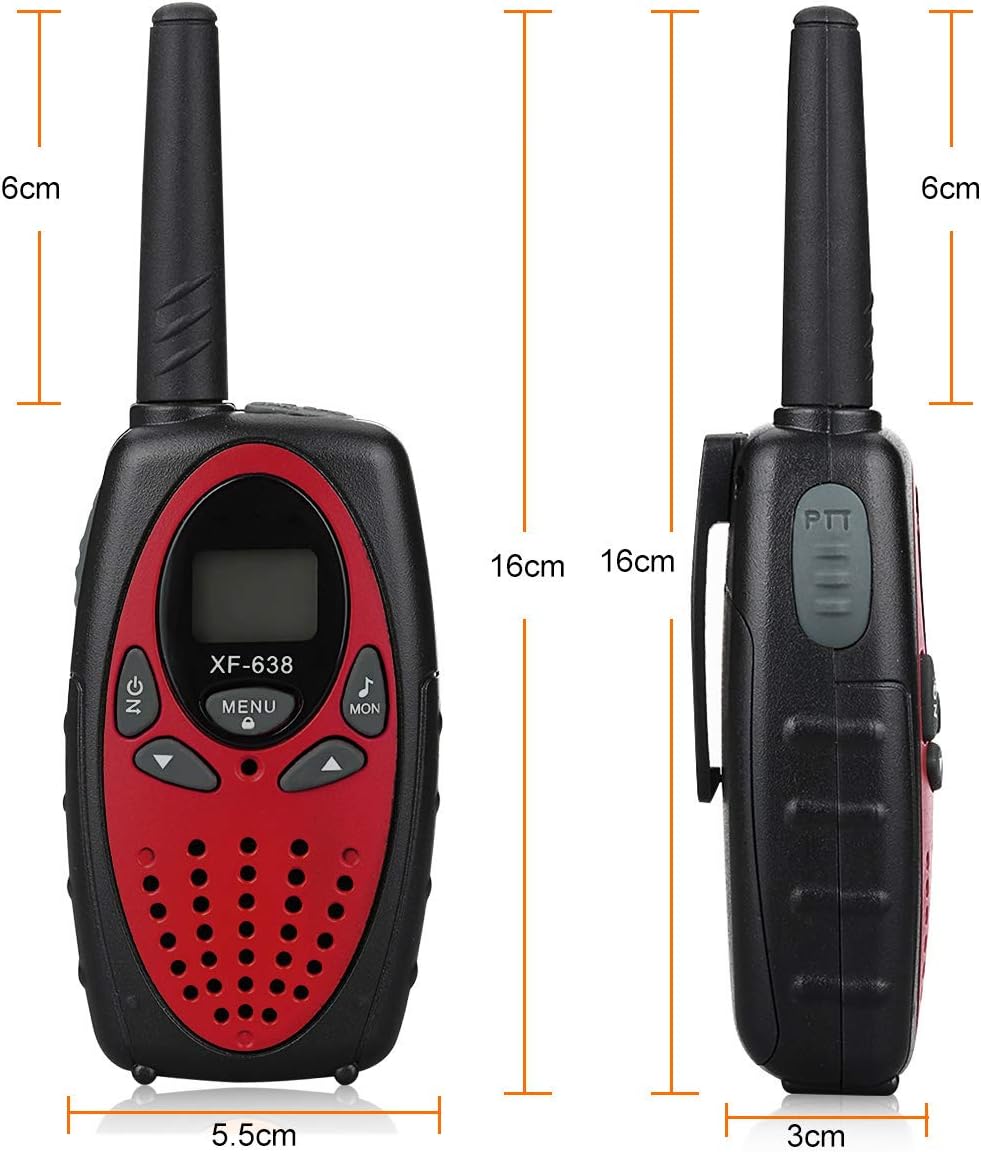
Figure 9.1: Physical dimensions of the Mksutary XF-638 Two-Way Radio.
10. Warranty and Support
Mksutary is committed to providing friendly customer service. For any concerns or issues not covered in this manual, please contact the retailer or manufacturer directly for assistance.
Please refer to your purchase documentation for specific warranty terms and contact information.