
1. Product Overview
The BLACK+DECKER GoPak Cordless Tacker/Nailer (Model BDCT12UB) is a versatile power tool designed for various DIY and fastening tasks. This unit is sold as a body-only tool, meaning the GoPak battery and charger are sold separately. The GoPak battery features a USB output port, allowing it to also function as a portable power source for charging mobile devices.
This tool is capable of using both staples and nails. It features a driving depth adjustment dial, enabling users to modify the fastening depth according to the material being processed, ensuring optimal results for different applications.

Figure 1: The BLACK+DECKER GoPak Cordless Tacker/Nailer (Model BDCT12UB) main unit. This image shows the tool's ergonomic design and the magazine for fasteners.
2. Important Safety Instructions
Always observe basic safety precautions when using this tool to reduce the risk of fire, electric shock, and personal injury.
- Read all instructions: Familiarize yourself with the tool's operation and safety guidelines before use.
- Wear eye protection: Always wear safety goggles or safety glasses with side shields when operating the tool.
- Secure workpiece: Ensure the material you are working on is stable and secured to prevent movement during fastening.
- Keep hands clear: Never place hands or other body parts near the fastening area.
- Use correct fasteners: Only use staples and nails specified for this tool.
- Disconnect battery: Always remove the battery pack before making any adjustments, changing accessories, or storing the tool.
- Store properly: Store the tool in a dry, secure place out of reach of children.
3. Setup
3.1. Battery Installation (Battery Sold Separately)
This tool operates with a BLACK+DECKER GoPak 10.8V battery. Ensure the battery is fully charged before use.
- Align the battery pack with the battery port on the tool handle.
- Slide the battery pack into the tool until it clicks securely into place.
- To remove, press the battery release button and slide the battery out.
3.2. Loading Fasteners (Staples/Nails)
The tool supports both 12mm staples and 12mm nails (100 of each included as accessories). The maximum magazine capacity is 80 staples or 80 nails.
- Ensure the battery is removed for safety.
- Locate the magazine release latch, typically at the bottom rear of the tool.
- Pull the magazine open.
- Insert a strip of staples or nails into the magazine with the points facing forward.
- Push the magazine closed until it latches securely.

Figure 2: Illustration of loading fasteners into the tool's magazine. This step is crucial for proper operation and safety.
4. Operating Instructions
4.1. Adjusting Driving Depth
The driving depth adjustment dial allows you to control how deep the fastener penetrates the material. Turn the dial clockwise for deeper penetration and counter-clockwise for shallower penetration.

Figure 3: Detail of the depth adjustment dial. Proper depth setting prevents damage to the workpiece and ensures secure fastening.
4.2. Using the Tacker/Nailer
- Ensure the battery is installed and fasteners are loaded.
- Place the nose of the tool firmly against the workpiece where you want to drive the fastener.
- Press the trigger to drive the fastener. The tool will activate and drive one fastener per trigger pull.
- Lift the tool from the workpiece and reposition for the next fastener.

Figure 4: A user demonstrating the tacker in use on a wooden crate. This shows the practical application of the tool for DIY projects.
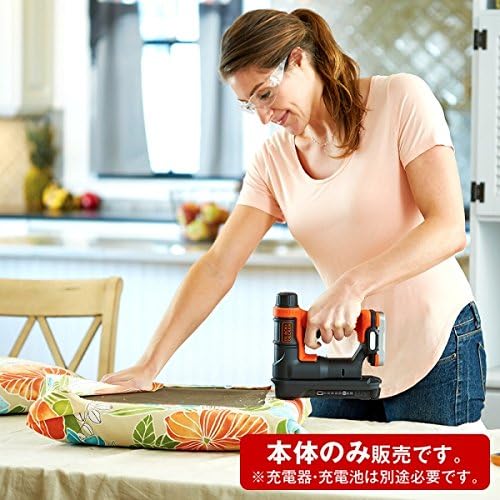
Figure 5: A user operating the tacker for upholstery work, demonstrating its use on fabric. This highlights the tool's versatility for different materials.
4.3. Using GoPak Battery as a Power Bank (Battery Sold Separately)
The GoPak battery (sold separately) can also be used to charge mobile devices via its integrated USB output port.
- Ensure the GoPak battery is charged.
- Locate the USB output port on the battery.
- Connect your mobile device's USB charging cable to the battery's USB port.
- The device will begin charging.

Figure 6: A user charging a mobile device using the GoPak battery. This illustrates the dual functionality of the GoPak battery as both a tool power source and a portable charger.
5. Maintenance
Regular maintenance ensures the longevity and optimal performance of your tool.
- Cleaning: Keep the tool clean and free of debris. Use a dry cloth to wipe down the exterior. Do not use harsh chemicals or abrasive cleaners.
- Fastener Magazine: Periodically check the fastener magazine for any obstructions or bent fasteners that could cause jams.
- Storage: When not in use, store the tool and battery in a cool, dry place, away from direct sunlight and moisture.
- Battery Care: Follow the battery manufacturer's instructions for charging and storage to maximize battery life.
6. Troubleshooting
| Problem | Possible Cause | Solution |
|---|---|---|
| Tool does not fire. | Battery not installed or discharged. No fasteners in magazine. Tool not pressed firmly against workpiece. | Ensure battery is properly installed and charged. Load fasteners. Press tool firmly against workpiece. |
| Fasteners not driving fully. | Driving depth set too shallow. Incorrect fastener type. | Adjust driving depth dial for deeper penetration. Use recommended fasteners. |
| Tool jams frequently. | Bent or incorrect fasteners. Debris in magazine. | Remove jammed fasteners. Use only straight, recommended fasteners. Clean magazine. |
7. Product Specifications
| Feature | Detail |
|---|---|
| Model Number | BDCT12UB |
| Rated Voltage | DC 10.8V |
| Body Dimensions (W x D x H) | 8.2 x 22 x 21.5 cm (approx. 3.2 x 8.7 x 8.5 inches) |
| Body Weight | 1.5 kg (approx. 3.3 lbs) |
| Fastener Type | Dedicated Staples/Nails |
| Compatible Staple Length | 6-14 mm |
| Compatible Nail Length | 12-15 mm |
| Max Magazine Capacity | 80 Staples, 80 Nails |
| Included Accessories | 12mm Staples x 100, 12mm Nails x 100 |
| Battery Included | No (Sold Separately) |
| Battery Type | Lithium-ion (GoPak series) |
8. Warranty & Support
This BLACK+DECKER product is covered by a manufacturer's warranty. Please retain your proof of purchase for warranty claims.
- Warranty Period: 1 year from the date of purchase.
- Warranty Coverage: Covers defects in materials and workmanship under normal use.
- Exclusions: Does not cover damage due to misuse, abuse, normal wear and tear, or unauthorized repairs.
Customer Support
For technical assistance, warranty service, or to purchase replacement parts and accessories, please contact BLACK+DECKER customer support. Refer to the contact information provided in your product packaging or visit the official BLACK+DECKER website for your region.
Note: Battery and charger are sold separately. Ensure you purchase genuine BLACK+DECKER GoPak batteries and chargers for compatibility and safety.