
1. Introduction
Welcome to the user manual for your new Christopeit Ergometer AL 2 Indoor Bike. This manual provides essential information for the safe assembly, operation, and maintenance of your fitness equipment. Please read it thoroughly before first use and keep it for future reference.
The Christopeit Ergometer AL 2 is designed to provide an effective and comfortable indoor cycling experience. Key features include a 24-level resistance system, a quiet flat belt drive, and a wear-free braking system. The integrated computer allows for various training programs and displays crucial data such as distance, time, speed, calories burned, and heart rate.

Figure 1: Christopeit Ergometer AL 2 Indoor Bike
2. Safety Instructions
Your safety is paramount. Please observe the following safety guidelines:
- Ensure all parts are correctly assembled and tightened before use.
- Place the bike on a flat, stable surface.
- Keep children and pets away from the equipment during operation.
- The maximum recommended user weight for this ergometer is 150 kg (330 lbs).
- Consult a physician before starting any new exercise program.
- Stop exercising immediately if you feel faint, dizzy, or experience pain.
- Wear appropriate athletic footwear and clothing.
- The unit requires an electrical power source for full functionality, including resistance adjustment and program usage.
3. Package Contents
Please check that all components are present in the package:
- Christopeit Ergometer AL 2 main frame
- Handlebar assembly with integrated pulse sensors
- Seat and seat post
- Pedals with safety straps
- Front and rear stabilizers
- Power adapter
- Assembly hardware (bolts, washers, nuts)
- User Manual (Mode d'emploi)
- Tools for assembly
4. Assembly and Setup
Follow these general steps for assembly. Refer to the included detailed assembly instructions for specific diagrams and hardware identification.
- Attach Stabilizers: Secure the front and rear stabilizers to the main frame using the provided bolts. Ensure they are firmly attached for stability.
- Install Pedals: Attach the left and right pedals to the crank arms. Note that pedals are typically marked 'L' and 'R' and thread in opposite directions.
- Mount Seat Post and Seat: Insert the seat post into the main frame and secure it. Attach the seat to the seat post.
- Attach Handlebar Post and Handlebars: Connect the handlebar post to the main frame and then attach the handlebars to the post. Ensure all cables for the computer console are properly connected.
- Connect Power: Plug the power adapter into the ergometer and then into a suitable wall outlet.
Adjusting the Bike:
- Seat Height: Adjust the seat height to ensure a comfortable and efficient pedaling position. Your leg should have a slight bend at the knee when the pedal is at its lowest point. Use the adjustment knob to loosen, pull, and then re-tighten the seat post.
- Seat Position (Horizontal): The seat can also be adjusted horizontally for optimal comfort and biomechanics.
- Pedal Straps: Adjust the pedal straps to secure your feet firmly to the pedals.
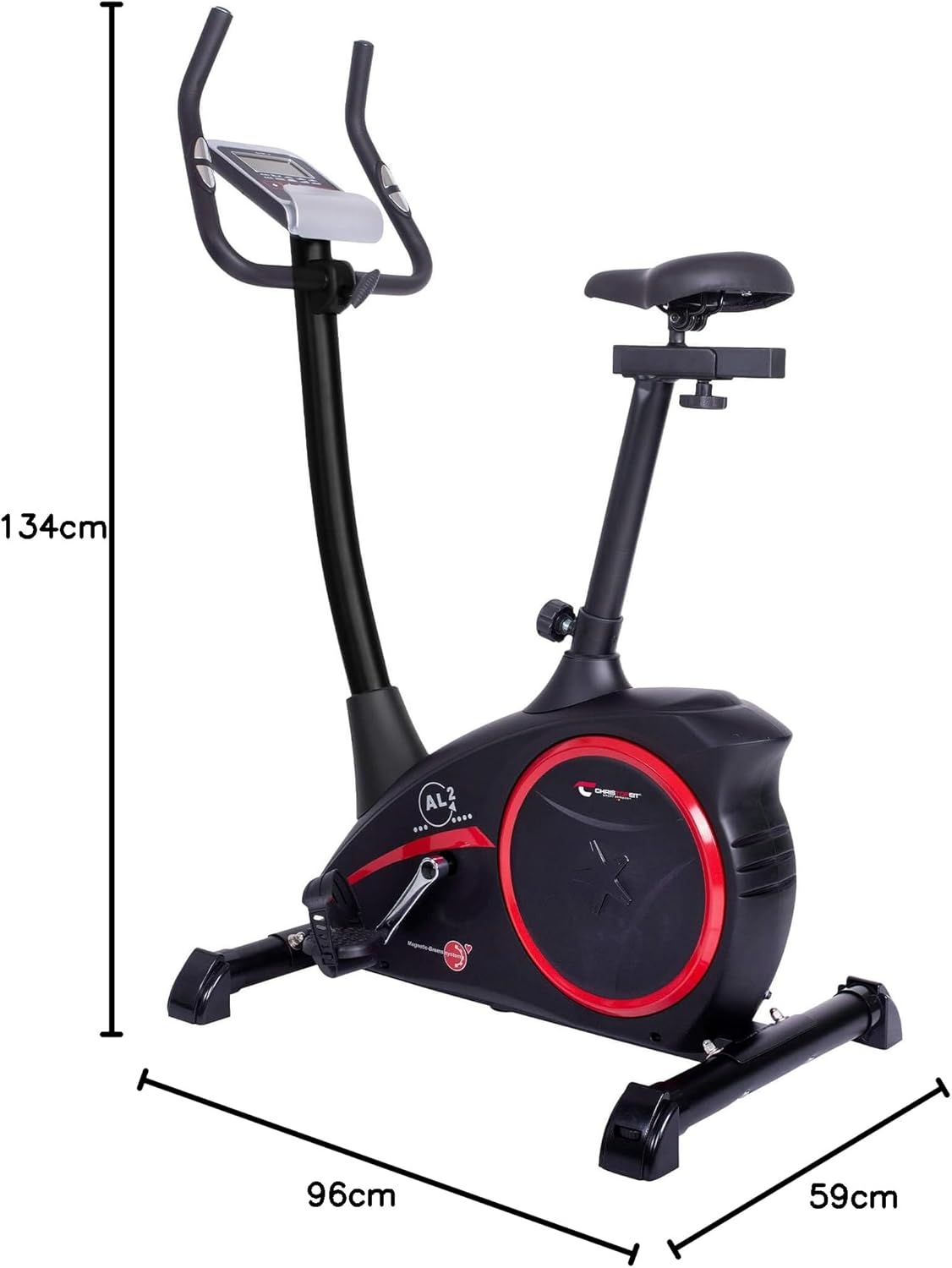
Figure 2: Product dimensions for space planning (96 x 59 x 134 cm)

Figure 3: Integrated transport wheels for easy relocation

Figure 4: Seat height adjustment knob
5. Operating Instructions
The Christopeit Ergometer AL 2 features an intuitive computer console to manage your workouts.
Powering On: Connect the power adapter. The console should automatically power on or can be activated by pressing any button or beginning to pedal.
Console Functions:
- Display: The LCD screen shows various metrics including Time, Distance, Speed, Calories, Pulse, and Resistance Level (Watt).
- Programs: The ergometer offers 6 specified training programs and 1 body fat program. Use the console buttons (e.g., 'Mode', 'Program', '+', '-') to navigate and select your desired program.
- Resistance Adjustment: The resistance is motor and computer-controlled, offering 24 levels. Adjust the resistance using the '+' and '-' buttons on the console to increase or decrease workout intensity.
- Pulse Measurement: Grip the integrated hand pulse sensors on the handlebars to measure your heart rate. Your pulse will be displayed on the console.

Figure 5: Close-up view of the computer console

Figure 6: Console and handlebars with integrated pulse sensors

Figure 7: Hand pulse sensors for heart rate monitoring
6. Maintenance
Regular maintenance will ensure the longevity and optimal performance of your ergometer.
- Cleaning: Wipe down the bike with a damp cloth after each use to remove sweat and dust. Do not use abrasive cleaners or solvents.
- Check Connections: Periodically check all bolts, nuts, and screws to ensure they are tight. Re-tighten if necessary.
- Moving Parts: The magnetic braking system is wear-free. No lubrication is typically required for internal components. If you notice any unusual noises, inspect the area for loose parts or foreign objects.
- Storage: Store the ergometer in a dry, clean environment away from direct sunlight and extreme temperatures.
7. Troubleshooting
If you encounter issues with your Christopeit Ergometer AL 2, refer to the following common problems and solutions:
- No Display on Console:
- Ensure the power adapter is securely plugged into both the bike and a working electrical outlet.
- Check for any damage to the power cable.
- No Resistance or Inconsistent Resistance:
- Verify the power adapter is connected, as resistance adjustment is electronically controlled.
- Ensure all cables connecting the console to the resistance mechanism are properly seated.
- If the issue persists, contact customer support.
- Unusual Noises During Operation:
- Check all assembly bolts and nuts for tightness, especially on the stabilizers and pedal cranks.
- Ensure no foreign objects are caught in the moving parts.
- If the noise is internal and persistent, discontinue use and contact customer support.
- Inaccurate Pulse Reading:
- Ensure your hands are firmly and fully gripping the pulse sensors.
- Moisture or dry skin can affect readings; ensure hands are clean and slightly moist.
For issues not listed here or if troubleshooting steps do not resolve the problem, please contact Christopeit customer support.
8. Specifications
| Feature | Specification |
|---|---|
| Model Number | 30-11072 |
| Dimensions (L x W x H) | 96 x 59 x 134 cm (37.8 x 23.2 x 52.8 inches) |
| Weight | 28 kg (61.7 lbs) |
| Maximum User Weight | 150 kg (330 lbs) |
| Resistance System | Magnetic |
| Resistance Levels | 24 (Motor and computer-controlled) |
| Flywheel Mass | Approx. 9 kg |
| Drive System | Belt |
| Power Source | Electrical Cable |
| Special Features | Adjustable seat, Transport wheels |
9. Warranty and Support
Christopeit products are manufactured to high-quality standards. For information regarding warranty coverage, please refer to the warranty card included with your product or visit the official Christopeit Sport website. Keep your proof of purchase for any warranty claims.
For technical support, spare parts, or any questions not covered in this manual, please contact Christopeit Sport customer service. Contact details can typically be found on the manufacturer's website or on the product packaging.


