
1. Introduction
This manual provides essential information for the safe and efficient installation, operation, and maintenance of your Manitowoc Indigo NXT IYT-0420A/D420 Air Cooled Ice Machine with D420 Bin. Please read this manual thoroughly before installing or operating the unit. Retain this manual for future reference.
The Manitowoc Indigo NXT series is designed for high performance, energy efficiency, and ease of use, featuring advanced diagnostics and programmable ice production.
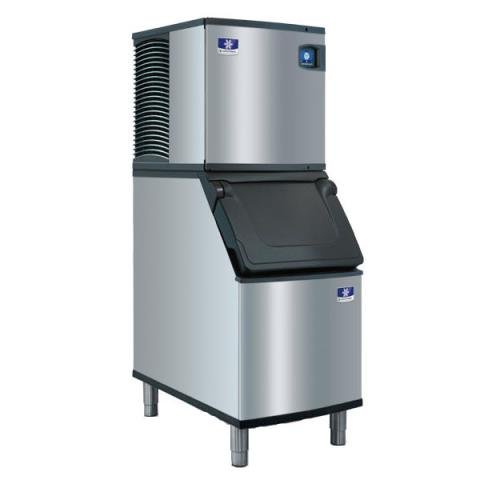
Image 1: Manitowoc Indigo NXT IYT-0420A/D420 Air Cooled Ice Machine with D420 Bin. This image displays the complete ice machine unit, including the ice maker head and the integrated D420 storage bin.
2. Safety Information
Important Safety Instructions:
- Always disconnect power before performing any service or maintenance.
- Ensure proper grounding to prevent electrical shock.
- Do not operate the machine with damaged cords or plugs.
- Keep hands and tools away from moving parts during operation.
- Installation and service should be performed by qualified personnel only.
- Use only potable water for ice production.
- Do not store explosive substances or flammable materials near the appliance.
3. Setup and Installation
3.1 Unpacking
Carefully remove the ice machine and bin from its packaging. Inspect for any shipping damage. Report any damage to the carrier immediately.
3.2 Location Requirements
- Air Circulation: Ensure adequate air flow for the air-cooled condenser. Maintain at least 6 inches of clearance around the back and sides, and 12 inches above the unit.
- Ambient Temperature: Operate in an environment where ambient temperatures are between 50°F (10°C) and 100°F (38°C).
- Level Surface: Place the unit on a strong, level surface capable of supporting the machine's weight plus a full bin of ice.
3.3 Electrical Connection
The unit requires a dedicated 115V, 60 Hz, 15 Amp electrical supply. A qualified electrician must perform the electrical connection in accordance with all local and national codes.
3.4 Water Connection
Connect to a potable cold water supply with a 3/8 inch FPT inlet. Install a shut-off valve and a water filter system (recommended) in the water line. Water pressure should be between 20 psi and 80 psi.
3.5 Drain Connection
Connect the 1/2 inch FPT drain line to an open, vented drain. Ensure proper slope for gravity drainage and prevent standing water in the drain line.
3.6 Initial Cleaning
Before first use, clean the ice machine and bin interior thoroughly according to the 'Maintenance and Cleaning' section to remove any manufacturing residues.
4. Operating Instructions
4.1 Powering On
Once all connections are secure and verified, turn on the main power switch. The machine will initiate a self-diagnostic check.
4.2 EasyTouch Display
The Indigo NXT series features an intuitive EasyTouch display. Use the icon-based interface to monitor machine status, adjust settings, and initiate cleaning cycles. Refer to the on-screen prompts for navigation.
4.3 Programmable Ice Production
Utilize the EasyTouch display to program ice production settings:
- Daily Volume: Set the desired daily ice production amount.
- Off-Times: Schedule specific times for the machine to be off, which can help save energy during non-peak hours or when electrical rates are higher.
- Night Programming: Optimize ice production for overnight periods.
The machine produces Half Dice ice cubes, measuring approximately 3/8 in x 1-1/8 in x 7/8 in.
5. Maintenance and Cleaning
Regular maintenance ensures optimal performance and extends the lifespan of your ice machine.
5.1 Easy to Clean Foodzone
The unit features a hinged front door for easy access to the foodzone. Key components are removable for thorough cleaning:
- Water-trough
- Distribution tube
- Curtain
- Water probe
- Water pump
Follow the on-screen instructions via the EasyTouch display to initiate and guide you through the cleaning cycle.
5.2 DuraTech Exterior
The DuraTech exterior provides superior corrosion resistance and features a clear-coat that resists fingerprints and dirt. Clean the exterior with a soft cloth and mild detergent. Avoid abrasive cleaners.
5.3 Intelligent Diagnostics
The Intelligent Diagnostics system provides 24-hour preventative maintenance and diagnostic feedback. Monitor the display for alerts and recommended actions to ensure trouble-free operation.
5.4 Cleaning Schedule
It is recommended to clean and sanitize the ice machine and bin at least every six months, or more frequently depending on water quality and usage.
6. Troubleshooting
Before contacting service, review the following common issues and solutions:
- No Ice Production: Check power supply, water supply, and ensure the machine is not in a programmed 'off' cycle. Consult the EasyTouch display for diagnostic codes.
- Low Ice Production: Verify proper air circulation around the condenser. Clean the air filter (if applicable) and ensure the water filter is not clogged. Check for proper water pressure.
- Unusual Noises: Ensure the machine is level. Check for any obstructions in the fan or water pump areas.
- Ice Quality Issues: Perform a thorough cleaning and sanitizing cycle. Check water quality and consider replacing the water filter.
For persistent issues or complex diagnostic codes, contact a qualified Manitowoc service technician.
7. Technical Specifications
| Brand | Manitowoc |
| Model Name | IYT0420A |
| Model Number | IYT0420A-161/D420 |
| Product Dimensions (D x W x H) | 34" x 22" x 71.5" |
| Ice Production per Day | Up to 470 lbs (approx. 350 lbs at 90°F air / 70°F water) |
| Bin Capacity | 383 lbs (D420 Bin) |
| Cube Type | Half Dice (3/8" x 1-1/8" x 7/8") |
| Condenser Cooling | Air Cooled |
| Voltage | 115V, 60 Hz |
| Amperage | 15 Amps |
| Wattage | 5.4 kWh |
| Refrigerant | R410a |
| Water Inlet Size | 3/8 in FPT |
| Drain Size | 1/2 in FPT |
| Exterior Finish | DuraTech (Stainless Steel/Black) |
8. Warranty and Support
For specific warranty details and terms, please refer to the warranty card included with your product or visit the official Manitowoc website. In case of technical issues or for authorized service, please contact Manitowoc customer support or your authorized dealer.


