1. Introduction
This manual provides comprehensive instructions for the safe and efficient use of the Generic DDS6111 Single Phase Two Wire Electric Energy Meter. This device is designed to accurately measure active energy consumption in single-phase, two-wire AC electricity networks. Please read this manual thoroughly before installation and operation to ensure correct usage and to prevent potential hazards.
2. Safety Information
WARNING: Electrical shock hazard. Installation and servicing should only be performed by qualified personnel.
- Always disconnect power before installing or servicing the meter.
- Ensure all wiring connections are secure and comply with local electrical codes.
- Do not operate the meter if it appears damaged.
- Keep the meter away from moisture and extreme temperatures.
- This meter is designed for indoor use or in a protective enclosure.
3. Product Overview
The Generic DDS6111 Electric Energy Meter utilizes Large-scale Integration (LSI) and Surface Mount Technology (SMT) for reliable and accurate measurement. Its compact design, light weight, and robust construction make it suitable for various applications.
Key Features:
- Measures 50Hz active energy consumption.
- Single phase, two wire AC electricity network compatibility.
- High reliability and long lifespan components.
- Compact volume and light weight.
- ABS flame-retardant material construction.
Components:
The meter typically consists of a main housing, a digital display for energy readings, and connection terminals for input and output wiring.
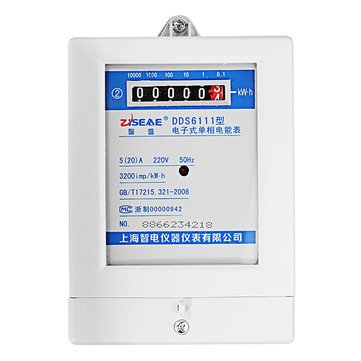
Figure 1: Front view of the DDS6111 Electric Energy Meter, showing the digital display and specifications label.
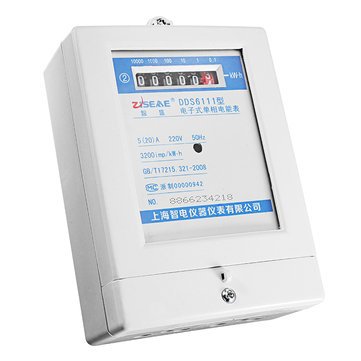
Figure 2: Angled view of the DDS6111 Electric Energy Meter, highlighting its compact form factor.
4. Specifications
| Parameter | Value |
|---|---|
| Model | DDS6111 |
| Material | ABS Flame Retardant |
| Accuracy Class | Class 10 |
| Rated Voltage | 220V |
| Rated Current | 5(20) A |
| Constant | 3200 imp/kWh |
| Starting Current | 0.5%Ib |
| Max. Operation Temperature | -20°C ~ 55°C |
| Relative Humidity | ≤ 85% |
| Rated Frequency | 50Hz |
| Connectivity Protocol | Wi-Fi (Note: This feature may vary by specific model variant or require additional modules not included.) |
| UPC | 695652691715 |
| Item Part Number | switchesmisck406 |
5. Setup and Installation
Professional installation by a certified electrician is highly recommended to ensure safety and compliance with electrical standards.
Installation Steps:
- Preparation: Ensure the main power supply to the installation area is completely disconnected. Verify with a voltage tester.
- Mounting: Securely mount the DDS6111 meter in a dry, protected location, away from direct sunlight or excessive vibration. Use appropriate screws and anchors for the mounting surface.
- Wiring Connections:
- Identify the Live (L) and Neutral (N) input wires from the power source.
- Identify the Live (L) and Neutral (N) output wires to the load.
- Connect the input Live wire to the designated Live input terminal on the meter.
- Connect the input Neutral wire to the designated Neutral input terminal on the meter.
- Connect the output Live wire from the meter to the load's Live input.
- Connect the output Neutral wire from the meter to the load's Neutral input.
- Ensure all terminal screws are tightened firmly to prevent loose connections and arcing.
- Verification: Double-check all wiring connections for correctness and security.
- Power Restoration: Carefully restore power to the circuit. The meter's display should illuminate, indicating it is operational.
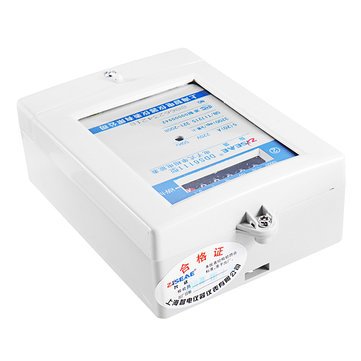
Figure 3: Rear view of the DDS6111 Electric Energy Meter, illustrating the terminal block for wiring connections.
6. Operating Instructions
Once properly installed and powered, the DDS6111 meter operates automatically to measure energy consumption.
Reading the Display:
- The meter features a digital display that shows the total accumulated active energy consumption in kilowatt-hours (kWh).
- The display typically shows a series of digits followed by 'kWh'.
- An indicator light (often an LED) may flash to signify active energy measurement, with the flash rate proportional to the power consumption.
No user interaction is typically required for basic energy measurement. The meter continuously records consumption as long as power is supplied.
7. Maintenance
The DDS6111 electric energy meter is designed for minimal maintenance.
- Cleaning: Periodically wipe the exterior of the meter with a soft, dry cloth. Do not use abrasive cleaners or solvents. Ensure no moisture enters the meter.
- Inspection: Regularly inspect the meter for any signs of physical damage, loose connections, or discoloration. If any issues are observed, disconnect power and consult a qualified electrician.
- Environmental Conditions: Ensure the operating environment remains within the specified temperature and humidity ranges to prolong the meter's lifespan.
8. Troubleshooting
If you encounter issues with your DDS6111 energy meter, refer to the following common problems and solutions:
| Problem | Possible Cause | Solution |
|---|---|---|
| Meter display is blank | No power supply to the meter; internal fault. | Check circuit breaker/fuse. Verify input wiring connections. If power is present and display remains blank, contact support. |
| Meter not accumulating energy | Incorrect wiring; no load connected; internal fault. | Verify wiring according to Section 5. Ensure a load is connected and drawing power. If issue persists, contact support. |
| Indicator light not flashing | No power consumption; indicator fault. | Ensure a load is active. If power is being consumed but the light does not flash, the meter may still be measuring, but the indicator could be faulty. |
| Unusual noises or smells | Internal electrical issue. | Immediately disconnect power to the meter and contact a qualified electrician or support. Do not attempt to repair. |
For problems not listed here or if troubleshooting steps do not resolve the issue, please contact customer support.
9. Warranty and Support
For warranty information and technical support, please refer to the documentation provided with your purchase or contact the seller/manufacturer directly. Keep your purchase receipt as proof of purchase.
Manufacturer: Generic
Model: DDS6111