
Introduction
This manual provides comprehensive instructions for the Pyle PLTV1053 10-inch Portable Widescreen TV. It covers essential information regarding product setup, operation, maintenance, and troubleshooting to ensure you achieve optimal performance and extend the lifespan of your device. Please read this manual thoroughly before using the product.
What's in the Box
Carefully unpack all components and ensure the following items are included:
- Display Monitor
- Remote Control
- Headphones
- TV Antenna
- RCA Connection Cable
- Cigarette Lighter Plug
- Wall Power Plug
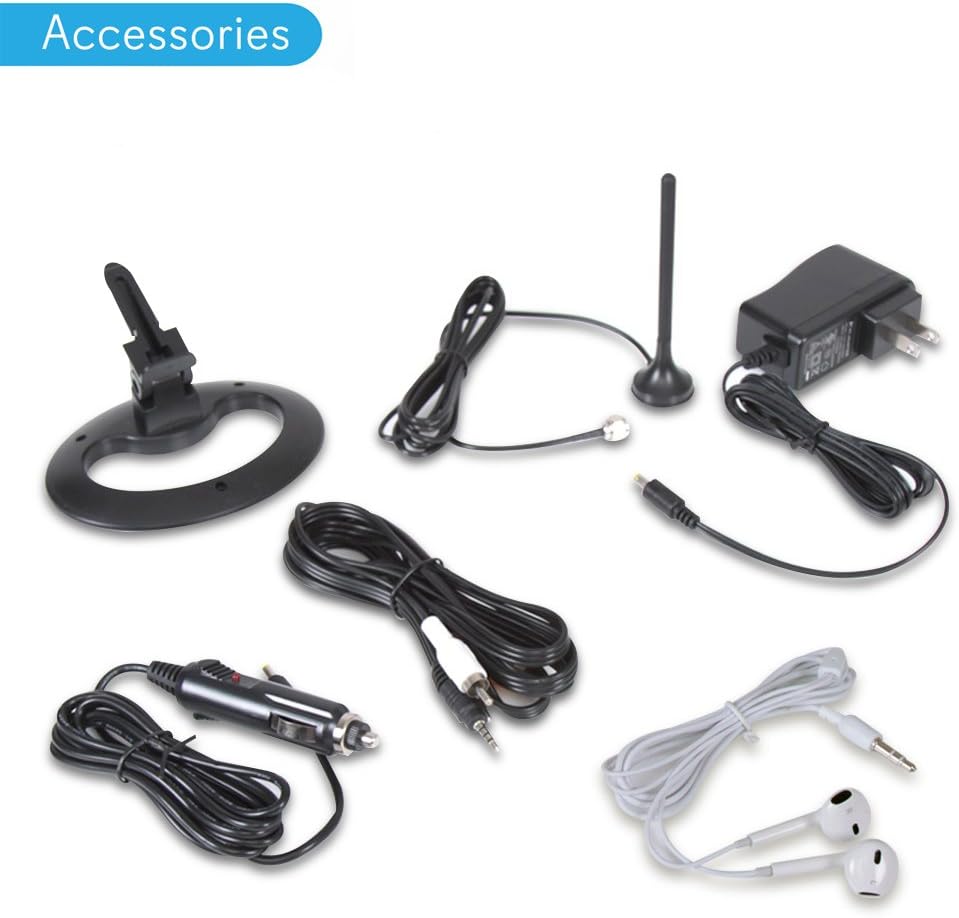
Figure 1: Included Accessories. This image displays the display monitor, remote control, headphones, TV antenna, RCA connection cable, cigarette lighter plug, and wall power plug.
Product Features
The Pyle PLTV1053 is a versatile 10-inch portable widescreen TV designed for mobile and outdoor use. Key features include:
- 10.1-inch Hi-Res Widescreen Display: TFT LCD screen with 1024 x 600 pixel resolution and 16:9 aspect ratio.
- Built-in Rechargeable Battery: 3.7V Lithium, 2500mAh capacity for wireless operation.
- Digital TV Tuner: Supports ATSC-1, Analog, and Digital Television (DTV) reception.
- Versatile Media Playback: Integrated USB port and Micro SD card reader (up to 32GB) for digital picture, video, and audio files.
- Dual Stereo Speakers: Provides clear audio output.
- Multiple Connection Interfaces: Audio/Video (AV) input, headphone jack (3.5mm), external antenna port.
- User-Friendly Controls: Front panel buttons and included remote control for easy navigation.

Figure 2: Portable TV in a Car. This image illustrates the Pyle PLTV1053 being used as a portable TV tuner monitor display in a vehicle, highlighting its mobile application.
Controls and Connections
Front Panel Controls

Figure 3: Front Panel Layout. This image shows the front of the Pyle PLTV1053 with its control buttons labeled.
- MODE: Selects input source (TV, AV, USB, Micro SD).
- CH- / CH+: Navigates channels or moves to previous/next item.
- OK / MENU: Confirms selection or opens/closes the menu.
- VOL- / VOL+: Adjusts volume or fast backward/forward in media playback.
- Return / LCD: Exits current menu or turns the screen on/off.
Side Panel Connections

Figure 4: Side Panel Connections. This image highlights the various input and output ports located on the side of the Pyle PLTV1053.
- Power Input Port (DC IN 12V): Connect the provided wall power plug or cigarette lighter plug.
- AV Input: Connect external audio/video devices using the RCA connection cable.
- Headphone Jack (3.5mm): For private listening with headphones.
- USB Port: Insert USB flash drives for media playback.
- Micro SD Card Slot: Insert Micro SD cards for media playback.
- External Antenna Port (TV): Connect the included TV antenna for signal reception.
Setup
1. Charging the Battery
- Connect the Wall Power Plug or Cigarette Lighter Plug to the Power Input Port (DC IN 12V) on the side of the TV.
- Plug the adapter into a suitable power outlet (AC 100-240V) or vehicle's cigarette lighter socket (DC 12V).
- The charging indicator light will illuminate. Allow sufficient time for a full charge before initial use.
2. Connecting the TV Antenna
- Screw the included TV Antenna into the External Antenna Port (TV) on the side of the unit.
- Position the antenna for optimal signal reception. You may need to adjust its position later during channel scanning.
3. Powering On
- Press and hold the Return / LCD button on the front panel or the power button on the remote control to turn on the TV.
- The display will light up.
4. Initial Channel Scan
- After powering on for the first time, the TV may prompt you to perform an auto-scan. If not, press the OK / MENU button.
- Navigate to the 'Channel' or 'Setup' menu using the CH- / CH+ buttons.
- Select 'Auto Scan' or 'Auto Tuning' and press OK / MENU to start.
- The TV will search for available ATSC (digital) and Analog channels. This process may take several minutes.
- Once complete, the TV will save the found channels.
Operating Instructions
Power On/Off
- Press the Return / LCD button on the front panel or the power button on the remote control to turn the TV on or off.
Channel Selection
- Use the CH- / CH+ buttons on the front panel or remote to change channels sequentially.
- On the remote control, you can directly enter channel numbers using the numeric keypad.
Volume Adjustment
- Use the VOL- / VOL+ buttons on the front panel or remote to increase or decrease the volume.
Input Source Selection
- Press the MODE button on the front panel or remote control to cycle through available input sources: TV, AV, USB, Micro SD.
- Select the desired input source based on your connected device or media.
Menu Navigation
- Press the OK / MENU button to open the On-Screen Display (OSD) menu.
- Use the CH- / CH+ (up/down) and VOL- / VOL+ (left/right) buttons to navigate through menu options.
- Press OK / MENU to confirm a selection.
- Press the Return / LCD button to exit the current menu or return to the previous screen.
Media Playback (USB / Micro SD)
The Pyle PLTV1053 supports playback of various digital media files from USB flash drives and Micro SD cards.
1. Inserting Media
- Insert your USB flash drive into the USB Port or your Micro SD card into the Micro SD Card Slot on the side of the TV.
- Ensure the media is inserted correctly.
2. Selecting Media Source
- Press the MODE button repeatedly until 'USB' or 'Micro SD' is selected as the input source.
- The TV will display the file browser for the selected media.
3. Browsing and Playing Files
- Use the navigation buttons (CH- / CH+, VOL- / VOL+) to browse through folders and files.
- Press OK / MENU to open a folder or play a selected file.
- During playback, use VOL- / VOL+ for fast backward/forward and CH- / CH+ for previous/next track/file.
Supported File Formats
- Digital Image Files: JPEG, BMP, PMG
- Digital Audio Files: MP3, WMA
- Digital Video Files: MKV, AVI, DIVX, XVID, MOV, VOB, FLV, 3GP, DAT, MPEG, MPG, MP4, TS, TRP

Figure 5: Digital Video File Support. This image illustrates the wide range of digital video file formats supported by the Pyle PLTV1053, including MKV, AVI, DIVX, MPEG, MP4, FLV, 3GP, MOV, TS, MP3, WMA, JPG, BMP, and PMG.
Maintenance
Cleaning the Unit
- Before cleaning, ensure the TV is powered off and unplugged from any power source.
- Use a soft, dry cloth to wipe the screen and exterior surfaces.
- Do not use liquid cleaners, aerosols, or abrasive cleaning agents, as they may damage the finish or internal components.
Battery Care
- To prolong battery life, avoid fully discharging the battery frequently.
- Charge the battery regularly, even if the unit is not in frequent use.
- Avoid exposing the unit to extreme temperatures (hot or cold), as this can affect battery performance and lifespan.
Storage
- When storing the TV for an extended period, ensure it is fully charged and then store it in a cool, dry place.
Troubleshooting
If you encounter issues with your Pyle PLTV1053, refer to the following common problems and solutions:
| Problem | Possible Cause | Solution |
|---|---|---|
| No power | Battery discharged; Power adapter not connected or faulty. | Charge the battery using the provided power adapter. Ensure the power adapter is securely connected to both the TV and a working power outlet. |
| No signal or poor picture quality (TV mode) | Antenna not connected; Poor antenna position; No channels scanned. | Ensure the TV antenna is securely connected. Adjust the antenna's position for better reception. Perform an auto-scan for channels (refer to Setup section). |
| No sound | Volume too low; Mute function active; Headphones connected. | Increase the volume using VOL+. Check if the mute function is active and deactivate it. Disconnect headphones if sound is desired from speakers. |
| Remote control not working | Batteries depleted; Obstruction between remote and TV; Remote sensor blocked. | Replace the remote control batteries. Ensure there is a clear line of sight between the remote and the TV's IR sensor. |
| USB/Micro SD media not playing | Unsupported file format; Media not inserted correctly; Corrupted media. | Verify that the file format is supported (refer to Media Playback section). Ensure the USB drive or Micro SD card is inserted correctly. Try another USB drive or Micro SD card. |
Specifications
Detailed technical specifications for the Pyle PLTV1053:
- Display Type: LCD-TFT, 10.1-inch
- Screen Resolution: 1024 x 600 Pixels
- Aspect Ratio: 16:9
- TV Tuner Support: ATSC-1, Analog / Digital Television (DTV) Receiver
- Analog TV Band Range: 55.25-861.25 MHz (TV Channels)
- Digital Image File Support: JPEG, BMP, PMG
- Digital Audio File Support: MP3, WMA
- Digital Video File Support: MKV, AVI, DIVX, XVID, MOV, VOB, FLV, 3GP, DAT, MPEG, MPG, MP4, TS, TRP
- USB/Micro SD Support: Up to 32GB
- Rechargeable Battery: 3.7V Lithium, 2500mAh
- Power Supply: 12V DC (100-240V AC)
- Display Monitor Dimensions (L x W x H): 10.2'' x 7.4'' x 1.2'' -inches
- Item Weight: 1.28 Pounds

Figure 6: Product Dimensions. This image shows the Pyle PLTV1053 with its length and width dimensions indicated.
Warranty and Support
Warranty Information
The Pyle PLTV1053 comes with a 1-year hassle-free warranty. Please retain your proof of purchase for warranty claims.
Technical Support
For technical assistance, troubleshooting beyond this manual, or warranty inquiries, please contact Pyle customer support. Refer to the official Pyle website or your product packaging for the most current contact information.


