
1. Introduction
This manual provides detailed instructions for the assembly, operation, and maintenance of your Giantex Adjustable Bed Base with Remote. Please read this manual thoroughly before use to ensure proper function and safety. Keep this manual for future reference.
2. Safety Information
WARNING: To prevent injury, do not exceed the 850 lbs weight capacity. Ensure proper assembly according to instructions. Use caution when adjusting bed position to avoid pinch points. Keep children and pets away from moving parts during operation.
- Always ensure the power cord is securely plugged into a grounded outlet.
- Do not operate the bed base if the power cord or remote control is damaged.
- Avoid placing liquids near the electrical components of the bed base.
- Do not allow children or pets to play on or under the bed base.
- Distribute weight evenly on the bed base; do not concentrate weight on one section.
3. Package Contents
Before beginning assembly, verify that all components are present and undamaged. If any parts are missing or damaged, contact customer support.
- Adjustable Bed Base Frame (pre-assembled sections)
- Remote Control
- Power Adapter and Cord
- Adjustable Legs (set of 6 or more, depending on size)
- Mattress Retainer Bar(s)
- User Manual (this document)
4. Setup and Assembly
Assembly is straightforward and requires minimal tools. Follow these steps carefully:
- Unpack the Bed Base: Carefully remove all components from the packaging. Place the folded bed base on a clean, flat surface.
- Unfold the Bed Base: Gently unfold the bed base sections. Ensure all moving parts are clear of obstructions.
- Attach the Legs: The bed base comes with legs adjustable to 3 heights: 4 inches, 7 inches, and 11 inches. Choose your desired height and securely screw the legs into the designated threaded holes on the bed frame. Ensure all legs are tightened for stability.

This image illustrates the three adjustable height options for the bed base legs: 4 inches, 7 inches, and 11 inches, allowing customization to match mattress height.
- Install the Mattress Retainer Bar: Insert the mattress retainer bar(s) into the slots at the foot of the bed base. This bar prevents the mattress from sliding when the bed is adjusted.
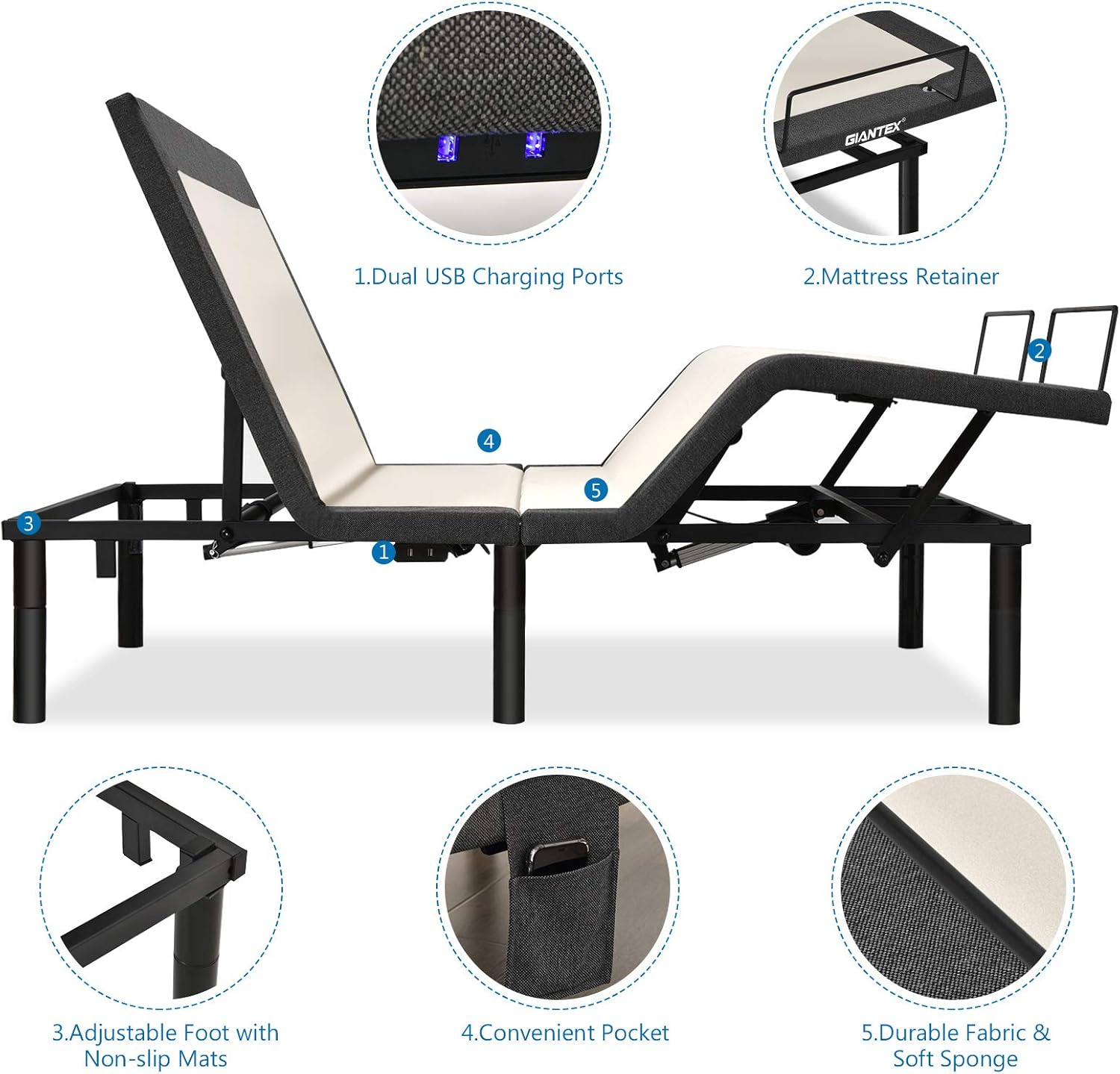
This image shows the mattress retainer bar installed at the foot of the bed base, along with other features such as dual USB charging ports, adjustable feet with non-slip mats, and a convenient side pocket.
- Connect Power: Plug the power adapter into the bed base and then into a wall outlet. Ensure the connection is secure.
- Place Mattress: Carefully place your mattress onto the bed base. The bed base is suitable for various mattress types, including memory foam and gel foam.
5. Operating Instructions
Your Giantex Adjustable Bed Base is operated using the wireless remote control. Familiarize yourself with the remote's functions:
5.1 Remote Control Functions

This diagram illustrates the remote control layout and the function of each numbered button for operating the adjustable bed base.
- Head Up/Down: Adjusts the head section of the bed.
- Head & Feet Rise/Down: Simultaneously adjusts both the head and foot sections.
- Feet Up/Down: Adjusts the foot section of the bed.
- TV Memory Key: Recalls a pre-set position ideal for watching TV.
- ZG (Zero Gravity) Memory Bit: Recalls the Zero Gravity position, designed to relieve pressure.
- ANTI (Anti-Snore) Memory Bit: Recalls a pre-set position to help reduce snoring.
- Flashlight/Beside Light: Activates the under-bed nightlight.
- M1 Memory Bit: Saves and recalls a custom memory position.
- Flat Key: Returns the bed to a completely flat position.
- Head Massage Enhancement/Weakening Key: Adjusts the intensity of the head massage.
- All Stop Key: Stops all current bed movements and massage functions.
- Foot Massage Enhancement/Weakening Key: Adjusts the intensity of the foot massage.
- Massage Mode Selection Key (x2): Cycles through the four available massage modes.
5.2 Head and Foot Adjustment
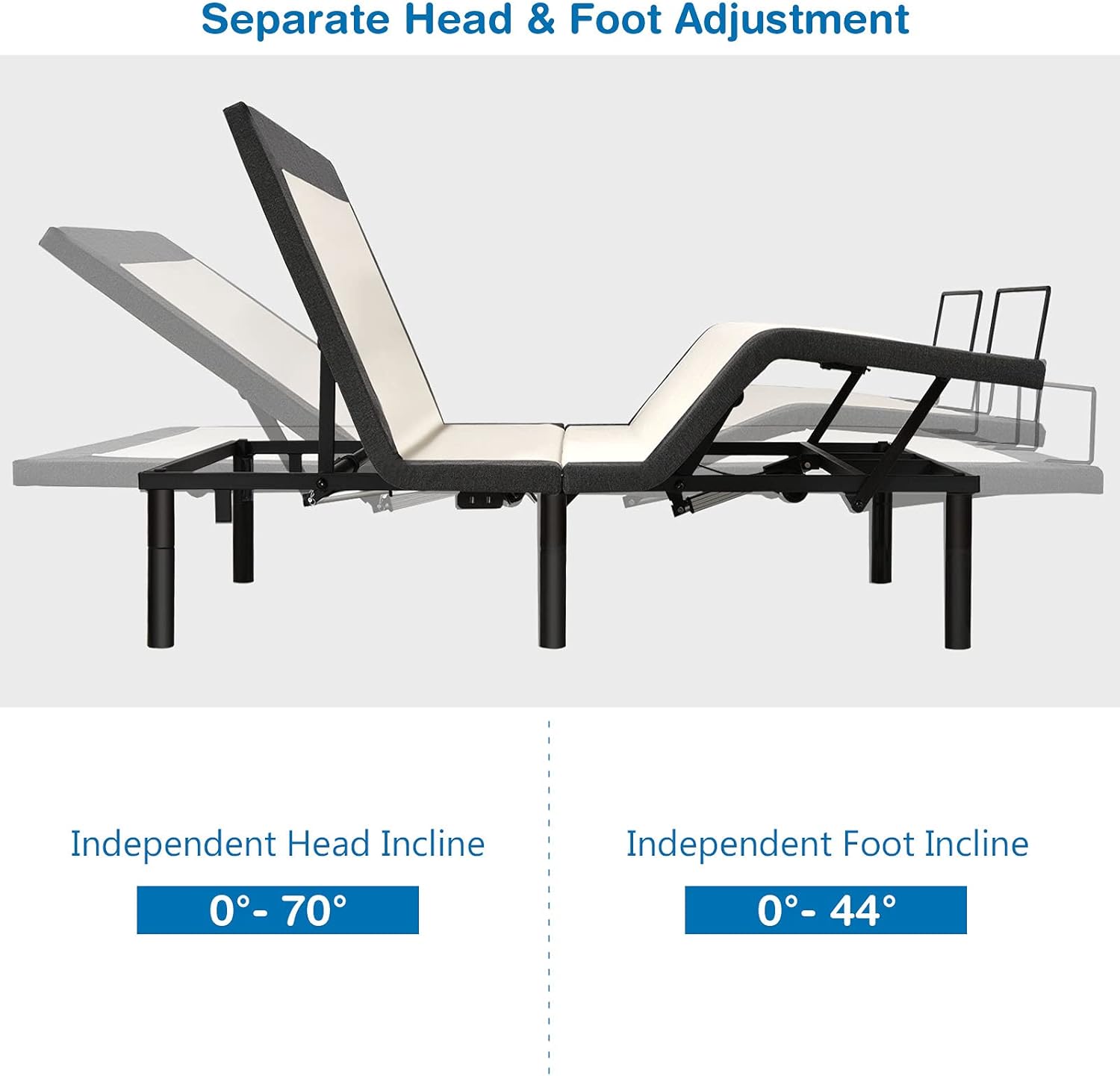
The bed base allows for independent adjustment of the head and foot sections:
- The back section can be adjusted from 0 degrees (flat) to 70 degrees (upright).
- The leg section can be adjusted from 0 degrees (flat) to 44 degrees (elevated).

This image demonstrates the independent adjustment capabilities of the head (0-70 degrees) and foot (0-44 degrees) sections of the bed base.
5.3 Vibration Massage Function
The bed base features vibrating nodes at both the head and foot for a massage function. Use the remote control to select from four massage modes and adjust intensity.
This image highlights the vibrating massage zones at the head and foot of the bed base, indicating the presence of 2 vibrating motors and 4 massage modes.
5.4 Preset and Memory Positions
The bed base includes several pre-set positions for convenience:
- Zero Gravity Position: Elevates the head and feet to a position that can reduce pressure on the back.
- TV Position: Adjusts the head section for comfortable viewing.
- Anti-Snore Position: Slightly elevates the head to help open airways.
- Memory Position (M1): Allows you to save and recall a favorite custom position.
To return the bed to a completely flat position, press the Flat button on the remote control.

This image displays multiple position options available with the adjustable bed base, such as Anti-snore, Foot Incline, Flat, Zero Gravity, TV, and Read Books positions.
5.5 USB Charging Ports
Dual USB charging ports are located on the side of the bed base for convenient charging of electronic devices.
5.6 Under-Bed Nightlight
The integrated under-bed nightlight provides soft illumination. Activate it using the remote control's Flashlight/Beside Light button.

This image demonstrates the built-in nightlight feature, providing soft illumination under the bed base.
6. Maintenance
To ensure the longevity and proper functioning of your adjustable bed base, follow these maintenance guidelines:
- Cleaning: For fabric components, dry clean only. For metal or plastic surfaces, wipe with a damp cloth and mild detergent. Avoid abrasive cleaners.
- Power Cord: Regularly inspect the power cord for any signs of damage. Do not use if frayed or cut.
- Moving Parts: Keep the area around the bed base clear of obstructions to allow for smooth operation of moving parts.
- Weight Capacity: Do not exceed the maximum weight capacity of 850 lbs.
7. Troubleshooting
If you encounter issues with your adjustable bed base, refer to the following common troubleshooting steps:
- Bed Not Responding to Remote:
- Check if the power cord is securely plugged into both the bed base and the wall outlet.
- Ensure the remote control batteries are not depleted. Replace if necessary.
- Verify that the remote control is paired with the bed base according to the pairing instructions (if applicable, refer to a separate pairing guide if provided).
- Motor Noise: Some motor noise during adjustment is normal. If the noise is excessive or unusual, ensure no objects are obstructing the moving parts.
- Massage Function Not Working: Check power connection. Ensure the massage intensity and mode are selected correctly on the remote.
- Under-Bed Light Not Working: Press the Flashlight/Beside Light button on the remote. Check power connection.
If problems persist after attempting these steps, please contact Giantex customer support.
8. Specifications
| Feature | Detail |
|---|---|
| Brand | Giantex |
| Model Number | GT67766-HW |
| Size | Queen |
| Color | Black |
| Style | with Under-Bed Light & Adjustable Height |
| Assembly Required | Yes |
| Head Incline Adjustment | 0° to 70° |
| Foot Incline Adjustment | 0° to 44° |
| Massage Function | Vibration massage, 4 modes |
| USB Ports | Dual USB Charging Ports |
| Nightlight | Under-Bed Nightlight |
| Leg Heights | 4", 7", 11" (adjustable) |
| Maximum Weight Capacity | 850 lbs |
| Material Type | Cotton (for fabric components) |
9. Warranty and Support
For warranty information or technical support, please refer to the documentation included with your purchase or contact Giantex customer service directly. Keep your purchase receipt and model number (GT67766-HW) handy when contacting support.
Customer Service: Please visit the official Giantex website or refer to your purchase platform for contact details.