
K&F CONCEPT 82mm ND2-ND400
K&F CONCEPT 82mm Variable ND2-ND400 Lens Filter Instruction Manual
Model: 82mm ND2-ND400
Introduction
The K&F CONCEPT 82mm Variable ND2-ND400 Lens Filter is designed to provide adjustable light reduction for camera lenses, enabling greater control over exposure in various lighting conditions. This filter allows for 1 to 9 stops of light reduction, making it suitable for bright environments and creative photographic techniques.

Image: The K&F CONCEPT 82mm Variable ND2-ND400 Lens Filter shown with its orange retail packaging.
Product Features
- Optical Glass: Crafted from premium AGC optical glass for superior image quality.
- Multi-Layer Coatings: Features 8 multi-layer coatings to reduce reflections and glare.
- Adjustable Light Reduction: Offers 1 to 9 stops of neutral density, adjustable via 360-degree rotation.
- Glare-Free Surface: Treated with an oxidized sandblasting process to minimize stray light and reflections.
- Slim Design: Measures 7.4mm in thickness with a CNC-patterned design for enhanced grip.

Image: A diagram illustrating the 8-layer nanometer coating technology and CNC precision machining used in the filter's construction.
Setup and Installation
- Check Lens Thread Size: Before attaching, verify your camera lens thread size. This is typically indicated by a "ø" (diameter) symbol followed by a number (e.g., ø82mm) on the lens barrel or inside the lens cap. This filter is designed for 82mm lenses.
- Attach Filter: Gently screw the K&F CONCEPT variable ND filter onto the front thread of your 82mm camera lens. Ensure it is securely fastened but do not overtighten.
- Lens Cap Compatibility: Note that a larger lens cap (e.g., 86mm) may be required to fit over this 82mm variable ND filter due to its design.
Video: Demonstrates how to identify the lens thread size and attach the K&F CONCEPT variable ND filter to a camera lens.
Operating the Variable ND Filter
The variable neutral density filter allows you to control the amount of light entering your lens without changing your aperture, shutter speed, or ISO settings. This is particularly useful for achieving slower shutter speeds in bright conditions or maintaining a wide aperture for shallow depth of field.
- Adjusting Density: Rotate the outer ring of the filter to increase or decrease the neutral density. The filter offers a range from ND2 (1 stop) to ND400 (9 stops) of light reduction.
- Monitoring Exposure: Observe your camera's exposure meter or live view display as you rotate the filter to achieve the desired brightness.
- Avoiding "X Black Cross" Effect: At the maximum density settings (e.g., close to ND400), some variable ND filters may exhibit a cross-pattern effect, commonly known as an "X black cross." This is a natural optical phenomenon that can occur due to the filter's design and interaction with certain lenses or focal lengths. To mitigate this, reduce the density slightly from the maximum setting.
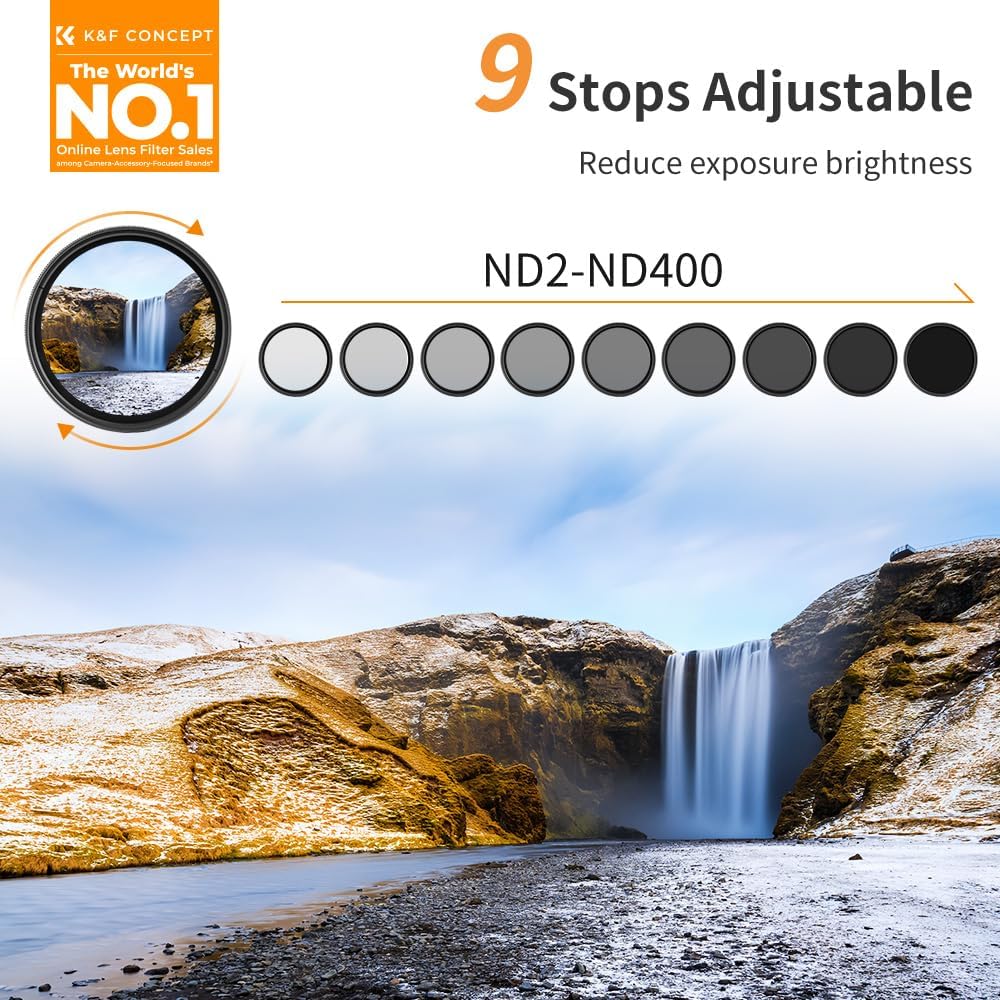
Image: Visual representation of the 9-stop adjustable light reduction capability of the filter, from minimal to maximum density.
Maintenance
Proper care and maintenance will extend the life and performance of your K&F CONCEPT ND filter.
- Cleaning: Use the provided microfiber cleaning cloth to gently wipe away dust, fingerprints, or smudges from the filter's glass surfaces. Avoid using harsh chemicals or abrasive materials.
- Storage: When not in use, store the filter in its protective case to prevent scratches and dust accumulation.
- Handling: Always handle the filter by its metal frame to avoid touching the glass surface.

Image: A hand gently cleaning a lens filter with a soft, dust-free microfiber cloth.
Troubleshooting
- Vignetting: If dark corners appear in your images (vignetting), especially with wide-angle lenses, ensure the filter is correctly seated and consider using a step-up ring if stacking multiple filters. The filter is designed to minimize vignetting on focal lengths as wide as 16mm.
- "X Black Cross" Pattern: As mentioned in the operating section, this can occur at maximum density settings. Reduce the filter's density slightly to eliminate the pattern.
- Image Softness/Loss of Sharpness: Ensure the filter is clean and free from smudges. Also, verify that the filter is securely attached and not cross-threaded.

Image: A comparison demonstrating the absence of vignetting when using the K&F CONCEPT filter at a 16mm focal length.
Specifications
| Brand | K&F CONCEPT |
| Model Number | 82mm ND2-ND400 |
| Filter Type | Variable Neutral Density (ND) |
| Density Range | ND2 to ND400 (1 to 9 Stops) |
| Filter Thread Size | 82 Millimeters |
| Material | Optical Glass, Aviation Aluminum Frame |
| Coating Description | 8 Multi-Layer Coatings |
| Thickness | 7.4mm |
| Water Resistance Level | Not Water Resistant |
| Item Weight | 0.705 ounces |
| Product Dimensions | 3.22 x 3.22 x 0.04 inches |
Warranty and Support
For warranty information, technical support, or any inquiries regarding your K&F CONCEPT product, please refer to the official K&F CONCEPT website or contact their customer service directly. Keep your purchase receipt as proof of purchase for warranty claims.
Ask a question about this manual
Ask about setup, troubleshooting, compatibility, parts, safety, or missing instructions. Manuals+ will review the question and use this page’s manual context to help answer it.