
1. Product Overview
This DC-DC step-down converter module is designed to convert an input voltage range of 6.5V-60V to an adjustable output voltage range of 1.25V-30V. It supports a maximum continuous output current of 10A. The module features screw terminals for convenient and secure input and output connections.
Operating with high efficiency, up to 97%, this module is suitable for various voltage step-down applications. Common uses include charging lithium or lead-acid batteries, powering low voltage systems, and regulating voltage for 6V, 12V, 14V, and 24V battery charging setups.

Image 1: Hilitand DC-DC Converter Module showing key specifications like input voltage (6.5V-60V), output voltage (1.25V-30V), max load (10A), and conversion efficiency (97%).
2. Safety Information
- Always ensure that the input voltage is higher than the desired output voltage, as this is a step-down (buck) converter.
- Observe correct polarity when connecting input and output wires. Incorrect connections can cause irreversible damage to the module or connected devices.
- Do not exceed the maximum input voltage of 60V or the maximum output current of 10A to prevent damage and ensure safe operation.
- Handle the module with care to avoid accidental short circuits, especially during installation and wiring.
- Ensure adequate ventilation around the module to prevent overheating, particularly when operating at higher currents or in enclosed spaces.
- If you are uncertain about any aspect of connection or operation, consult a qualified electronics professional.
3. Setup and Connection
The module is equipped with screw terminals for straightforward and secure wiring connections.
- Identify Input Terminals: Locate the terminals labeled "IN+" and "IN-" on the module. "IN+" is for the positive input voltage, and "IN-" is for the negative (ground) input voltage.
- Connect Input Power: Connect your DC power source (within the 6.5V-60V range) to the input terminals. Double-check to ensure correct polarity before applying power.
- Identify Output Terminals: Locate the terminals labeled "OUT+" and "OUT-" on the module. "OUT+" is for the positive output voltage, and "OUT-" is for the negative (ground) output voltage.
- Connect Load: Connect your target device or load to the output terminals. Again, ensure correct polarity to prevent damage to your load or the module.

Image 2: Connection diagram illustrating the input and output screw terminals on the module for wiring.
4. Operating Instructions
After successfully connecting the input power and your load, you can adjust the output voltage using the onboard potentiometer.
- Power On: Apply power to the input terminals of the module.
- Measure Output Voltage: Use a multimeter to accurately measure the voltage across the "OUT+" and "OUT-" terminals.
- Adjust Output Voltage: Carefully turn the blue potentiometer (a small variable resistor) located on the module using a small screwdriver. Turning it clockwise typically increases the output voltage, while turning it counter-clockwise decreases it. Adjust until the desired output voltage (within the 1.25V to 30V range) is achieved.
- Verify Load Operation: Once the output voltage is set, observe the operation of your connected load to ensure it is functioning correctly.

Image 3: Top view of the module, highlighting the blue potentiometer used for fine-tuning the output voltage.
5. Maintenance
- Keep the module clean and free from dust, dirt, and other debris that could interfere with its operation or cooling.
- Avoid exposing the module to moisture, high humidity, or extreme temperatures, as these conditions can lead to malfunction or damage.
- Periodically inspect all electrical connections to ensure they remain tight and secure. Loose connections can cause intermittent operation or arcing.
- Do not attempt to modify the module beyond its intended use or open its sealed components, as this may void any warranty and could lead to damage or unsafe operation.
6. Troubleshooting
- No Output Voltage:
- Verify that the input voltage is within the specified range (6.5V-60V) and is correctly connected to the "IN+" and "IN-" terminals.
- Ensure the input voltage is indeed higher than the desired output voltage, as this is a step-down converter.
- Check for any short circuits on the output or input terminals, which could prevent the module from operating.
- Inspect the module for any visible damage, such as burnt components or loose solder joints.
- Output Voltage Cannot Be Adjusted:
- Ensure the potentiometer is not damaged or stuck. Try turning it slowly across its full range while monitoring the output voltage with a multimeter.
- Confirm that the input voltage is stable and within the operational range.
- Module Overheating:
- Reduce the load current to ensure it does not exceed the maximum specified 10A.
- Ensure adequate airflow around the module for proper heat dissipation. Consider adding a heatsink or fan if operating at high loads continuously.
- Verify that the input and output voltages are within the specified limits, as operating outside these can cause excessive heat.
- Module Not Functioning (e.g., short circuit detected):
- Before initial use, it is recommended to perform a basic continuity check across the input terminals to ensure no manufacturing defects, such as internal short circuits, are present.
- If a short circuit is detected or the module appears faulty upon inspection, do not apply power. Disconnect it immediately and contact customer support for assistance.
7. Specifications
| Parameter | Value |
|---|---|
| Input Voltage Range | 6.5V - 60V DC |
| Output Voltage Range | 1.25V - 30V DC (Adjustable) |
| Maximum Output Current | 10A |
| Conversion Efficiency | Up to 97% |
| Module Type | DC-DC Step-Down Converter (Buck) |
| Dimensions (Approx.) | 75mm (Length) x 21mm (Width) x 16mm (Height) |
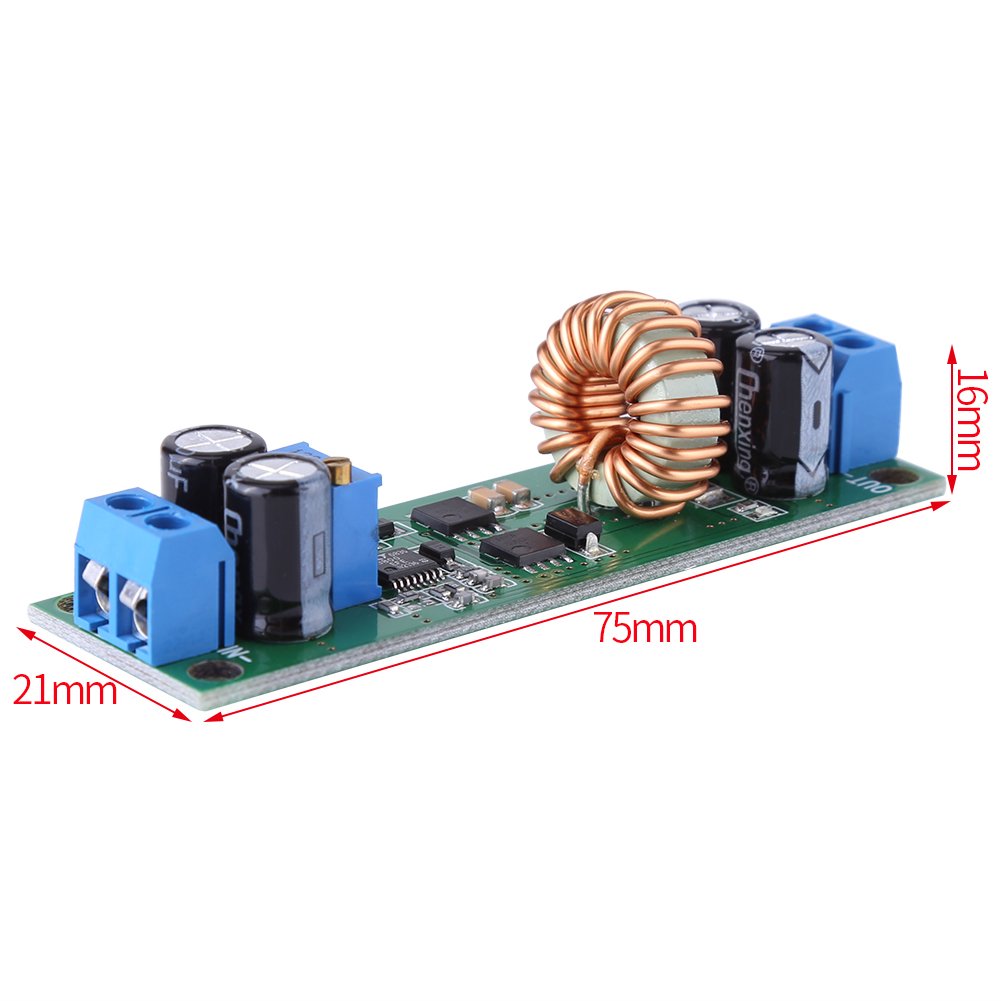
Image 4: Module dimensions showing approximate length, width, and height for integration planning.
8. Support and Warranty
For technical support, warranty information, or any assistance regarding your Hilitand DC-DC Converter Module, please refer to the contact information provided with your original purchase documentation or visit the official Hilitand website. Hilitand is committed to providing quality products and dedicated customer service to ensure your satisfaction.