
Introduction
The VELAMP R720 Night Guard is a versatile 3-in-1 lighting device designed for convenience and safety. It functions as a courtesy light with a motion sensor, an automatic emergency light during power outages, and a portable flashlight. Its compact and elegant design integrates seamlessly into any home environment, providing practical lighting solutions for various situations.

Image: The VELAMP R720 Night Guard unit, showing its sleek white design and central motion sensor.
Setup
- Unpacking: Carefully remove the VELAMP R720 Night Guard and its charging base from the packaging.
- Installation: Plug the charging base directly into a standard wall socket. Ensure the socket is easily accessible and not obstructed. Note that the plug pins are oriented vertically. Depending on your wall socket orientation, the unit may sit horizontally.
- Initial Charge: Place the portable flashlight unit into the charging base. Allow the unit to charge fully before first use. The unit is designed to remain plugged in for continuous readiness.
- Mode Selection: Locate the slide switch on the side of the portable unit. Select the desired operating mode:
- AUTO: Activates the motion sensor and anti-blackout functions.
- OFF: The light is off, but the unit remains in the charging base and will still activate in case of a power outage.
- ON: Provides continuous light from the portable flashlight.

Image: Side view of the VELAMP R720 Night Guard showing the AUTO, OFF, and ON slide switch for mode selection.
Operating Instructions
1. Courtesy Light Mode (AUTO)
- When the switch is set to AUTO and the unit is in its charging base, the integrated motion sensor will activate the light automatically in dark conditions.
- The light will turn on when motion is detected within a 3-meter range and a 120-degree detection angle.
- The light will automatically turn off after approximately 20 seconds of no detected activity. This mode is ideal for illuminating hallways, staircases, and entryways at night.

Image: Diagram illustrating the 120-degree detection range and 3-meter detection distance of the motion sensor, with a person walking up stairs.
2. Emergency Light Mode (Anti-Blackout)
- The R720 Night Guard is equipped with an anti-blackout feature. When the unit is plugged into the wall socket (in any mode: AUTO, OFF, or ON) and a power outage occurs, the light will automatically activate.
- This provides immediate illumination, ensuring safety and visibility during unexpected power failures.

Image: The VELAMP R720 unit plugged into a wall socket, with an icon indicating its anti-blackout functionality.
3. Portable Flashlight Mode
- The main light unit can be easily detached from its charging base to function as a portable flashlight.
- To use, simply pull the light unit upwards from the charging base.
- Set the slide switch to ON for continuous illumination, or to AUTO for motion-activated portable light.
- This feature is useful for navigating dark areas, during emergencies, or for outdoor activities.

Image: A hand holding the detached VELAMP R720 unit, demonstrating its use as a portable flashlight.
Maintenance
- Cleaning: To clean the unit, unplug it from the wall socket and wipe it with a soft, dry cloth. Do not use abrasive cleaners or solvents.
- Battery: The VELAMP R720 contains a rechargeable battery. This battery is not user-replaceable. Do not attempt to open the unit or replace the battery yourself.
- Storage: If storing the unit for an extended period, ensure it is fully charged and then store it in a cool, dry place. Periodically recharge the unit to maintain battery health.
Troubleshooting
| Problem | Possible Cause | Solution |
|---|---|---|
| Light does not turn on in AUTO mode. | Not dark enough; no motion detected; unit not charged; switch not in AUTO. | Ensure ambient light is low; check for motion within range; ensure unit is fully charged; verify switch is set to AUTO. |
| Emergency light does not activate during power outage. | Unit not properly plugged into wall socket; unit not charged. | Ensure the charging base is securely plugged into a live wall socket; allow the unit to charge fully. |
| Portable flashlight does not work. | Battery is depleted; switch not in ON or AUTO mode. | Return the unit to the charging base to recharge; set the slide switch to ON for continuous light or AUTO for motion-activated light. |
| Unit sits horizontally in the wall socket. | Vertical orientation of plug pins not compatible with horizontal wall sockets. | This is a design characteristic. The unit will function correctly even if oriented horizontally. Ensure it is stable and does not easily dislodge. |
Specifications
- Brand: Velamp
- Model Number: R720
- Product Dimensions: 59 x 112 x 75 mm (approx. 2.3 x 4.4 x 3 inches)
- Item Weight: 130 grams (approx. 4.6 ounces)
- Voltage: 3.7 Volts
- Power Source: AC (for charging base)
- Light Source: LED
- Luminous Flux: 40 lm
- Material: Plastic
- Color: White
- Installation Type: Wall-mounted (plug-in)
- Batteries: Rechargeable battery included (not user-replaceable)
- Motion Sensor Range: Up to 3 meters
- Motion Sensor Angle: 120 degrees
- Automatic Shut-off (Motion Sensor): Approximately 20 seconds of inactivity
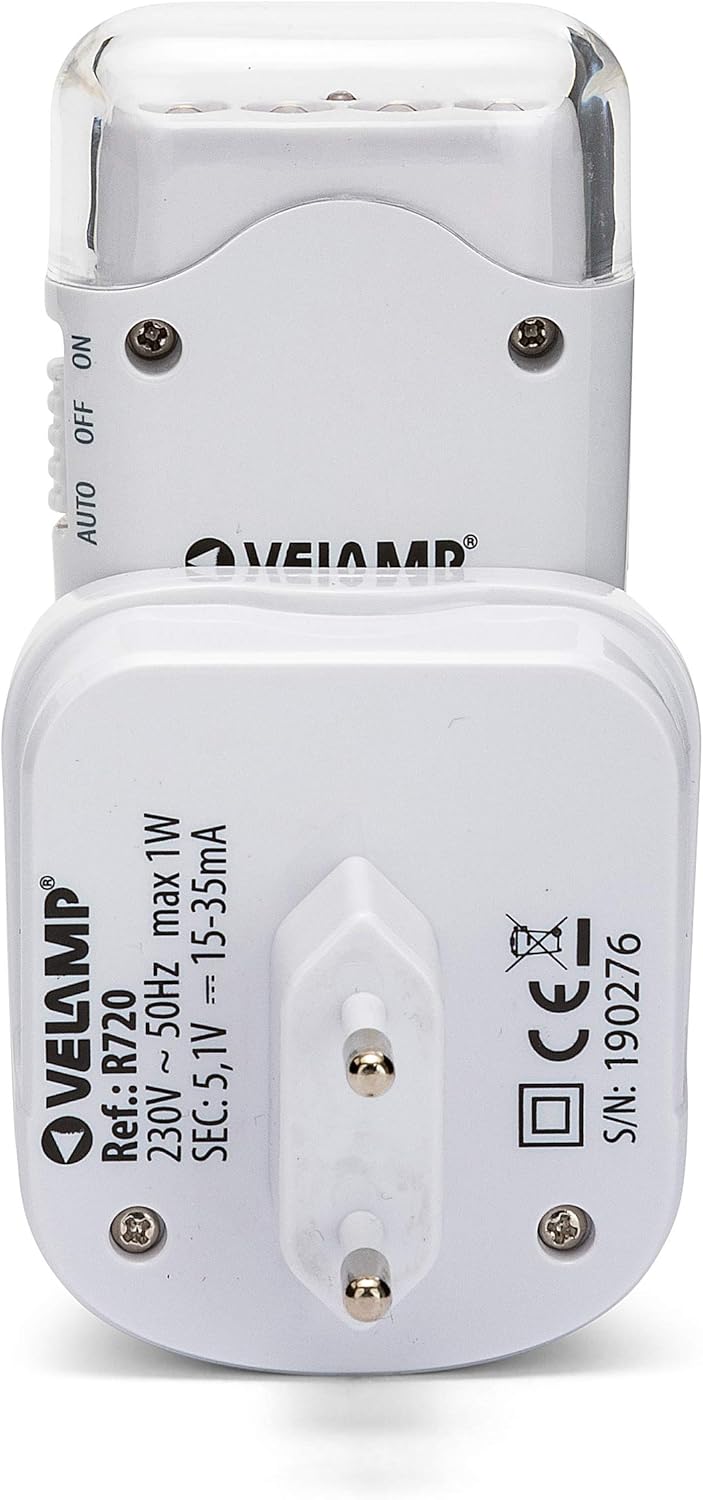
Image: Back view of the VELAMP R720 charging base, displaying technical specifications and model number.
For more detailed product information, you may refer to the EPREL Product Card.
Warranty and Support
Velamp products are manufactured to high-quality standards. For information regarding warranty coverage, please refer to the warranty card included with your purchase or visit the official Velamp website. If you encounter any issues or require technical assistance, please contact Velamp customer support through their official channels. Keep your purchase receipt as proof of purchase for warranty claims.