Introduction
This manual provides detailed instructions for the safe and efficient operation of your Mikado MD-BT20S 20W Bluetooth Amplifier. Please read this manual thoroughly before using the product and retain it for future reference.
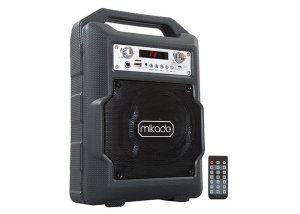
Image: The Mikado MD-BT20S 20W Bluetooth Amplifier, a portable audio system with an integrated handle.
Safety Information
- Do not expose the device to water or excessive moisture.
- Avoid placing the device near heat sources or in direct sunlight.
- Do not attempt to disassemble or repair the unit yourself. Refer all servicing to qualified personnel.
- Use only the specified power supply (DC-5V) and compatible lithium battery.
- Keep out of reach of children.
Package Contents
The Mikado MD-BT20S package includes:
- Mikado MD-BT20S Bluetooth Amplifier Unit
- User Manual (this document)
- Warranty Certificate
- Remote Control
- USB Charging Cable
Product Overview
Familiarize yourself with the various parts and controls of your MD-BT20S amplifier.
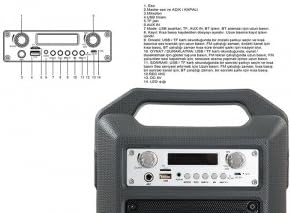
Image: Detailed view of the Mikado MD-BT20S control panel with numbered components.
- Echo Control: Adjusts the echo effect for microphone input.
- Master Volume and ON/OFF Switch: Controls the overall volume and powers the device on/off.
- Microphone Input: 6.35mm jack for connecting a microphone.
- USB Port: For connecting USB flash drives to play audio files.
- TF (Micro SD) Card Slot: For inserting Micro SD cards to play audio files.
- AUX IN Port: 3.5mm jack for connecting external audio devices.
- Mode Button: Switches between USB, TF, AUX In, BT (Bluetooth), and FM radio modes. Press and hold to initiate FM station search.
- Previous Track / Volume Down: Short press for previous track/station. Long press to decrease volume.
- Play/Pause / FM Scan: Short press to play/pause audio. In FM mode, short press to auto-scan and save stations.
- Next Track / Volume Up: Short press for next track/station. Long press to increase volume.
- Recording Button (REC): Initiates and stops audio recording to USB/TF card.
- DC 5V Input: Power input port for charging or operating the device via USB cable.
- LED Display: Shows current mode, track number, FM frequency, etc.
Setup
Powering the Device
The MD-BT20S supports dual power modes: DC-5V via USB cable or internal lithium battery.
- To charge the internal battery or operate via external power, connect the provided USB cable to the DC 5V input on the unit and a compatible USB power adapter (not included) or USB port.
- Ensure the battery is sufficiently charged for portable use.

Image: Rear view of the amplifier showing the battery compartment and a USB charging cable.
Initial Power On
Turn the Master Volume knob (labeled 2 in Product Overview) clockwise to power on the device. The LED display will illuminate.
Operating Instructions
Mode Selection
Press the "Mode" button (labeled 7) repeatedly to cycle through available input sources: Bluetooth (BT), USB, TF (Micro SD), AUX In, and FM Radio.
Bluetooth Connection
- Switch the amplifier to "BT" mode using the Mode button. The LED display will show "BT" and a pairing indicator may flash.
- On your smartphone or other Bluetooth-enabled device, search for available Bluetooth devices.
- Select "MD-BT20S" from the list to pair.
- Once paired, the amplifier will emit a confirmation sound, and the "BT" indicator will stop flashing. You can now play audio from your device.
USB/TF Card Playback
- Insert a USB flash drive or TF (Micro SD) card containing MP3 audio files into the respective port (labeled 4 for USB, 5 for TF).
- The amplifier will automatically switch to USB or TF mode and begin playing the first track. If not, press the "Mode" button to select the correct source.
- Use the Previous/Next Track buttons (labeled 8 and 10) for navigation and the Play/Pause button (labeled 9) for playback control. Long press Previous/Next for volume adjustment.
FM Radio Operation
- Switch the amplifier to "FM" mode using the Mode button.
- To perform an automatic station scan, press and hold the "Mode" button (labeled 7) or the Play/Pause button (labeled 9) for a few seconds. The amplifier will scan and save available FM stations.
- Use the Previous/Next Track buttons (labeled 8 and 10) to navigate between saved stations. Long press for volume adjustment.
AUX In Connection
- Connect an external audio device (e.g., MP3 player, laptop) to the "AUX IN" port (labeled 6) using a 3.5mm audio cable (not included).
- Switch the amplifier to "AUX In" mode using the Mode button.
- Control playback from your connected external device.
Microphone Usage
Connect a microphone to the Microphone Input port (labeled 3). Adjust the Echo control (labeled 1) and Master Volume (labeled 2) as needed.
Recording Function
To use the recording function, ensure a USB drive or TF card is inserted. Press the "REC" button (labeled 11) to start recording. Press again to stop.
Remote Control
The included remote control provides convenient access to various functions, including power, mode selection, track navigation, volume control, and EQ settings. Point the remote control directly at the amplifier's front panel for optimal response.
Maintenance
- Clean the device with a soft, dry cloth. Do not use abrasive cleaners or solvents.
- Keep the ports free from dust and debris.
- When not in use for extended periods, store the amplifier in a cool, dry place.
- Avoid dropping or subjecting the device to strong impacts.
Troubleshooting
| Problem | Possible Cause | Solution |
|---|---|---|
| No power | Battery depleted; Power cable not connected | Charge the battery; Connect the USB power cable |
| No sound | Volume too low; Incorrect mode selected; Device not paired (Bluetooth) | Increase volume; Select correct input mode; Re-pair Bluetooth device |
| Bluetooth pairing failed | Amplifier not in BT mode; Device too far; Interference | Ensure amplifier is in BT mode; Move devices closer; Turn off other Bluetooth devices |
| USB/TF card not playing | Incorrect file format; Card not inserted correctly; Corrupted files | Ensure files are MP3; Reinsert card; Try a different card/files |
Specifications
- Model: Mikado MD-BT20S
- Output Power: 20W
- Connectivity: Bluetooth, USB, TF (Micro SD), AUX In, FM Radio
- Power Input: DC 5V (USB)
- Compatible Devices: Smartphones, Laptops
- Dimensions: 34.5 x 15 x 24 cm
- Weight: 6 Kilograms
- Color: Black
- Special Features: Lightweight, LED Display, Remote Control
Warranty and Support
This product comes with a warranty certificate included in the package. Please refer to the warranty certificate for specific terms and conditions. For technical support or service inquiries, please contact your local Mikado dealer or authorized service center.