
1. Introduction and Overview
The Cloudray DM542S is a high-performance digital 2-phase stepper motor driver. It is built on TI's 32-bit DSP platform and incorporates micro-stepping technology and auto-tuning of power-up parameters. This design ensures low noise, minimal vibration, reduced heating, and high-speed, high-torque output, making it suitable for a wide range of stepper motors.
This driver is ideal for applications requiring precise motor control, such as engraving machines, wire-stripping machines, marking machines, cutting machines, plotters, numerical control machines, and automatic assembly equipment.
Key features include:
- Extra-low motor noise for quiet operation.
- Industrial-grade design for robust performance.
- Compatible with Nema 17, 23, and 34 stepper motors.
- Current range: 1.0A to 5.0A.
- Supply voltage: 18VDC to 50VDC (36V or 48V recommended).
- Microstep resolution up to 1/128.
- Pulse input frequency: 0-200KHz.
- Signal level compatibility: 3.3V to 24V.

2. Specifications
The following table details the technical specifications of the DM542S Stepper Motor Driver:
| Parameter | Min | Typical | Max | Unit |
|---|---|---|---|---|
| Output Current | 1.0 | - | 5.0 | A |
| Supply Voltage | 18 | 24/36/48 | 50 | VDC |
| Logic Signal Current | 7 | 10 | 16 | mA |
| Pulse Input Frequency | 0 | - | 200 | kHz |
| Weight | 278g / 9.81oz | g/oz | ||
| Size (L x W x H) | 118 x 76 x 33mm | mm | ||
| Suitable Stepper Motors | Nema 17, 23, 24 | - | ||

3. Setup and Installation
Proper installation is crucial for the optimal performance and longevity of your DM542S driver. Ensure all connections are secure and correct before applying power.
3.1. Physical Installation
Mount the driver in a location with adequate ventilation to prevent overheating. Use appropriate fasteners to secure the driver to a stable surface. Refer to the dimensional drawings for mounting hole locations and overall size.

3.2. Wiring Connections
The DM542S driver features clearly labeled terminals for signal input, power supply, and motor connections. Always ensure power is disconnected before making or changing any wiring.
- Signal Connections: PUL+ (Pulse positive), PUL- (Pulse negative), DIR+ (Direction positive), DIR- (Direction negative), ENA+ (Enable positive), ENA- (Enable negative). These inputs are compatible with 3.3V to 24V logic signals.
- Power Supply: V+ (Positive DC input), V- (Negative DC input). Connect a DC power supply within the 18V to 50V range.
- Motor Connections: A+, A-, B+, B-. Connect these to the corresponding windings of your 2-phase stepper motor.

4. Operating Instructions
The DM542S driver's operating parameters are configured using DIP switches located on the side of the unit. These switches control the output current and micro-stepping resolution.
4.1. Current Setting
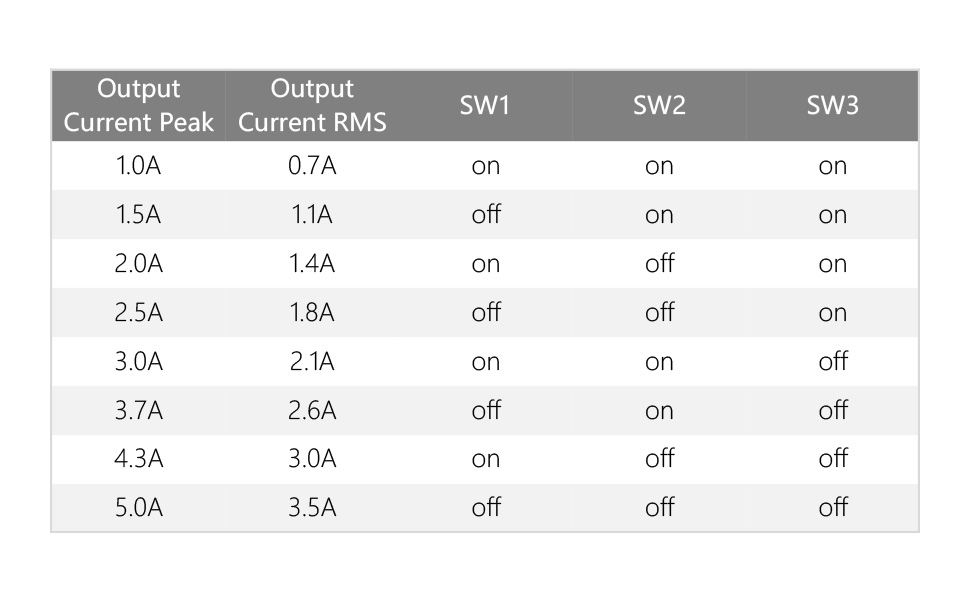
Use DIP switches SW1, SW2, and SW3 to set the desired peak and RMS output current for your stepper motor. SW4 controls the half/full current mode.
| Output Current Peak | Output Current RMS | SW1 | SW2 | SW3 |
|---|---|---|---|---|
| 1.0A | 0.7A | on | on | on |
| 1.5A | 1.1A | off | on | on |
| 2.0A | 1.4A | on | off | on |
| 2.5A | 1.8A | off | off | on |
| 3.0A | 2.1A | on | on | off |
| 3.7A | 2.6A | off | on | off |
| 4.3A | 3.0A | on | off | off |
| 5.0A | 3.5A | off | off | off |
Note: SW4 controls the half current (off) or full current (on) mode. For most applications, full current is recommended.
4.2. Micro-Stepping Level Setting
Use DIP switches SW5, SW6, SW7, and SW8 to set the desired micro-stepping resolution (steps per revolution).
| Steps/Revolution | SW5 | SW6 | SW7 | SW8 |
|---|---|---|---|---|
| 3600 | on | on | on | on |
| 400 | off | on | on | on |
| 800 | on | off | on | on |
| 1600 | off | off | on | on |
| 3200 | on | on | off | on |
| 6400 | off | on | off | on |
| 12800 | on | off | off | on |
| 25600 | off | off | off | on |
| 1000 | on | on | on | off |
| 2000 | off | on | on | off |
| 4000 | on | off | on | off |
| 5000 | off | off | on | off |
| 8000 | on | on | off | off |
| 10000 | off | on | off | off |
| 20000 | on | off | off | off |
| 25000 | off | off | off | off |

5. Troubleshooting
The DM542S driver includes an LED indicator to provide status information, which can be helpful for troubleshooting.
5.1. LED Status Indicators
| LED Status | Drive Status |
|---|---|
| ● | Green indicator is on for a long time: Drive Not Enabled |
| ● ● | Green indicator is flickering: Drive Working Normally |
| ● ● | One Green Indicator and One Red Indicator: Drive Overcurrent |
| ● ● ● | One Green Indicator and Two Red Indicators: Drive Input Power Overvoltage |
| ● ● ● ● | One Green Indicator and Three Red Indicators: The internal voltage of the drive is wrong. |

5.2. General Troubleshooting Tips
- Motor not moving: Check power supply voltage, motor wiring, and signal connections (PUL, DIR, ENA). Ensure the enable signal is active.
- Motor vibrating or making noise: Verify current settings match the motor's specifications. Check for loose motor connections.
- Overheating: Ensure adequate ventilation around the driver. Reduce output current if possible or consider a heatsink/fan.
- Loss of steps: Increase output current or reduce motor load. Check for mechanical binding in the system.
6. Maintenance
The Cloudray DM542S Stepper Motor Driver is designed for reliable operation with minimal maintenance. However, adhering to a few guidelines can extend its lifespan and ensure consistent performance.
- Cleaning: Periodically clean the driver's exterior to remove dust and debris, especially from the heatsink fins, to maintain optimal cooling. Use a soft, dry cloth or compressed air. Do not use liquid cleaners.
- Environmental Conditions: Ensure the driver operates within its specified temperature and humidity ranges. Avoid exposure to corrosive gases, excessive moisture, or direct sunlight.
- Connection Checks: Routinely inspect all wiring connections for tightness and signs of wear or corrosion. Loose connections can lead to intermittent operation or damage.
- Ventilation: Confirm that the installation area provides sufficient airflow for heat dissipation. Do not obstruct the heatsink.
7. Product Video
Watch the official product video for a visual overview of the Cloudray DM542S 2-Phase Stepper Motor Driver.
8. Warranty and Support
For warranty information and technical support, please refer to the official Cloudray website or contact your authorized dealer. Keep your purchase receipt for warranty claims.
Cloudray is committed to providing high-quality products and customer service. If you encounter any issues or have questions regarding the DM542S driver, please reach out to our support team for assistance.
For additional resources and product updates, visit the Cloudray Store on Amazon.