
1. Introduction and Overview
The DollaTek TDA7297 Audio Amplifier Module is a compact and efficient stereo power amplifier designed for various audio applications. Featuring the integrated TDA7297 audio chip, it delivers a dual-channel output of 15W + 15W, suitable for 4-8 ohm speakers ranging from 10W to 50W. This module includes an onboard potentiometer for volume control and supports a wide operating voltage range of 6V to 18V DC. Its small form factor makes it ideal for DIY audio projects, portable sound systems, and educational electronics.
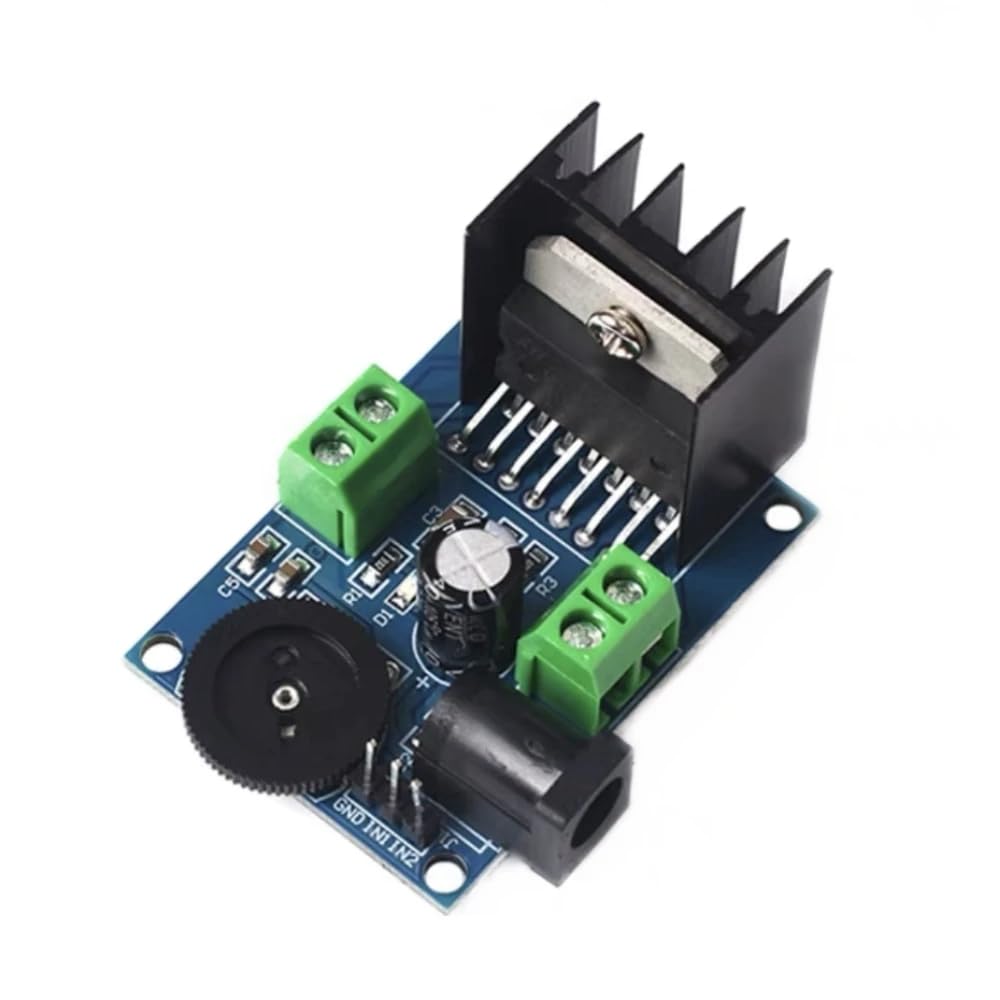
Image 1.1: Top-down view of the DollaTek TDA7297 Audio Amplifier Module. This image shows the compact design of the module, including the heat sink, power input jack, speaker terminals, and volume potentiometer.
2. Package Contents
Please verify that all items are present and in good condition upon opening the package.
- 1x DollaTek TDA7297 Audio Amplifier Module
3. Product Features
The DollaTek TDA7297 Audio Amplifier Module offers the following key features:
- Integrated TDA7297 audio chip for reliable performance.
- Dual-channel stereo output: 15W + 15W.
- Compatible with 4-8 ohm speakers, recommended power 10W-50W.
- Exposed main pins for convenient integration with external devices.
- Onboard 2-way, 5.08mm pitch terminal for speaker track connection output.
- Integrated dial potentiometer for easy output volume adjustment.
- Supports DC terminal and pin input power modes.
- Wide operating voltage range: 6V to 18V DC.
- Compact board dimensions: 45mm x 33mm.

Image 3.1: Top view of the amplifier module illustrating its compact dimensions of 45mm by 33mm.
4. Setup Instructions
Follow these steps to set up your DollaTek TDA7297 Audio Amplifier Module:
- Power Connection: Connect a DC power supply (6V to 18V) to the module. You can use either the DC power jack or the 2-pin terminal labeled 'DC IN'. Ensure correct polarity if using the terminal block. Caution: Exceeding 18V DC or incorrect polarity can damage the module.
- Speaker Connection: Connect your speakers to the green screw terminals labeled 'OUT1' and 'OUT2'. Each output supports one speaker. Ensure your speakers are rated between 4-8 ohms and have a power handling capacity of 10W-50W.
- Audio Input: Connect your audio source (e.g., smartphone, MP3 player, computer) to the 3-pin header labeled 'GND', 'IN1', and 'IN2'. 'GND' is the common ground, 'IN1' is for the left channel, and 'IN2' is for the right channel.

Image 4.1: Top view of the amplifier module highlighting the power input, speaker output terminals, and audio input pins for proper connection.
5. Operating Instructions
Once the module is correctly wired:
- Power On: Apply power to the module. There is no power switch; the module will power on immediately upon receiving voltage.
- Volume Adjustment: Use the onboard black dial potentiometer to adjust the output volume. Rotate clockwise to increase volume and counter-clockwise to decrease it.
- Audio Playback: Start playing audio from your connected source.
6. Maintenance
To ensure the longevity and optimal performance of your amplifier module:
- Keep the module in a dry environment, away from moisture and extreme temperatures.
- Avoid exposing the module to static electricity. Handle it by the edges or use anti-static precautions.
- Periodically inspect connections for looseness or corrosion.
- Ensure adequate ventilation around the heat sink, especially during prolonged use at high volumes.
- Do not attempt to modify the circuit unless you are a qualified electronics technician.
7. Troubleshooting
If you encounter issues with your amplifier module, refer to the following troubleshooting guide:
- No Sound Output:
- Verify that the power supply is connected correctly and providing the specified voltage (6V-18V DC).
- Check all speaker connections for proper wiring and secure contact.
- Ensure the audio input source is active and connected correctly to the 'IN1' and 'IN2' pins.
- Confirm the volume potentiometer is not set to minimum.
- Distorted Sound:
- Check if the input audio signal level is too high, causing clipping. Reduce the source volume.
- Ensure your speakers' impedance matches the module's requirements (4-8 ohms).
- Verify the power supply is stable and within the recommended voltage range. Fluctuations can cause distortion.
- Module Overheating:
- Ensure the module has adequate airflow around the heat sink.
- Check if the speaker load is too low (below 4 ohms) or if the speakers are short-circuited.
- Reduce the output volume if operating at maximum for extended periods.
- Module Not Powering On:
- Double-check power supply connections and ensure the power source is functional.
- Verify the input voltage is within the 6V-18V DC range.
8. Specifications
| Feature | Specification |
|---|---|
| Brand | DollaTek |
| Model | TDA7297 (Internal ID: 8c97e4aa-9270-4699-a6b3-d5bd6452d77e) |
| Chipset | TDA7297 |
| Number of Channels | 2 (Stereo) |
| Output Power | 15W + 15W (Total 30W) |
| Speaker Impedance | 4-8 Ohms |
| Recommended Speaker Power | 10W-50W |
| Operating Voltage | 6V - 18V DC |
| Mounting Type | Surface Mount |
| Board Dimensions | 45mm x 33mm |
| Certifications | CE |
| UPC / GTIN | 742548979584 |
| ASIN | B07DJZKGDR |
9. Warranty and Support
This DollaTek product comes with a standard manufacturer's warranty. For specific warranty details, please refer to the product packaging or contact your retailer. For technical support, troubleshooting assistance, or inquiries regarding product functionality, please contact DollaTek customer service through their official website or the platform where the product was purchased.