
1. Product Overview
The MODOAO COB LED Work Light is a versatile and rechargeable lighting tool designed for various applications, including home emergency lighting, car repair, camping, hiking, and mechanical tasks. It features a COB LED strip providing up to 700 lumens of adjustable brightness, a magnetic base, and a swivel hook for hands-free operation. The light is powered by a built-in lithium-ion battery and recharges via a universal USB cable.

Figure 1: MODOAO COB LED Work Light
2. Product Structure
Familiarize yourself with the components of your MODOAO COB LED Work Light:

Figure 2: Product Component Diagram
- Hook: For hanging the light.
- Lamp Head: Contains the COB LED strip for illumination.
- USB Charging Port: Input for charging the internal battery.
- Charging Indicator: Displays charging status.
- Turntable Switch: Controls power and brightness adjustment.
- Rotate the Nut: Secures the adjustable base.
- Base: Magnetic base for attachment to metal surfaces.
3. Key Features
- Brightness Adjustment: Variable fluid adjustment from 0 to 700 lumens via a dial power switch.
- USB Rechargeable: Built-in battery with universal USB charging for convenience.
- Energy Efficient: Up to 13 hours of work time at 50% power, or 3.5 hours at full power.
- Magnetic Base: Strong magnetic base for hands-free attachment to metal surfaces.
- Swivel Hook: Integrated hook for hanging the light in various positions.
- Multi-Angle Illumination: Adjustable body and base to provide light from multiple angles.
- Durable Construction: Made from ABS material.
4. Setup
- Unpack: Carefully remove the work light and USB charging cable from its packaging.
- Initial Charge: Before first use, fully charge the device. Refer to the "Charging Instructions" section for details.
- Inspect: Check the device for any visible damage. Do not use if damaged.
5. Operating Instructions
5.1 Power On/Off and Brightness Adjustment
The work light features a turntable switch that controls both power and brightness.
- To turn the light ON and increase brightness: Rotate the turntable switch clockwise. The COB LEDs will illuminate and gradually increase in intensity.
- To turn the light OFF and decrease brightness: Rotate the turntable switch counter-clockwise. The brightness will decrease until the light turns off with a click.

Figure 3: Brightness Adjustment Dial
5.2 Using the Magnetic Base and Swivel Hook
- Magnetic Base: Attach the magnetic base to any ferrous metal surface for hands-free lighting. Ensure the surface is clean and free of debris to prevent scratches.
- Swivel Hook: Extend the integrated hook from the top of the light to hang it from various objects or structures.
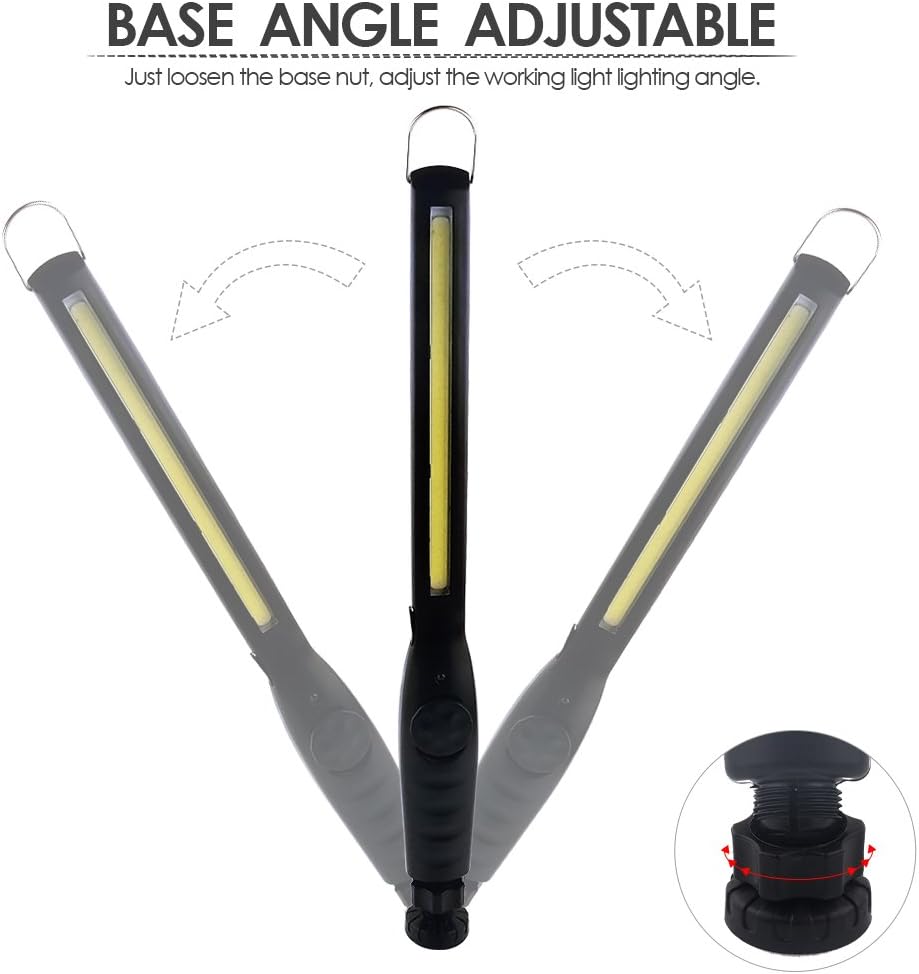
Figure 4: Work Light in use under a car hood

Figure 5: Work Light attached to a metal surface
5.3 Adjusting the Base Angle
The base of the work light can be adjusted to direct illumination as needed.
- To adjust the angle: Loosen the nut located at the base of the light.
- Position the light to your desired angle.
- Tighten the nut to secure the light in place.

Figure 6: Base Angle Adjustment
6. Charging Instructions
The MODOAO COB LED Work Light is equipped with a built-in rechargeable lithium-ion battery.
- Locate the USB charging port on the side of the work light.
- Connect the provided USB charging cable to the port on the light.
- Connect the other end of the USB cable to a standard USB power source (e.g., computer USB port, USB wall adapter, power bank).
- The charging indicator light will illuminate red during charging.
- Once fully charged, the indicator light will turn green.
- Disconnect the USB cable from the light and the power source when charging is complete.
A full charge typically takes several hours. The light can operate for approximately 13 hours at 50% brightness or 3.5 hours at full brightness on a single charge.

Figure 7: USB Charging and Indicator Lights
7. Maintenance
- Cleaning: Wipe the light with a soft, damp cloth. Do not use abrasive cleaners or solvents.
- Storage: Store the light in a cool, dry place when not in use. If storing for extended periods, charge the battery periodically to maintain its health.
- Battery Care: Avoid fully discharging the battery frequently. Recharge when the light output noticeably diminishes.
- Magnet Care: Keep the magnetic base clean. Metal shavings or debris can reduce magnetic strength and potentially scratch surfaces.
8. Troubleshooting
| Problem | Possible Cause | Solution |
|---|---|---|
| Light does not turn on. | Battery is depleted. | Charge the work light using the provided USB cable. |
| Light does not turn on. | Turntable switch not rotated sufficiently. | Ensure the turntable switch is rotated clockwise past the "click" point. |
| Light is dim or flickers. | Low battery charge. | Recharge the work light. |
| Light is dim or flickers. | Brightness dial set too low. | Rotate the turntable switch clockwise to increase brightness. |
| Charging indicator does not light up. | USB cable or power source issue. | Try a different USB cable or power adapter. Ensure connections are secure. |
| Magnetic base does not hold securely. | Surface is not ferrous metal or is uneven. Debris on magnet. | Ensure attachment to a clean, flat ferrous metal surface. Clean the magnet. |
9. Specifications
| Feature | Detail |
|---|---|
| Model Number | amsdt500-01 |
| Light Source Type | COB LED |
| Luminous Flux (Max) | 700 Lumens |
| Power Source | USB Rechargeable |
| Battery Type | 1 Lithium Ion (included) |
| Voltage | 3.7 Volts |
| Wattage | 5 watts |
| Material | ABS |
| Item Weight | 6.7 ounces (190 grams) |
| Product Dimensions | 1.38 x 1.02 x 14.76 inches |
| Special Features | Brightness adjustable, Magnetic base, Swivel hook |
| Water Resistance Level | Not Water Resistant |
10. Warranty Information
Specific warranty details are not provided in the product information. Please refer to the retailer or manufacturer's official website for current warranty terms and conditions. Keep your purchase receipt as proof of purchase for any warranty claims.
11. Customer Support
For technical assistance, product inquiries, or support, please contact MODOAO customer service through their official website or the retailer where the product was purchased. Ensure you have your product model number (amsdt500-01) available when contacting support.