
MAXUS ELITE
MAXUS Digital Pocket Gram Scale
Model: ELITE
Precision Weighing for Small Items
Introduction
The MAXUS Digital Pocket Gram Scale (Model ELITE) is a high-precision weighing instrument designed for accurate measurements of small items. With a capacity of 500g and a readability of 0.01g, it is ideal for weighing food, jewelry, grains, and other small objects. Its compact design and multiple unit options make it a versatile tool for various applications.

Image: The MAXUS Digital Pocket Gram Scale, shown open with its stainless steel weighing platform and LCD display. A clear plastic weighing tray is positioned next to the scale.
Package Contents
- 1 x MAXUS Digital Pocket Gram Scale (Model ELITE)
- 1 x Weighing Tray
- 2 x AAA Batteries (pre-installed or included separately)
- 1 x User Manual (this document)
Key Features
- Capacity: 500g x 0.01g
- Multiple Units of Measure: Grams (g), Ounces (oz), Troy Ounces (ozt), Pennyweights (dwt), Carats (ct), Grains (gn)
- Backlit LCD Display for easy readability
- Tare Function for weighing items in a container
- Smart-Off (Auto Shut-Off) to conserve battery life
- Overload Protection
- Compact and Portable Design
- Durable Stainless Steel Weighing Platform
- Laminated Buttons for protection

Image: A detailed view of the MAXUS Digital Pocket Gram Scale's features, including the backlit display, stainless steel platform, laminated buttons, and the included AAA batteries.
Setup
1. Battery Installation
The scale requires 2 AAA batteries. If not pre-installed, open the battery compartment on the underside of the scale and insert the batteries, ensuring correct polarity (+/-). Close the compartment securely.
2. Initial Placement
Place the scale on a hard, flat, and stable surface. Avoid placing it on soft or uneven surfaces, or near vibrating equipment, as this can affect accuracy.
Operating Instructions
1. Basic Weighing
- Press the [Power] key to turn on the scale.
- Wait for the display to show "0.00" (or "0.000" depending on the unit).
- Gently place the item to be weighed on the center of the stainless steel platform.
- The weight will be displayed on the LCD screen.
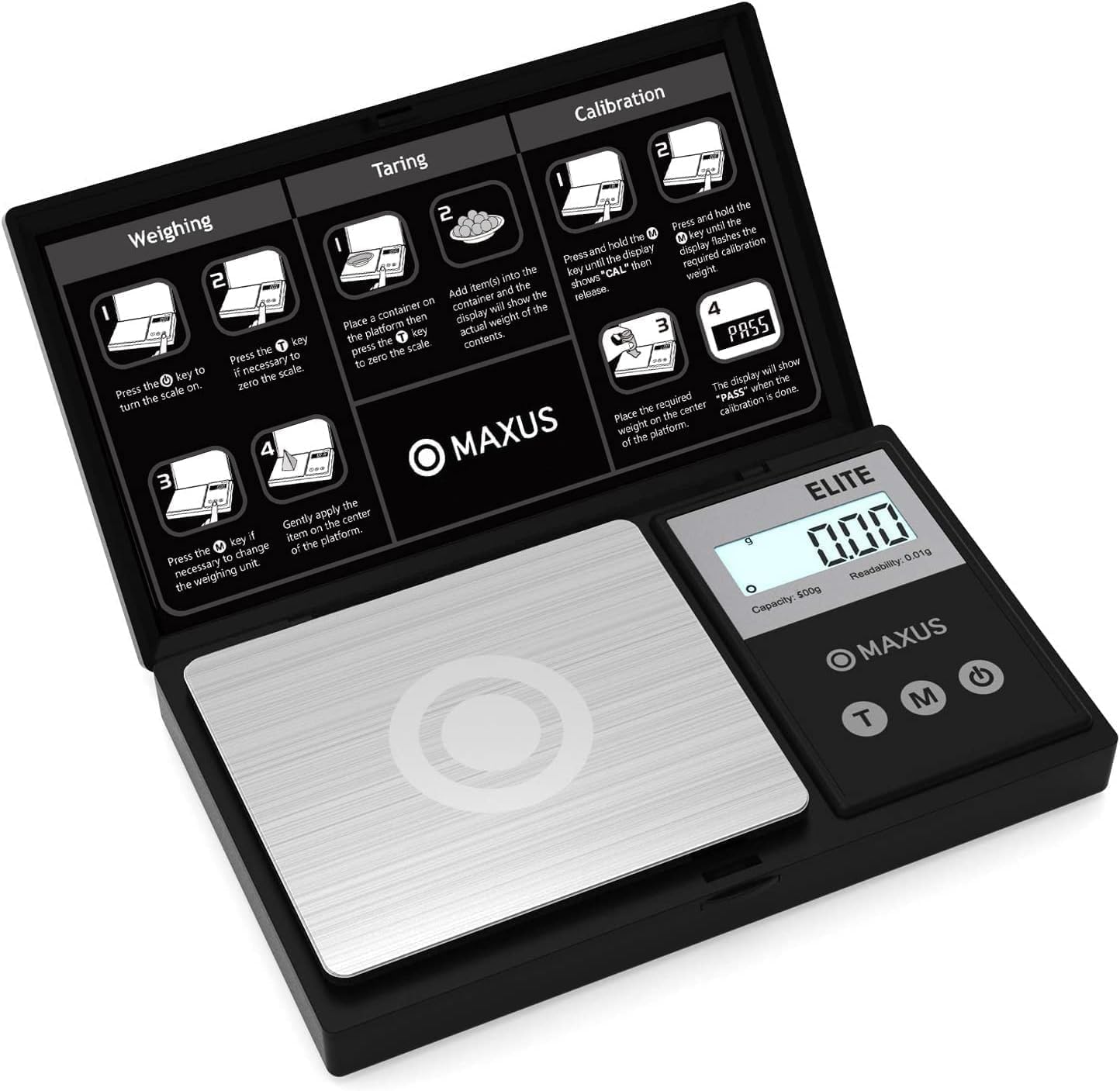
Image: The MAXUS Digital Pocket Gram Scale with visual instructions on its lid for weighing, taring, and calibration. The display shows "0.00" grams, indicating it's ready for weighing.
2. Tare Function (Weighing with a Container)
The Tare function allows you to subtract the weight of a container, so you only measure the net weight of its contents.
- Turn on the scale and wait for "0.00" to appear.
- Place the empty container (e.g., the included tray) on the center of the weighing platform. The display will show the container's weight.
- Press the [T] (Tare) key. The display will reset to "0.00".
- Add the items you wish to weigh into the container. The display will now show only the weight of the items.

Image: A four-step visual guide demonstrating the tare function. It shows turning on the scale, placing an empty container, pressing the TARE button to zero, and then adding contents to measure their net weight.
3. Unit Conversion
To switch between different units of measure:
- With the scale on, press the [M] (Mode) key repeatedly to cycle through the available units: g (grams), oz (ounces), ozt (troy ounces), dwt (pennyweights), ct (carats), gn (grains).
- The selected unit will be displayed on the screen.

Image: A close-up of the MAXUS Digital Pocket Gram Scale's display, illustrating how different units (g, oz, ozt, dwt, ct, gn) are shown on the screen.
4. Calibration
Calibration ensures the accuracy of your scale. It is recommended to calibrate the scale periodically or if you notice inconsistent readings. You will need a precise calibration weight (e.g., 500g, not included).
- Turn on the scale and wait for "0.00" to appear.
- Press and hold the [M] (Mode) key until the display shows "CAL", then release.
- The display will then flash the required calibration weight (e.g., "500.00g").
- Place the exact calibration weight gently on the center of the weighing platform.
- The display will show "PASS" when the calibration is complete. Remove the weight.
Maintenance & Care
- Keep the scale clean by wiping it with a soft, damp cloth. Do not use abrasive cleaners or immerse the scale in water.
- Store the scale in a dry, cool place.
- Avoid dropping the scale or subjecting it to strong impacts, as this can damage the internal sensors.
- If the scale will not be used for an extended period, remove the batteries to prevent leakage.
Troubleshooting
| Problem | Possible Cause | Solution |
|---|---|---|
| "Lo" displayed | Low battery power. | Replace the batteries. |
| "O-Ld" displayed | Overload. Weight exceeds maximum capacity. | Remove the item immediately to avoid damage. |
| Inaccurate readings | Unstable surface, need for calibration, or interference. | Place on a stable, flat surface. Perform calibration. Avoid strong electromagnetic fields. |
| Scale does not turn on | No batteries, incorrect battery installation, or dead batteries. | Check battery presence and polarity. Replace batteries if necessary. |
Specifications
| Brand | MAXUS |
| Model Number | ELITE |
| Capacity | 500 Grams |
| Readout Accuracy | 0.01-grams |
| Units of Measure | g, oz, ozt, dwt, ct, gn |
| Display Type | LCD with Backlight |
| Power Source | 2 x AAA Batteries (Included) |
| Material | Stainless Steel (Platform), ABS (Body) |
| Product Dimensions | 5 x 2.99 x 0.75 inches |
| Item Weight | 4 ounces (0.25 Pounds) |
| Special Features | Backlit Display, Lightweight, Auto Shut Off, Tare Function |
Warranty & Support
For warranty information or technical support, please contact MAXUS customer service. Refer to the product packaging or the official MAXUS website for contact details.
Related documentsELITE


Ask a question about this manual
Ask about setup, troubleshooting, compatibility, parts, safety, or missing instructions. Manuals+ will review the question and use this page’s manual context to help answer it.