
1. Introduction
The DollaTek SW-420 NC Type Vibration Sensor Module is designed to detect vibrations and provide a digital output signal. This module utilizes a normally closed (NC) type vibration switch, meaning its output is low when stable and goes high upon detecting vibration. It is suitable for various applications requiring vibration detection, such as alarm systems, smart car projects, and earthquake detection.
2. Key Features
- Utilizes SW-420 normally closed type vibration sensor.
- Comparator output provides a clean, strong digital signal (>15mA driving ability).
- Wide operating voltage range: 3.3V to 5V.
- Digital switching output (0 and 1) for easy integration with microcontrollers.
- Incorporates a wide voltage LM393 comparator for stable performance.
- Equipped with bolt holes for convenient installation.
- Compact PCB size: approximately 3.2 cm x 1.4 cm.
3. Components Overview
The SW-420 module consists of a vibration sensor, an LM393 comparator, a potentiometer for sensitivity adjustment, and indicator LEDs.

Figure 3.1: Top view of the SW-420 Vibration Sensor Module. This image displays the main components including the blue vibration sensor, the black LM393 chip, the blue potentiometer for sensitivity adjustment, and the three-pin header for connections.
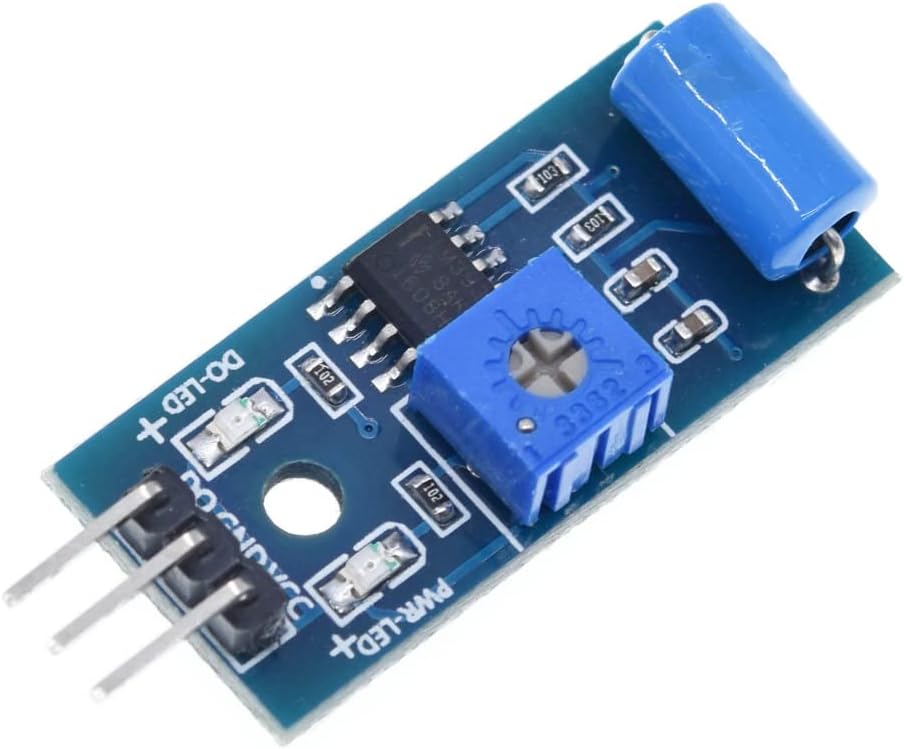
Figure 3.2: Angled view of the SW-420 Vibration Sensor Module. This perspective highlights the compact design and the arrangement of the components on the blue PCB.
4. Operating Principle
The SW-420 sensor is a normally closed (NC) type. This means:
- When the module is stable and not vibrating, the internal switch is closed, resulting in a low output signal (0) and the green indicator LED (DO-LED) being on.
- When the module detects vibration, the internal switch momentarily opens, causing the output to be driven high (1) and the green indicator LED (DO-LED) to turn off.
The LM393 comparator processes the signal from the vibration switch, providing a clean digital output. The sensitivity of the vibration detection can be adjusted using the onboard potentiometer.
5. Setup and Connection
To integrate the SW-420 module into your project, connect it to a microcontroller or other compatible device using the three-pin header.
5.1 Pin Description
| Pin | Label | Description |
|---|---|---|
| 1 | VCC | Power supply input (3.3V - 5V DC) |
| 2 | GND | Ground connection |
| 3 | DO | Digital Output (0 or 1) |
5.2 Connection Steps
- Connect the VCC pin of the module to the 3.3V or 5V power supply output of your microcontroller.
- Connect the GND pin of the module to the ground (GND) pin of your microcontroller.
- Connect the DO (Digital Output) pin of the module to a digital input pin on your microcontroller.
Important Note: Ensure the power supply polarity is correct. Reversing the power direction can damage the module.
6. Operation
6.1 Power Indicator (PWR-LED)
The red LED labeled "PWR-LED" illuminates when the module is correctly powered, indicating that the module is receiving voltage.
6.2 Digital Output Indicator (DO-LED)
The green LED labeled "DO-LED" indicates the state of the digital output:
- DO-LED On: Module is stable, no vibration detected. Digital output (DO) is LOW (0).
- DO-LED Off: Vibration detected. Digital output (DO) is HIGH (1).
6.3 Sensitivity Adjustment
The blue potentiometer (variable resistor) on the module allows you to adjust the sensitivity of the vibration detection. Turn the potentiometer clockwise to increase sensitivity (detect weaker vibrations) and counter-clockwise to decrease sensitivity (require stronger vibrations for detection).
7. Applications
The DollaTek SW-420 Vibration Sensor Module can be used in a variety of projects, including:
- Smart car collision or impact detection.
- Earthquake alarm systems.
- Motorcycle or vehicle alarm systems.
- Theft alarm systems for doors, windows, or objects.
- Vibration monitoring in industrial equipment.
8. Specifications
| Parameter | Value |
|---|---|
| Sensor Type | SW-420 Normally Closed (NC) Vibration Sensor |
| Comparator Chip | LM393 Wide Voltage Comparator |
| Operating Voltage | 3.3V - 5V DC |
| Output Format | Digital Switching Output (0 or 1) |
| Driving Ability | >15mA |
| PCB Dimensions (L x W) | Approx. 3.2 cm x 1.4 cm (31.2mm x 14.2mm) |
| Item Weight (per module) | Approx. 0.704 ounces (20 grams) |
| Material | Iron (for certain components) |

Figure 8.1: Dimensions of the SW-420 Vibration Sensor Module, showing a length of 31.2mm and a width of 14.2mm.
9. Important Notes and Warnings
- Power Polarity: Ensure the power supply (VCC and GND) is connected with correct polarity. Reversing the polarity can permanently damage the module's integrated circuits.
- Output Level: The digital output (DO) level is close to the input voltage (VCC).
- Environmental Factors: Extreme temperatures, humidity, or strong electromagnetic interference may affect the module's performance.
10. Troubleshooting
10.1 Module Not Powering On
- Check power connections (VCC and GND) for correct polarity and secure contact.
- Verify that the power supply is providing the correct voltage (3.3V-5V DC).
- Ensure the power supply is capable of providing sufficient current.
10.2 No Output or Incorrect Output
- DO-LED always ON (output LOW): The module is not detecting vibration. Try increasing sensitivity using the potentiometer. Ensure the module is securely mounted and experiencing actual vibration.
- DO-LED always OFF (output HIGH): The module might be too sensitive or constantly detecting minor vibrations. Try decreasing sensitivity using the potentiometer. Check for continuous vibration in the environment.
- Verify the connection of the DO pin to your microcontroller's input.
- Ensure your microcontroller's code is correctly reading the digital input.
10.3 Module Damaged
If the module shows no signs of life after verifying power and connections, or if there's a burning smell, it might be damaged. This often occurs due to incorrect power polarity. Replace the module if damage is suspected.


