
ZETCOM N446
ZETCOM N446 Handheld PMR Radio
User Instruction Manual
1. Introduction
Thank you for choosing the ZETCOM N446 Handheld PMR Radio. This device is designed for reliable and clear communication in various environments, from professional security operations to outdoor recreational activities. It operates on license-free PMR frequencies, making it ready for use right out of the box. This manual provides essential information on the radio's features, setup, operation, and maintenance to ensure optimal performance and longevity.
2. Safety Information
Please read and understand all safety precautions before using your ZETCOM N446 radio. Failure to do so may result in injury or damage to the device.
- Battery Safety: Use only the specified battery and charging accessories. Do not disassemble, puncture, or short-circuit the battery. Do not expose the battery to extreme temperatures or fire.
- Antenna: Do not touch the antenna during transmission.
- Hearing Protection: Avoid prolonged exposure to high volume levels, which may cause hearing damage.
- Flammable Environments: Do not operate the radio in environments with flammable gases or dust.
- Interference: Turn off the radio in areas where radio devices are prohibited, such as hospitals or aircraft.
- Water Exposure: While the radio has IP54-55 dust resistance, it is not fully waterproof. Avoid submerging the device in water.
3. Package Contents
Please check the package contents upon unboxing. If any items are missing or damaged, contact your retailer.
- ZETCOM N446 Handheld PMR Radio Unit
- Li-ion Battery Pack
- Charging Adapter (or USB cable for charging)
- Belt Clip
- User Manual (this document)
4. Product Features
The ZETCOM N446 radio is equipped with features designed for ease of use and reliable performance:
- Compact, Stylish, and Ergonomic Design
- Full Compatibility with All License-Free PMR Radios
- IP54-55 Dust Resistance Standard
- Powerful and Clear Sound Quality
- Hands-Free VOX (Voice Operated Exchange) Feature
- 16 Channels and 1240 Sub-Channel Options (CTCSS/DCS)
- High Capacity Li-ion Battery
- No Interference (Analog PMR)
5. Setup
5.1. Battery Installation
- Ensure the radio is turned off.
- Locate the battery compartment cover on the back of the radio.
- Slide the cover down or unlatch it according to the design.
- Insert the Li-ion battery pack, ensuring the contacts align correctly with the radio's terminals.
- Replace the battery compartment cover and secure it.
5.2. Charging the Battery
Before first use, fully charge the battery. A full charge typically takes 3-4 hours.
- Connect the charging adapter to a power outlet.
- Plug the charging cable into the radio's charging port.
- The charging indicator light (if present) will illuminate, typically red, during charging.
- Once fully charged, the indicator light may change color (e.g., green) or turn off. Disconnect the charger.
5.3. Attaching the Belt Clip
Align the belt clip with the screw holes on the back of the radio and secure it with the provided screws.
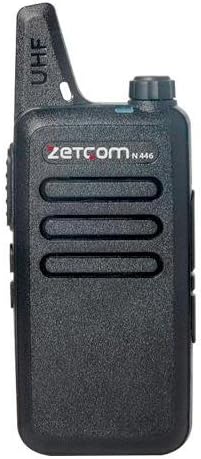
Figure 1: ZETCOM N446 Handheld PMR Radio. This image shows the front view of the black ZETCOM N446 radio, highlighting its compact design, speaker grille, and the UHF antenna at the top. The ZETCOM logo and N446 model number are visible.
6. Operation
6.1. Power On/Off
To turn the radio ON, rotate the Power/Volume knob clockwise until you hear a click and the radio announces its channel. To turn the radio OFF, rotate the knob counter-clockwise until it clicks off.
6.2. Volume Adjustment
Rotate the Power/Volume knob clockwise to increase the volume and counter-clockwise to decrease it.
6.3. Channel Selection
The ZETCOM N446 has 16 channels. To select a channel, rotate the Channel Selector knob (usually located next to the antenna) to your desired channel number. Ensure all radios in your group are on the same channel for communication.
6.4. Transmitting and Receiving
- To Transmit: Press and hold the Push-to-Talk (PTT) button, located on the side of the radio. Speak clearly into the microphone, holding the radio approximately 2-5 cm from your mouth. Release the PTT button when you finish speaking.
- To Receive: Ensure the PTT button is not pressed. The radio will automatically receive transmissions on the selected channel.
6.5. VOX (Voice Operated Exchange) Feature
The VOX feature allows for hands-free transmission. When activated, the radio will automatically transmit when it detects your voice, without needing to press the PTT button. Refer to your radio's specific programming software or a combination of button presses (if available) to activate/deactivate and adjust VOX sensitivity.
6.6. Sub-channels (CTCSS/DCS)
The radio supports 1240 sub-channel options, which are privacy codes (CTCSS/DCS tones). These codes filter out unwanted conversations from other users on the same main channel. To communicate, both radios must be set to the same main channel and the same sub-channel code. These are typically programmed using software.
7. Maintenance
Proper maintenance ensures the longevity and optimal performance of your radio.
- Cleaning: Use a soft, damp cloth to clean the radio's exterior. Do not use harsh chemicals or abrasive cleaners.
- Battery Care: Avoid fully discharging the battery frequently. Recharge the battery before it is completely depleted. If storing the radio for an extended period, charge the battery to about 50% and remove it from the radio.
- Storage: Store the radio in a cool, dry place away from direct sunlight and extreme temperatures.
- Antenna: Do not bend or modify the antenna. A damaged antenna can affect performance.
8. Troubleshooting
If you encounter issues with your ZETCOM N446 radio, refer to the following common problems and solutions:
| Problem | Possible Cause | Solution |
|---|---|---|
| Radio does not turn on | Battery is dead or not installed correctly. | Charge the battery. Reinstall the battery, ensuring proper contact. |
| Cannot transmit or receive | Wrong channel selected. Battery low. Out of range. | Ensure all radios are on the same channel. Recharge battery. Move closer to other radios. |
| Poor sound quality / Static | Weak signal. Interference. Volume too low/high. | Move to an open area. Adjust volume. Check for sources of interference. |
| VOX not working | VOX feature is off or sensitivity is too low. | Activate VOX. Adjust VOX sensitivity. |
9. Specifications
Key technical specifications for the ZETCOM N446 Handheld PMR Radio:
- Model: N446
- Brand: ZETCOM
- Channels: 16
- Sub-channels: 1240 (CTCSS/DCS)
- Operating Voltage: 3.7 Volts
- Battery Type: High Capacity Li-ion
- Dust Resistance: IP54-55 Standard
- Key Features: Hands-Free VOX Feature
- Dimensions: Approximately 96 x 55 x 22 mm
- Weight: Approximately 200 grams
- Compatibility: Fully compatible with all license-free PMR radios
10. Warranty and Support
ZETCOM products are manufactured to high-quality standards. For warranty information, please refer to the terms and conditions provided at the time of purchase or contact your retailer. For technical support or service inquiries, please reach out to your authorized ZETCOM dealer or customer service.
no relevant documents
Ask a question about this manual
Ask about setup, troubleshooting, compatibility, parts, safety, or missing instructions. Manuals+ will review the question and use this page’s manual context to help answer it.