
Panasonic AG-UX180PJ
Panasonic AG-UX180 4K Premium Professional Camcorder User Manual
Model: AG-UX180PJ
1. Introduction
This manual provides detailed instructions for the safe and effective operation of your Panasonic AG-UX180 4K Premium Professional Camcorder. The AG-UX180 is designed for professional video production, offering DCI 4K recording at 24p, UHD 4K up to 60p, and FHD up to 120p. It features a 1-inch type sensor and an integrated 20x optical zoom lens, supporting MOV, MP4, and AVCHD formats. Please read this manual thoroughly before using the camcorder to ensure proper handling and to maximize its performance.
2. What's in the Box
Verify that all items listed below are included in your package. If any items are missing or damaged, please contact your vendor.

Image 2.1: The Panasonic AG-UX180 camcorder shown with its complete studio starter bundle, including various lenses, filters, lighting, and audio equipment.
Manufacturer Included Items:
- Panasonic AG-UX180 4K Premium Professional Camcorder
- 7.28V 43Wh Battery for DVX200 (5,900mAh)
- Battery Charger for AG-VBR & Other Batteries
- AC Adapter
- Microphone Holder Kit
- Eye Cup
- Lens Hood
- Input Terminal Cap
- AC Cable
Studio Starter Bundle Includes:
- 67mm Wide Angle Lens with Pouch and Lens Caps
- 67mm Telephoto HD Lens
- Professional 3 Piece Filter Kit, 67mm (UV, CPL, FLD)
- 67mm Close Up Filter Set, Diopters +1 +2 +4 +10
- Professional 160 LED Video Light Studio Series
- Dual-Channel VHF Wireless Handheld & Lavalier/Headset Microphone System
- Carrying Case
- Lens Cleaning Solution
- Blower Brush
- Microfiber Cloth
- Lens Tissue Paper
- 5pc Cotton Swabs
- USB SDHC Card Reader
- Memory Card Wallet
- 32GB SDHC Class 10 UHS-1 600X Flash Memory Card
3. Product Overview
The Panasonic AG-UX180 is a high-performance professional camcorder designed for versatile shooting scenarios. It integrates advanced imaging technology with user-friendly controls.
Key Features:
- 1.0" Type CMOS Sensor: Captures high-quality images with excellent low-light performance.
- 4K Recording: Supports DCI 4K (4096x2160) at 24p and UHD 4K (3840x2160) at 60p/50p/30p/25p/24p.
- FHD Slow Motion: Records Full HD at 120 FPS for smooth slow-motion effects.
- 20x Optical Zoom Lens: Integrated 8.8 to 176mm lens with Optical Image Stabilization (OIS) for stable, clear shots across various focal lengths.
- 16-Axis Color Correction: Provides precise color adjustment capabilities for professional grading.
- Manual Lens Control Rings: Three dedicated rings for focus, zoom, and iris control, offering tactile and precise adjustments.
- IR Night Shooting: Enables recording in extremely low-light conditions.
- UHD/FHD Dual Codec Recording: Allows simultaneous recording in different formats for efficient workflows.

Image 3.1: Front-side view of the Panasonic AG-UX180 camcorder, highlighting the lens, lens hood, and integrated microphone.
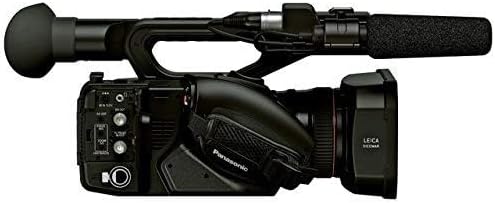
Image 3.2: Side view of the Panasonic AG-UX180 camcorder, illustrating the various input/output ports and control buttons for connectivity and operation.
4. Setup
4.1. Charging and Installing the Battery
- Connect the AC Adapter to the Battery Charger.
- Insert the 7.28V 43Wh Battery into the charger. The charging indicator will illuminate.
- Once charging is complete (indicator changes or turns off), remove the battery.
- Align the charged battery with the battery slot on the rear of the camcorder and slide it in until it clicks securely into place.
4.2. Inserting a Memory Card
- Locate the memory card slot on the camcorder (typically on the side or rear).
- Insert the 32GB SDHC Class 10 UHS-1 600X Flash Memory Card with the label facing the correct direction until it clicks. Ensure the card is fully seated.
- Note: For 4K and Ultra HD recording, higher speed memory cards (e.g., UHS-I Speed Class 3 or faster) are recommended to ensure stable recording performance. The included 600X card may be suitable for some HD recording but might be too slow for continuous 4K recording.
4.3. Attaching Accessories
- Lens Hood: Attach the lens hood to the front of the lens to prevent glare and protect the lens.
- Microphone Holder Kit: Secure the microphone holder to the designated mount on the camcorder's handle.
- External Lenses/Filters: Screw the 67mm Wide Angle Lens, Telephoto HD Lens, or various filters (UV, CPL, Close Up) onto the front of the camcorder's lens as needed.
- LED Video Light: Mount the Professional 160 LED Video Light onto the camcorder's accessory shoe. Ensure it is securely fastened.
- Wireless Microphone System: Connect the receiver of the Dual-Channel VHF Wireless Microphone System to the camcorder's audio input ports.
5. Operating the Camcorder
5.1. Powering On/Off
- To power on, slide the POWER switch to the ON position. The camcorder will boot up.
- To power off, slide the POWER switch to the OFF position.
5.2. Basic Recording
- Select your desired recording mode (e.g., 4K, UHD, FHD) via the menu system.
- Adjust exposure, focus, and white balance as required using the manual controls or automatic settings.
- Press the REC START/STOP button to begin recording. The recording indicator will illuminate.
- Press the REC START/STOP button again to stop recording.
5.3. Zoom Operation
The camcorder features a 20x optical zoom lens. You can control the zoom using the zoom rocker on the handle or the dedicated zoom ring on the lens.
- Zoom Rocker: Push the rocker gently for slow zoom, or firmly for fast zoom.
- Zoom Ring: Rotate the zoom ring on the lens for precise, manual zoom adjustments.
5.4. Manual Controls
Utilize the three manual lens control rings for precise adjustments:
- Focus Ring: Adjusts the focus manually.
- Zoom Ring: Controls the optical zoom.
- Iris Ring: Adjusts the aperture (f-stop) to control exposure.
6. Advanced Features
6.1. 16-Axis Color Correction
The 16-axis color correction function allows for highly detailed and precise color adjustments. Access this feature through the camcorder's menu system under 'Picture Adjust' or 'Color Settings'. You can fine-tune specific color ranges without affecting others, providing extensive creative control over your footage's look.
6.2. FHD Slow Motion Recording
To capture smooth slow-motion footage, set the recording format to FHD and select the 120 FPS option in the menu. This will allow for playback at standard frame rates (e.g., 24p, 30p) resulting in a slow-motion effect.
6.3. IR Night Shooting
Activate the IR (Infrared) shooting mode from the camcorder's menu to record in environments with minimal or no visible light. The camcorder will utilize infrared light to capture images, typically in monochrome.
7. Maintenance
7.1. Cleaning the Camcorder
- Body: Use a soft, dry cloth to wipe the camcorder body. For stubborn dirt, slightly dampen the cloth with water and then wipe dry. Avoid using harsh chemicals.
- Lens: Use the Blower Brush to remove dust. For smudges, apply a small amount of Lens Cleaning Solution to the Microfiber Cloth or Lens Tissue Paper and gently wipe the lens in a circular motion from the center outwards.
- Viewfinder/LCD Screen: Use a clean, soft cloth or the Microfiber Cloth to gently wipe the screen.
7.2. Storage
When not in use, store the camcorder in the provided Carrying Case in a cool, dry place away from direct sunlight and extreme temperatures. Remove the battery if storing for extended periods.
8. Troubleshooting
This section addresses common issues you might encounter. If the problem persists, please contact customer support.
| Problem | Possible Cause | Solution |
|---|---|---|
| Camcorder does not power on. | Battery is not charged or improperly installed. | Charge the battery fully and ensure it is correctly inserted. |
| Recording stops unexpectedly. | Memory card is full or too slow for the selected recording format. | Delete unnecessary files or use a higher-speed memory card, especially for 4K recording. |
| No audio from external microphone. | Microphone not connected properly or settings incorrect. | Check microphone connection, battery, and camcorder audio input settings. |
| Image is blurry. | Focus is not set correctly. | Adjust focus manually using the focus ring or enable autofocus. |
9. Specifications
Technical specifications for the Panasonic AG-UX180 4K Premium Professional Camcorder.
| Feature | Specification |
|---|---|
| Brand | Panasonic |
| Model Number | AG-UX180PJ |
| Item Weight | 21.4 pounds |
| Product Dimensions | 13.6 x 6.8 x 7.7 inches |
| Color | Black |
| Photo Sensor Technology | CMOS |
| Video Capture Resolution | 4K, UHD, FHD (480p ft, 720p listed as minimums) |
| Maximum Focal Length | 176 Millimeters |
| Maximum Aperture | f/1.76 (implied from 176 f) |
| Flash Memory Type | SD, SDHC |
| Video Capture Format | MP4, MOV, AVCHD |
| Supported Audio Format | AAC, MP3 |
| Screen Size | 5 Inches |
| Connectivity Technology | USB, Wireless |
10. Warranty and Support
10.1. Limited Warranty
The Panasonic AG-UX180 4K Premium Professional Camcorder comes with a Limited 1-Year Warranty from the date of purchase. This warranty covers manufacturing defects under normal use. Please retain your proof of purchase for warranty claims. For full terms and conditions, refer to the warranty card included with your product or visit the Panasonic support website.
10.2. Customer Support
For technical assistance, troubleshooting beyond this manual, or service inquiries, please contact Panasonic customer support. Contact information can typically be found on the official Panasonic website or in the documentation provided with your product.
Related Documents - AG-UX180PJ
 |
Panasonic DVX200 Camera: A Comprehensive Guide Explore the features, settings, and shooting techniques for the Panasonic DVX200 4K/UHD professional camcorder with this comprehensive guide by Barry Green. Ideal for filmmakers seeking to master advanced video production. |
 |
Panasonic AJ-PX380G/AJ-PX398MC AG-CVF15G/MC Exploded Views and Replacement Parts List Comprehensive guide to exploded views and replacement parts for Panasonic AJ-PX380G, AJ-PX398MC, and AG-CVF15G/MC camcorders. Includes detailed part lists, diagrams, and important safety notices for maintenance and repair. |
 |
Panasonic AG-AC90 HD Camcorder - Specifications and Features Detailed specifications and key features of the Panasonic AG-AC90, a professional HD camcorder with a wide-angle lens, high-sensitivity 3MOS sensors, and smooth manual ring operation. Includes information on recording formats, audio capabilities, and included accessories. |
 |
Panasonic AG-CX350 / AW-RP150 Connection Setup Guide This guide details the wired and wireless connection setup for Panasonic AG-CX350 camcorders with AW-RP150 PTZ camera controllers. It covers network configuration, software usage, and supported functions for professional video production systems. |
 |
Panasonic AG-CX350 4K Memory Card Camera Recorder Specifications Detailed specifications for the Panasonic AG-CX350 4K Memory Card Camera Recorder, including features, dimensions, recording formats, connectivity, and included accessories. |
 |
Panasonic AK-HRP1010 IP Connection Setup Guide A comprehensive guide to setting up IP connections for the Panasonic AK-HRP1010 remote camera control panel with various Panasonic cameras, covering network configuration, device selection, and authentication. |
Ask a question about this manual
Ask about setup, troubleshooting, compatibility, parts, safety, or missing instructions. Manuals+ will review the question and use this page’s manual context to help answer it.