
1. Product Overview
The SoulBay 36W Universal AC/DC Power Adapter (Model UC08U) is a versatile power supply designed for a wide range of household electronics requiring DC input from 3V to 12V. It features adjustable voltage settings and comes with 8 interchangeable adapter tips to ensure compatibility with various devices. This adapter is equipped with an advanced smart IC chip for protection against over-voltage, over-current, short circuits, and over-temperature.

Image 1: The SoulBay 36W Universal AC/DC Power Adapter, showcasing the main unit, various interchangeable tips, and the voltage adjustment key.
Key Features:
- Universal AC Input: 100-240V, 50/60Hz, 0.3A, suitable for worldwide use.
- Multi-Voltage DC Output: Selectable voltages of 3V, 4.5V, 5V, 6V, 7.5V, 9V, and 12V.
- High Current Output: Up to 3 Amps (3000mA) maximum, compatible with devices requiring less than 3A.
- 8 Interchangeable Adapter Tips: Includes 5.5*2.5mm, 4.8*1.7mm, 4.0*1.7mm, 3.5*1.35mm, 3.0*1.1mm, 2.5*0.7mm, Micro-USB plug, and an LED terminal connector.
- Safety Protections: Built-in smart IC chip provides protection against over-current, over-voltage, short circuits, and over-temperature.
- Positive Polarity Only: Designed for devices requiring positive polarity (center positive).
2. Setup and Installation
Before connecting the adapter to your device, carefully follow these steps to ensure correct voltage and tip selection.
- Verify Device Voltage: Check the required input voltage of your electronic device. This information is usually found on the device itself, its original power adapter, or in its instruction manual. The SoulBay adapter supports 3V, 4.5V, 5V, 6V, 7.5V, 9V, and 12V DC output.
- Set Adapter Voltage: Locate the red rotary switch on the adapter. Use the small key provided in the package to rotate the switch and align the arrow with your device's required voltage (e.g., 5V, 9V).
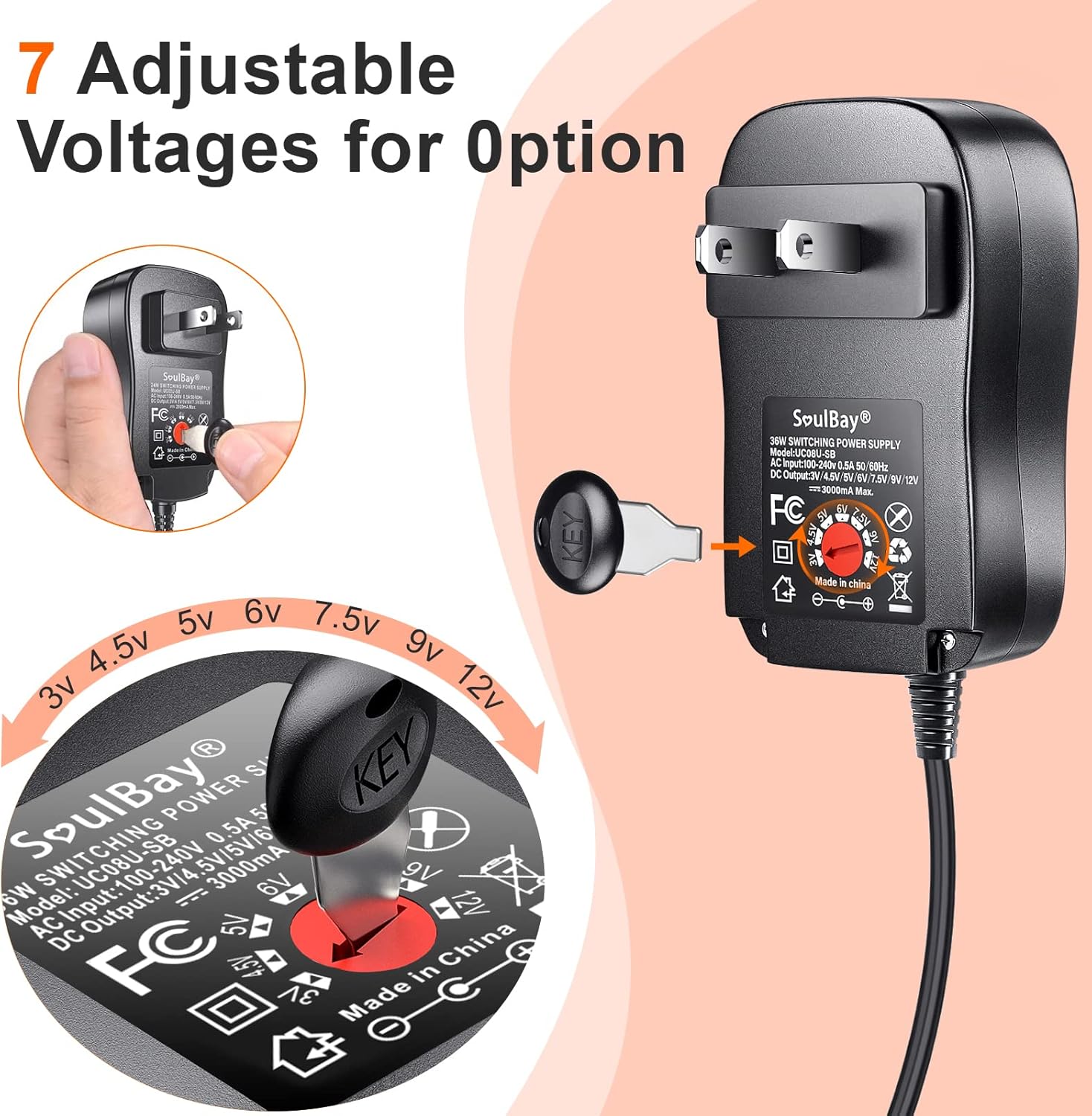
Image 2: Demonstrates how to use the small key to adjust the voltage setting on the adapter's rotary switch.
- Select Adapter Tip: Choose the adapter tip that physically fits your device's power input port. The adapter includes 8 different tips. Ensure a snug fit without forcing the tip.

Image 3: An illustration detailing the 8 different DC connector tips included with the adapter, along with their dimensions.
- Connect Tip to Adapter Cord: Attach the selected adapter tip to the end of the adapter's DC output cord.
- Verify Polarity: The SoulBay adapter is designed for center positive polarity only. Confirm that your device also requires center positive polarity. Connecting a center positive adapter to a center negative device can cause damage.
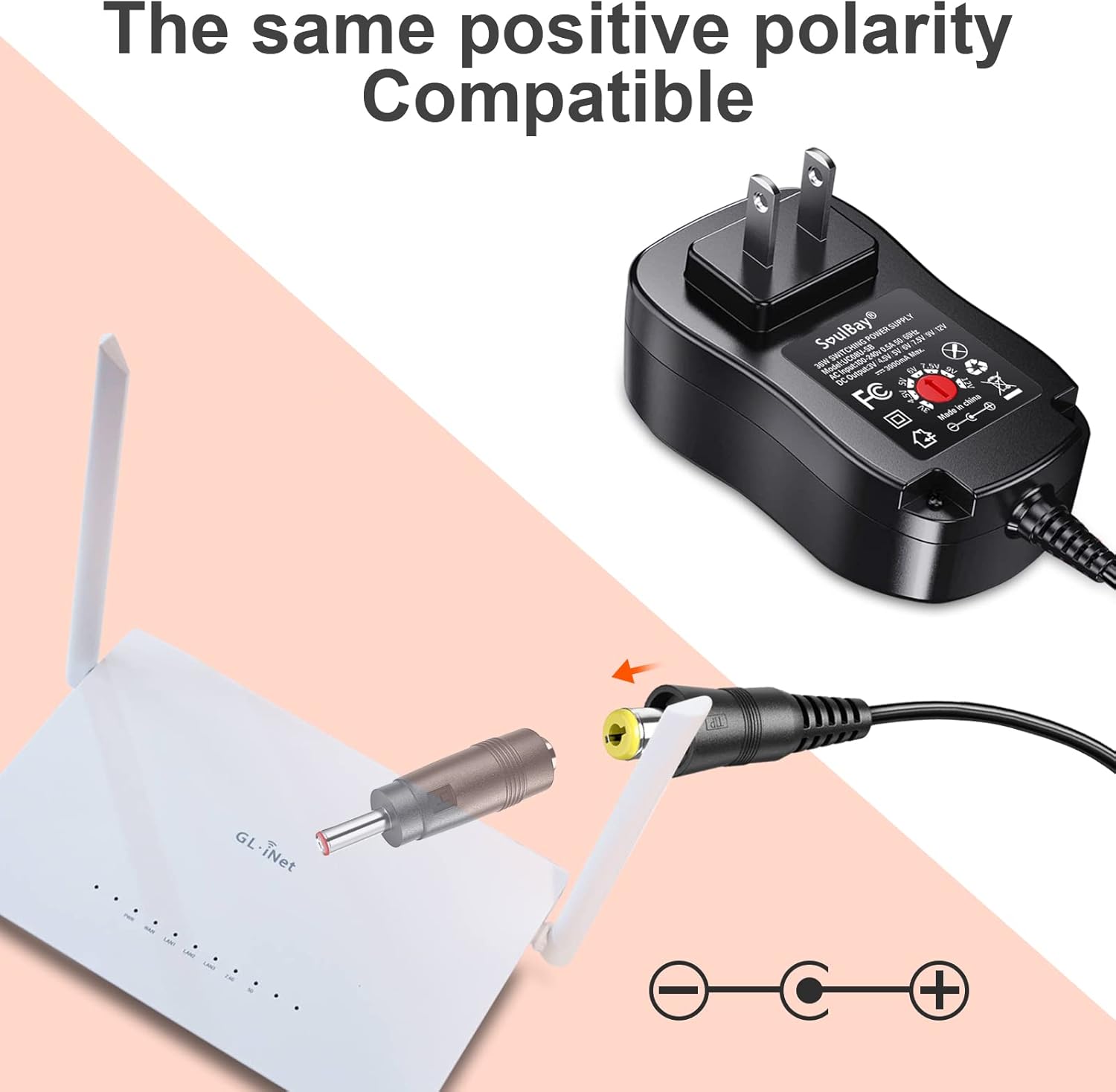
Image 4: Visual representation of the adapter's positive polarity, indicating compatibility with devices requiring center positive power.
- Connect to Device: Plug the adapter tip into your device's power input port.
- Connect to Power Outlet: Insert the AC adapter into a standard wall power outlet (100-240V). The device should now power on or begin charging.
Important Notes:
- Always confirm your device's voltage and polarity requirements before connecting.
- Do not force adapter tips if they do not fit properly.
- If the power supply indicator light flickers, disconnect the adapter immediately and re-check voltage and polarity settings.
3. Operating Instructions
Once properly set up, the SoulBay Universal AC/DC Power Adapter operates automatically. It provides a stable DC power supply to your connected electronic device.
General Usage:
- Ensure the adapter is placed in a well-ventilated area to prevent overheating.
- Avoid covering the adapter during operation.
- Disconnect the adapter from the power outlet when not in use for extended periods.
- This adapter is suitable for a variety of devices including routers, LED lamps, mini fans, light strips, humidifiers, CCTV cameras, mobile hard drives, and speakers.
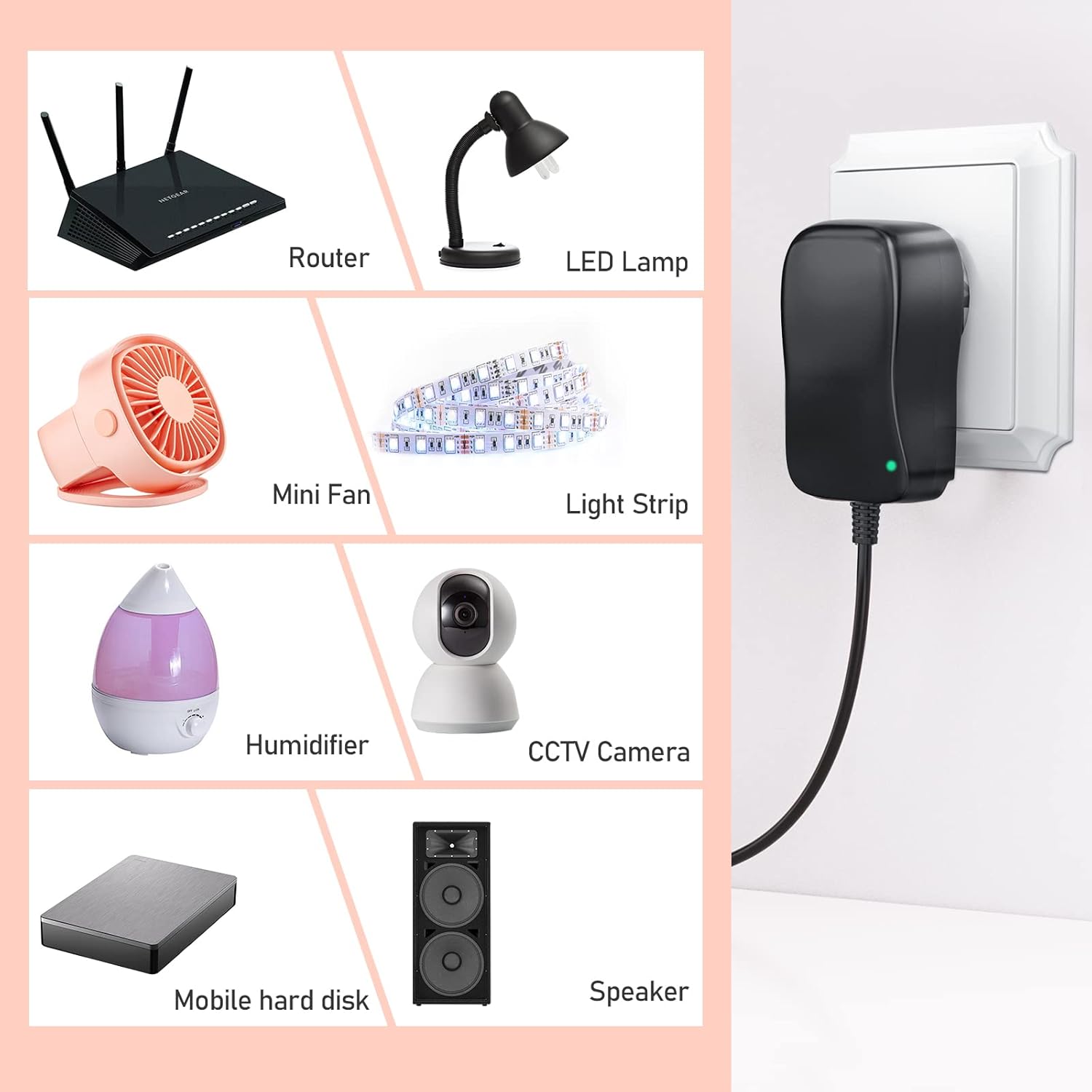
Image 5: A collage showing various household electronic devices such as routers, LED lamps, mini fans, and CCTV cameras that can be powered by this adapter.
4. Maintenance
Proper maintenance ensures the longevity and safe operation of your SoulBay AC/DC Power Adapter.
- Cleaning: Disconnect the adapter from the power outlet and your device before cleaning. Use a dry, soft cloth to wipe the surface. Do not use liquid cleaners or abrasive materials.
- Storage: Store the adapter in a cool, dry place away from direct sunlight and extreme temperatures.
- Handling: Avoid dropping the adapter or subjecting it to strong impacts. Do not pull the cord forcefully to unplug it from the wall or device.
- Inspection: Periodically inspect the adapter cord and housing for any signs of damage, such as cuts, fraying, or cracks. If damage is found, discontinue use and replace the adapter.
5. Troubleshooting
If you encounter issues with your SoulBay Universal AC/DC Power Adapter, refer to the following common problems and solutions:
| Problem | Possible Cause | Solution |
|---|---|---|
| Device not powering on/charging. | Incorrect voltage selected. | Verify and adjust the voltage setting on the adapter to match your device's requirement using the key. |
| Device not powering on/charging. | Incorrect adapter tip used or loose connection. | Ensure the correct tip is selected and securely connected to both the adapter cord and the device. |
| Device not powering on/charging. | Incorrect polarity. | Confirm your device requires center positive polarity. This adapter is center positive only. Using it with a center negative device will not work and may cause damage. |
| Power indicator light flickers. | Voltage or polarity mismatch, or unstable power. | Immediately disconnect the adapter. Re-check the voltage setting and polarity. Ensure the wall outlet is providing stable power. |
| Adapter feels excessively hot. | Overload or poor ventilation. | Disconnect the adapter. Ensure the connected device's current requirement does not exceed 3A. Place the adapter in a well-ventilated area, away from heat sources. |
If the problem persists after following these steps, please contact SoulBay customer support.
6. Specifications
| Feature | Detail |
|---|---|
| Model Number | UC08U |
| Input Voltage | AC 100-240V, 50/60Hz, 0.3A |
| Output Voltage | DC 3V, 4.5V, 5V, 6V, 7.5V, 9V, 12V (Adjustable) |
| Max Output Current | 3 Amps (3000mA) |
| Power Output | 36W Max |
| Polarity | Center Positive Only |
| Connector Type | Barrel Connector (with 8 interchangeable tips) |
| Included Components | AC 100-240V to DC Multi-Voltage Adapter, 8 Adapter Connectors, 1 Voltage Adjustment Key |
| Product Dimensions | 3.94 x 2.36 x 0.79 inches (Adapter unit) |
| Item Weight | 8.8 ounces |
| Color | Black |
| Certifications | CE/FCC |

Image 6: Detailed dimensions of the SoulBay power adapter unit and its cord length.
7. Warranty and Support
For warranty information or technical support, please contact SoulBay customer service. You can find more information and contact details on the official SoulBay store page:
