
Introduction
This manual provides essential instructions for the safe and efficient operation of your iLive Electronics ISBW108B Waterproof Fabric Wireless Speaker. Please read this manual thoroughly before using the device and retain it for future reference.
The ISBW108B is a portable Bluetooth speaker designed for wireless audio streaming. Its IPX5 waterproof rating and durable fabric construction make it suitable for various environments. It features a built-in microphone for hands-free calls and a rechargeable battery for portable use.
Package Contents
- iLive Electronics ISBW108B Waterproof Fabric Wireless Speaker
- Detachable carabiner clip
- Micro-USB to USB charging cable
- User's Guide (this document)
- Warranty information
Controls and Features
This image displays the top panel of the iLive ISBW108B speaker, highlighting the control buttons. From left to right, you can see the Volume Down (-) button, the Play/Pause button, the Power/Pairing button (with an illuminated ring), the Volume Up (+) button, the Bluetooth pairing indicator, and the Call Answer/End button. There are also small dots indicating the microphone location.
- Power/Pairing Button: Press and hold to power on/off. Short press to play/pause.
- Volume Up (+): Increases volume.
- Volume Down (-): Decreases volume.
- Call Answer/End Button: Answers incoming calls or ends current calls.
- Bluetooth Indicator: Flashes when pairing, solid when connected.
- Microphone: For hands-free speakerphone functionality.
- Micro-USB Port: For charging the internal battery.
- Carabiner Clip: Allows for easy attachment to bags or clothing.

This image shows the iLive ISBW108B speaker from an angled perspective, highlighting its cylindrical shape, fabric grille, and the detachable carabiner clip attached to its side. The clip allows for convenient portability.
Setup
Charging the Speaker
- Locate the Micro-USB charging port on the speaker, usually protected by a rubber flap.
- Connect the small end of the included Micro-USB to USB cable to the speaker's charging port.
- Connect the larger USB end of the cable to a powered USB port (e.g., computer, USB wall adapter).
- The LED indicator on the speaker will illuminate red during charging.
- The LED indicator will turn off once the battery is fully charged. A full charge provides approximately 2.5 hours of playback at 100% volume.
Powering On/Off
- To Power On: Press and hold the Power/Pairing button for a few seconds until you hear an audible prompt and the LED indicator lights up.
- To Power Off: Press and hold the Power/Pairing button again for a few seconds until you hear an audible prompt and the LED indicator turns off.
Bluetooth Pairing
- Ensure the speaker is powered on and within 60 feet of your Bluetooth-enabled device.
- The Bluetooth indicator light will flash, indicating it is in pairing mode.
- On your Bluetooth device (smartphone, tablet, etc.), go to the Bluetooth settings menu.
- Search for available devices and select "ISBW108B" from the list.
- Once successfully paired, the speaker will emit an audible confirmation, and the Bluetooth indicator light will become solid.
- The speaker will automatically attempt to reconnect to the last paired device when powered on.

This image shows a man relaxing on a couch, using his smartphone, with the iLive ISBW108B speaker placed on a table next to him. A Bluetooth logo is overlaid, emphasizing the speaker's wireless connectivity for streaming audio from compatible devices.
Operating
Playing Audio
- After successful Bluetooth pairing, begin playing audio from your connected device.
- Use the Play/Pause button on the speaker to control playback.
- Adjust the volume using the Volume Up (+) and Volume Down (-) buttons on the speaker or directly from your connected device.
Hands-Free Speakerphone
- When a call comes in while connected via Bluetooth, the speaker will ring.
- Press the Call Answer/End Button to answer the call.
- Speak into the built-in microphone on the speaker.
- Press the Call Answer/End Button again to end the call.
Maintenance
Cleaning
- Ensure the speaker is powered off and disconnected from any power source before cleaning.
- Use a soft, damp cloth to wipe the exterior of the speaker.
- Do not use harsh chemicals, cleaning solvents, or strong detergents.
- Ensure the rubber flap covering the charging port is securely closed to maintain IPX5 water resistance.
Storage
- Store the speaker in a cool, dry place away from extreme temperatures and direct sunlight.
- If storing for an extended period, charge the battery periodically to maintain its lifespan.
Troubleshooting
| Problem | Possible Cause | Solution |
|---|---|---|
| Speaker does not power on. | Battery is depleted. | Charge the speaker using the provided Micro-USB cable. |
| No sound from speaker. | Volume is too low or muted. Speaker not paired. | Increase volume on both the speaker and your connected device. Ensure the speaker is correctly paired via Bluetooth. |
| Cannot pair with Bluetooth device. | Speaker is not in pairing mode. Device is out of range. Interference. | Ensure speaker is powered on and Bluetooth indicator is flashing. Move device closer to speaker (within 60 feet). Turn off other Bluetooth devices temporarily. |
| Poor sound quality during calls. | Microphone obstruction. Low signal. | Ensure microphone is not covered. Move closer to the speaker. Check your phone's signal strength. |
Specifications

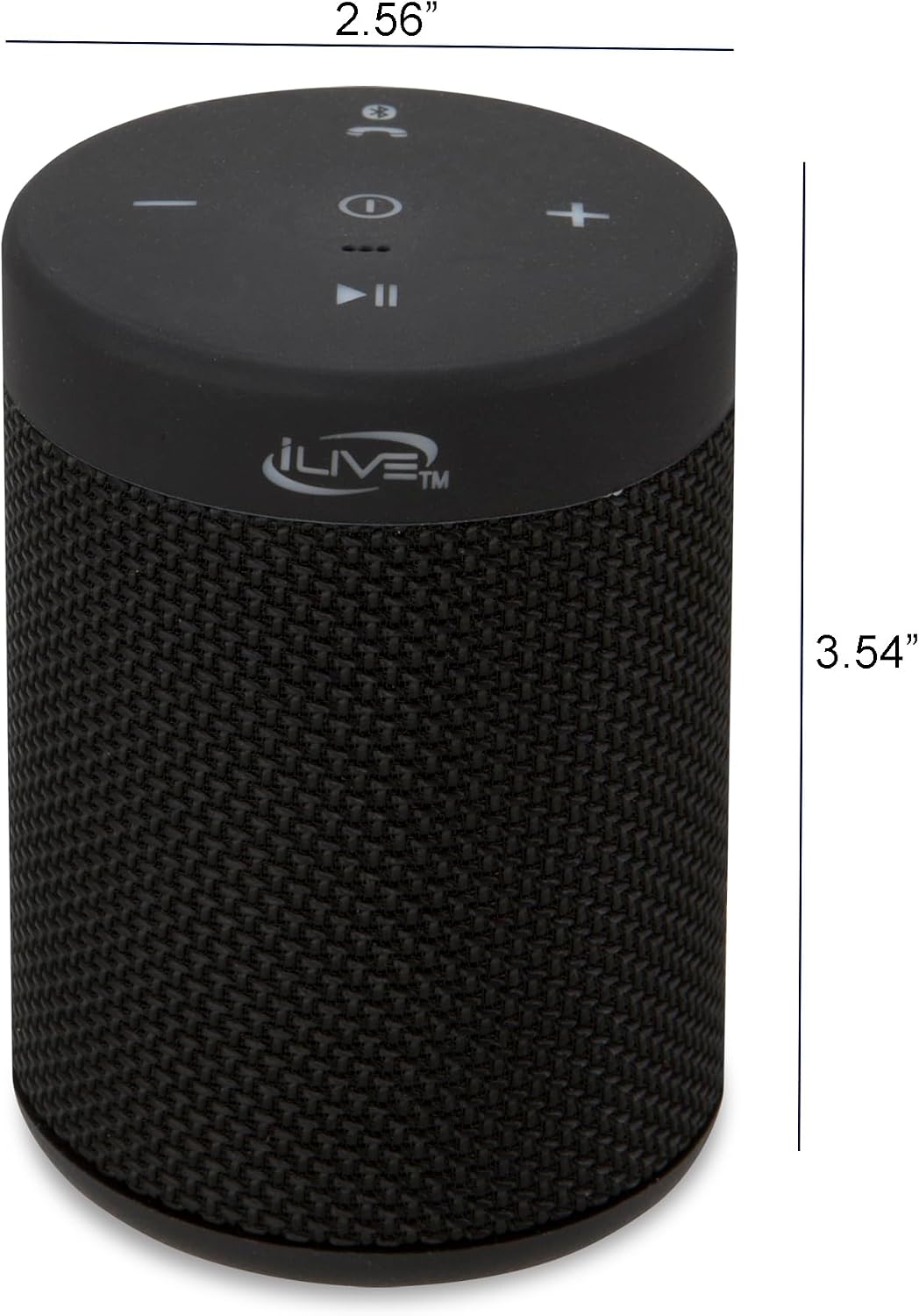
This image provides a clear visual representation of the iLive ISBW108B speaker's dimensions, showing a width of 2.56 inches, a depth of 2.56 inches, and a height of 3.4 inches. This helps users understand the compact size of the device.
- Model: ISBW108B
- Connectivity: Bluetooth, USB
- Wireless Range: 60 feet (18 meters)
- Water Resistance: IPX5 (Waterproof)
- Speaker Output Power: 3 Watts
- Speaker Size: 40 Millimeters
- Battery: Built-in Rechargeable Lithium Polymer
- Battery Life: Approximately 2.5 hours at 100% volume
- Controls: Volume Up/Down, Play/Pause, Pairing/Answer Phone
- Included Components: Speaker, Detachable Carabiner Clip, Micro-USB to USB Cable, User's Guide
- Product Dimensions: 3.4"D x 2.56"W x 2.56"H (8.6cm D x 6.5cm W x 6.5cm H)
- Item Weight: 9.9 ounces (281 grams)
- Material: Plastic with Fabric grille
- Color: Black
Warranty and Support
Limited Warranty
This product is covered by a limited warranty. Please refer to the warranty information included in your package for details regarding coverage, terms, and conditions. Retain your proof of purchase for warranty claims.
Customer Support
For technical assistance, troubleshooting, or warranty inquiries, please visit the iLive Electronics official website or contact their customer support department. Contact information can typically be found on the product packaging or the brand's website.
Safety Information
WARNING: This product can expose you to chemicals including lead, which is known to the State of California to cause cancer and birth defects or other reproductive harm. For more information go to www.P65Warnings.ca.gov. This product meets and complies with all Federal regulations.