Introduction
This manual provides instructions for the Gorilla babo Universal Remote Control, designed as a direct replacement for various Samsung TV models. This remote control operates without requiring any programming; simply insert batteries and begin use.
Product Overview
The Gorilla babo Universal Remote Control features a standard layout for easy navigation and control of your Samsung television. Below is an image of the remote with a description of its primary buttons.
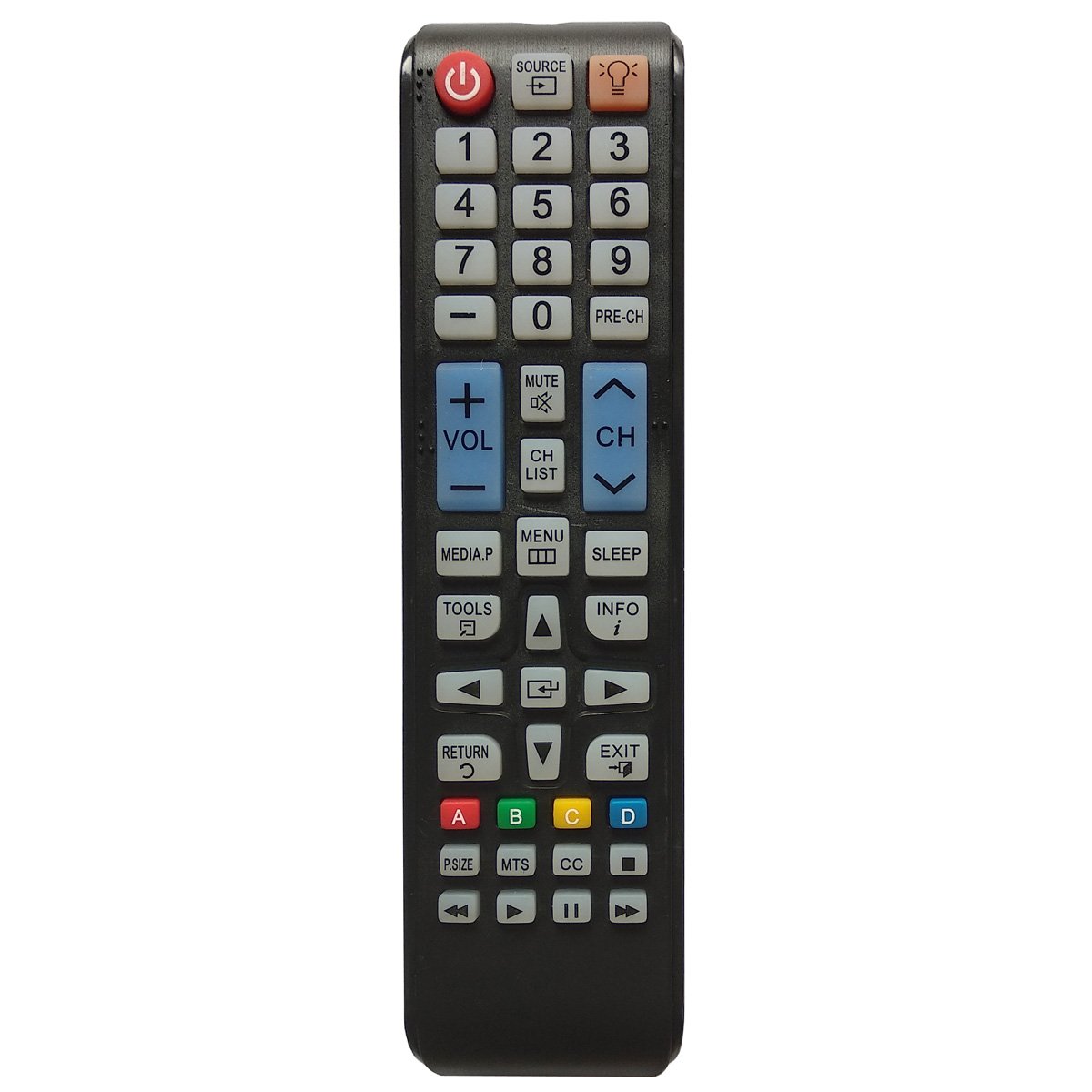
Image: Front view of the Gorilla babo Universal Remote Control, showing all buttons and their labels. The remote is black with white and blue buttons.
Key Button Functions:
- Power (Red Button): Turns the television on or off.
- Source: Selects input sources (e.g., HDMI 1, AV, TV).
- Number Pad (0-9): Directly enters channel numbers.
- PRE-CH: Returns to the previously viewed channel.
- VOL (+/-): Adjusts the volume level.
- MUTE: Silences the television audio.
- CH (Up/Down): Changes channels sequentially.
- CH LIST: Displays the channel list.
- MEDIA.P: Accesses media playback functions.
- MENU: Opens the television's main menu.
- SLEEP: Sets the sleep timer.
- TOOLS: Accesses quick settings or tools menu.
- INFO: Displays information about the current program or input.
- Navigation Arrows (Up, Down, Left, Right) & Enter: Navigates through menus and confirms selections.
- RETURN: Returns to the previous screen or menu.
- EXIT: Exits the current menu or function.
- Color Buttons (A, B, C, D): Used for specific functions within certain applications or menus.
- P.SIZE: Adjusts picture size or aspect ratio.
- MTS: Multi-channel Television Sound (e.g., SAP).
- CC: Activates or deactivates Closed Captions.
- Media Playback Controls (Rewind, Play, Pause, Fast Forward, Stop): Controls media playback.
Setup
1. Battery Installation
- Locate the battery compartment cover on the back of the remote control.
- Slide the cover downwards or press the latch and lift to open.
- Insert two (2) AAA batteries, ensuring the positive (+) and negative (-) terminals align correctly with the markings inside the compartment.
- Replace the battery compartment cover, sliding it back into place until it clicks securely.
2. Initial Use
This Gorilla babo Universal Remote Control is designed for immediate use with compatible Samsung TVs. No programming or code entry is required. After installing the batteries, point the remote control at your television and press the Power button to test its functionality.
Operating Instructions
To operate your Samsung TV using this remote control, simply point the remote directly at the television's infrared sensor and press the desired button. Ensure there are no obstructions between the remote and the TV.
- Power On/Off: Press the Power button once.
- Volume Adjustment: Press VOL + to increase volume, VOL - to decrease volume.
- Mute/Unmute: Press the MUTE button.
- Channel Change: Use CH Up or CH Down for sequential channel changes, or use the Number Pad to enter a specific channel number.
- Input Source Selection: Press the Source button to cycle through available input sources (e.g., HDMI, AV).
- Accessing Menus: Press the MENU button to open the TV's main menu. Use the Navigation Arrows and Enter button to navigate and select options.
- Exiting Menus: Press RETURN to go back one step, or EXIT to close the menu entirely.
- Media Playback: Use the dedicated media control buttons (Rewind, Play, Pause, Fast Forward, Stop) for compatible media devices connected to your TV.
Compatible TV Models
This universal remote control is compatible with a wide range of Samsung TV models, including but not limited to those typically using remote models such as AA59-00600A and TM1240. Specific compatible series include various PN, LT, T, and UN series models. For a comprehensive list, please refer to the product packaging or online product description.
Examples of compatible models include: PN43E440, PN51E450, UN19F4000, UN22F5000, UN32EH4050, UN32EH5000, UN40EH5000, UN46EH5000, UN50EH5000, UN55EH6000, UN60EH6000, and many others within these series.
Maintenance
- Cleaning: Wipe the remote control with a soft, dry cloth. Do not use liquid cleaners or abrasive materials.
- Battery Replacement: Replace batteries when the remote's response becomes sluggish or stops working. Always replace both batteries at the same time with new AAA batteries.
- Storage: If the remote will not be used for an extended period, remove the batteries to prevent leakage.
Troubleshooting
| Problem | Solution |
|---|---|
| Remote is not working. |
|
| Some buttons are not responding. |
|
| TV is not responding to the remote. |
|
Specifications
- Brand: Gorilla babo
- Model: TM1240 (Universal Replacement)
- Compatible Devices: Samsung Televisions
- Connectivity Technology: Infrared
- Power Source: 2 x AAA Batteries (not included)
- Dimensions: Approximately 8.11 x 4.8 x 1.22 inches
- Weight: Approximately 2.75 ounces (without batteries)
- Special Feature: Universal, no programming required
Warranty and Support
This Gorilla babo Universal Remote Control comes with a 60-day warranty from the date of purchase. For any questions, concerns, or support inquiries regarding your remote control, please contact the seller directly via email. Refer to your purchase documentation for specific contact details.
Note: This is a universal replacement remote and not an original Samsung product.


