
1. Introduction
Thank you for purchasing the AIRCRAFT QY66-D1 Drone. This quadcopter is equipped with a 6-axis gyro for enhanced stability, a 2.4GHz remote control for anti-interference operation, and features such as 360-degree rollover, headless mode, and one-key return. Please read this manual thoroughly before operating the drone to ensure safe and optimal performance.
This manual covers essential information regarding setup, operation, maintenance, and troubleshooting for your QY66-D1 drone.
2. Components Overview
Familiarize yourself with the main components of your AIRCRAFT QY66-D1 Drone and its remote control.

Figure 2.1: The AIRCRAFT QY66-D1 drone (beige) with its four propellers and protective guards, alongside the black remote control with orange joysticks and buttons.
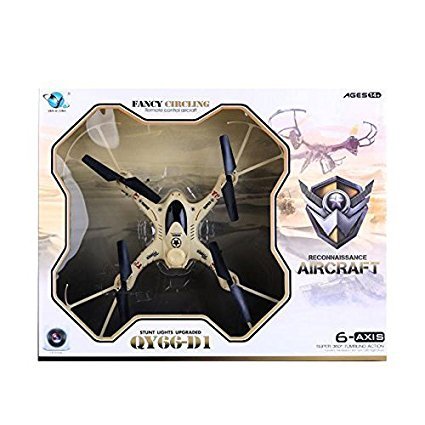
Figure 2.2: The retail packaging for the AIRCRAFT QY66-D1 drone, showcasing the drone inside a clear plastic mold within a cardboard box.
Drone Components:
- Propellers: Four rotating blades that provide lift and thrust.
- Motor: Powers the propellers.
- Protective Guards: Shields around the propellers to prevent damage.
- Landing Gear: Provides stable support for landing.
- Battery Compartment: Location for the drone's rechargeable battery.
- LED Lights: Indicate drone status and orientation.
Remote Control Components:
- Left Joystick: Controls throttle (ascend/descend) and yaw (rotate left/right).
- Right Joystick: Controls pitch (forward/backward) and roll (left/right sideward flight).
- Trim Buttons: Adjust drone's drift for stable hovering.
- Special Function Buttons: Activate features like Headless Mode, 3D Flips, and One Key Return.
- Power Switch: Turns the remote control on/off.
- Battery Compartment: Location for remote control batteries.
3. Setup
3.1 Battery Installation
- Drone Battery:
- Ensure the drone is powered off.
- Locate the battery compartment on the underside of the drone.
- Carefully insert the fully charged drone battery, ensuring correct polarity.
- Close the battery compartment securely.
- Remote Control Batteries:
- Open the battery cover on the back of the remote control.
- Insert the required batteries (e.g., AA batteries, not included) according to the polarity markings.
- Close the battery cover securely.
3.2 Pre-Flight Checklist
- Ensure both drone and remote control batteries are fully charged.
- Check that all propellers are securely attached and undamaged.
- Verify that the protective guards are properly installed.
- Choose an open, clear area for flight, free from obstacles, people, and animals.
- Avoid flying in strong winds or adverse weather conditions.
4. Operating Instructions
4.1 Pairing the Drone and Remote Control
- Place the drone on a flat, level surface.
- Turn on the drone's power switch. The LED lights on the drone will flash.
- Turn on the remote control's power switch.
- Push the left joystick (throttle) all the way up, then pull it all the way down. You will hear a beep, and the drone's LED lights will become solid, indicating successful pairing.
4.2 Take-off and Landing
- Manual Take-off: After pairing, slowly push the left joystick (throttle) upwards. The propellers will start spinning, and the drone will ascend.
- Manual Landing: Slowly pull the left joystick (throttle) downwards until the drone lands gently. Once on the ground, pull the joystick all the way down to stop the motors.
4.3 Basic Flight Controls
- Ascend/Descend: Push the left joystick up to ascend, pull down to descend.
- Forward/Backward: Push the right joystick up to fly forward, pull down to fly backward.
- Left/Right Sideward Flight: Push the right joystick left to fly left, push right to fly right.
- Turn Left/Right (Yaw): Push the left joystick left to rotate left, push right to rotate right.
4.4 Advanced Features
- Headless Mode: Press the Headless Mode button. In this mode, the drone's orientation is relative to the pilot, regardless of the drone's actual front. This simplifies control for beginners.
- 3D Flips and Rolls: Press the 3D Flip button, then quickly push the right joystick in any direction (forward, backward, left, or right) to perform a 360-degree flip.
- One Key Return: Press the One Key Return button. The drone will attempt to fly back towards its take-off point. Note: This feature is based on the drone's initial orientation and is not GPS-guided.
5. Maintenance
5.1 Cleaning
- Regularly clean the drone body with a soft, dry cloth.
- Remove any dust or debris from the motors and propellers to ensure smooth operation.
- Avoid using water or liquid cleaners directly on the drone's electronic components.
5.2 Propeller Replacement
- If a propeller is damaged or bent, replace it immediately.
- Ensure you use the correct replacement propellers (A and B types) and install them on the corresponding motor arms.
- Carefully remove the old propeller and firmly attach the new one.
5.3 Battery Care and Storage
- Always use the original charger provided with the drone.
- Do not overcharge or over-discharge the battery.
- Store the drone and remote control in a cool, dry place away from direct sunlight and extreme temperatures.
- Remove batteries from the remote control if not in use for extended periods.
6. Troubleshooting
| Problem | Possible Cause | Solution |
|---|---|---|
| Drone does not respond to remote control. | Not paired; low battery; remote control off. | Ensure drone and remote are on and paired correctly. Charge/replace batteries. |
| Drone flies erratically or drifts. | Uncalibrated gyro; damaged propeller; strong wind. | Recalibrate the gyro (refer to remote control instructions). Replace damaged propellers. Fly in calm conditions. |
| Short flight time. | Battery not fully charged; aging battery. | Ensure battery is fully charged before each flight. Consider replacing old batteries. |
| Propellers do not spin. | Not paired; motor issue; obstacle. | Ensure proper pairing. Check for any obstructions around motors/propellers. |
7. Specifications
| Feature | Detail |
|---|---|
| Model Name | QY66 D1 |
| Brand | AIRCRAFT |
| Control Type | Remote Control (2.4GHz) |
| Gyro | 6-Axis Gyro |
| Special Features | 360-degree Flip, Headless Mode, One Key Return, Rechargeable |
| Maximum Range | Up to 40 meters |
| Item Weight | 250 Grams |
| Material | Plastic |
| Recommended Age | 14 years and up |
| Batteries | Drone: Rechargeable (included); Remote: Not included |
| Package Dimensions | 42 x 34 x 8 cm |
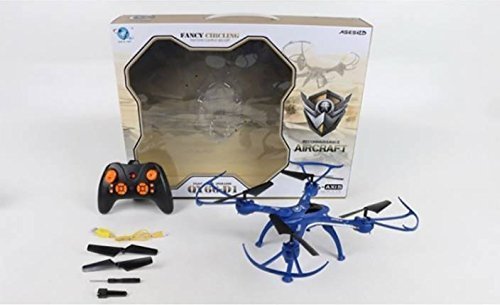
Figure 7.1: The AIRCRAFT QY66-D1 drone in blue, shown with its remote control and various accessories including spare propellers and a charging cable, all within its packaging.
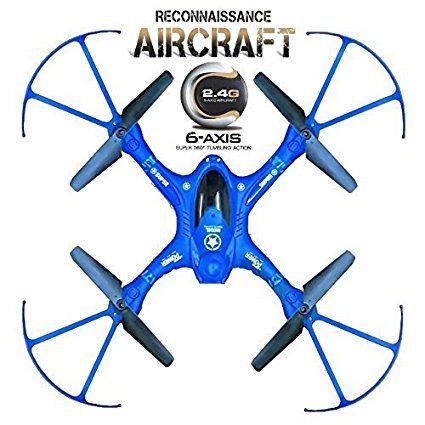
Figure 7.2: Top-down view of the AIRCRAFT QY66-D1 drone in blue, highlighting its 6-axis gyro and 2.4GHz communication capabilities.
8. Warranty and Support
This product is manufactured by EFFY SHOPPY. For any technical support or warranty inquiries, please refer to the contact information provided at the point of purchase or on the product packaging. Specific warranty terms and conditions may vary and are typically outlined by the retailer or manufacturer.
Always ensure you purchase from authorized sellers to guarantee product authenticity and access to support services.