
EUREKA ERGONOMIC Z2
EUREKA ERGONOMIC Z2 Gaming Desk Instruction Manual
Model: Z2
Product Overview
The EUREKA ERGONOMIC Z2 Gaming Desk is designed for an enhanced gaming and working experience, featuring a robust Z-shaped structure, integrated RGB LED lighting, and convenient accessories. This manual provides essential information for assembly, operation, maintenance, and troubleshooting.

Figure 1: Fully assembled EUREKA ERGONOMIC Z2 Gaming Desk.
This image displays the EUREKA ERGONOMIC Z2 Gaming Desk in a complete setup, showcasing its carbon fiber textured surface, integrated RGB lighting, and accessories like the headset hook and cup holder. A monitor, keyboard, and mouse are positioned on the desk, illustrating its functional layout.
Setup and Assembly
Careful assembly is crucial for the stability and longevity of your gaming desk. All necessary tools are included. It is recommended that two people assemble the desk for ease and safety.
- Unpack Components: Carefully remove all parts from the packaging. Verify that all components listed in the included assembly guide are present.
- Review Instructions: Familiarize yourself with the pictorial assembly instructions provided. Pay close attention to the orientation of parts.
- Assemble Frame: Begin by assembling the Z-shaped alloy steel frame. Ensure all bolts are securely tightened, but do not overtighten until the entire frame is aligned.
- Attach Desktop: Carefully place the carbon fiber textured desktop onto the assembled frame. Secure it using the designated fasteners.
- Install Accessories: Attach the retractable cup holder, headset hook, and any cable management trays as per the instructions.
- Adjust Leveling Feet: Once assembled, adjust the leveling feet at the base of the desk to ensure it is stable and level on your floor.
Assembly Tip: While assembly is generally straightforward, some users have noted that the instructions are primarily pictorial. Take your time to ensure correct alignment of all pieces before fully tightening fasteners.
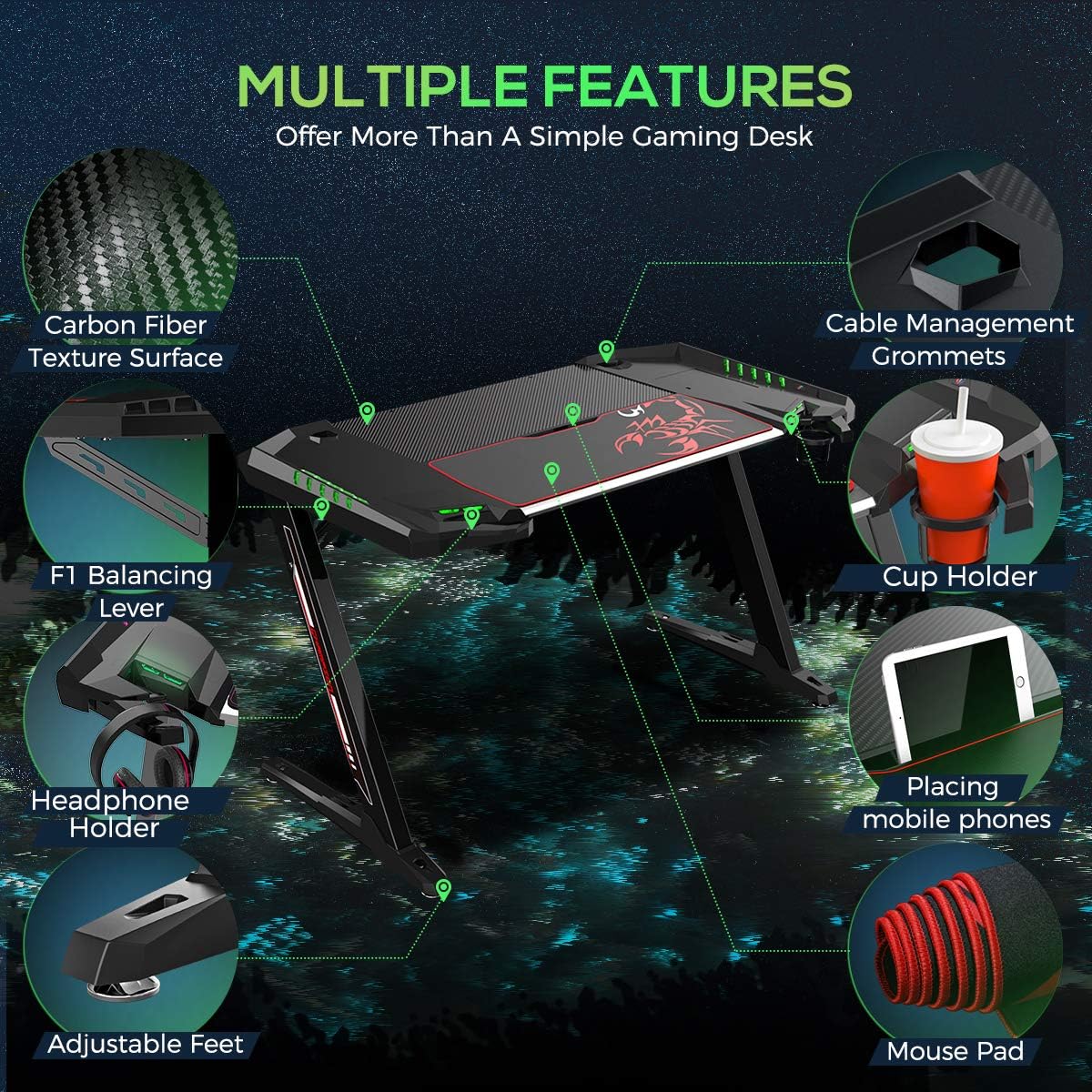
Figure 2: Desk construction details and dimensions.
This diagram illustrates the robust construction of the EUREKA ERGONOMIC Z2 Gaming Desk, highlighting its heavy-duty frame and key dimensions. It also indicates the maximum load capacity of 160 lbs, emphasizing the desk's durability.
Operating Features
Your EUREKA ERGONOMIC Z2 Gaming Desk comes equipped with several features designed to enhance your user experience:
- RGB LED Lighting: The desk features integrated RGB LED lights. Use the control button to cycle through 7 different colors and two modes: single color mode and gradient color mode. The lights are powered via a USB connection.
- Retractable Cup Holder: A convenient cup holder is located on the side of the desk. It can be retracted when not in use to save space. Note that cups with a tapered bottom may fit best.
- Headset Hook: A dedicated hook is provided for hanging your gaming headset, keeping it easily accessible and off the desktop.
- Mobile Device Slot: A slot is integrated into the desktop to securely hold your smartphone or tablet, keeping it within your line of sight.
- Cable Management System: The desk includes a storage box for power strips and two wire management trays to help organize and conceal cables, maintaining a tidy setup.
- Ergonomic Incline: The desk surface features a 5-degree ergonomic incline in the keyboard and mouse area, designed for comfortable long-term use. A large mouse pad is included to cover this area.

Figure 3: Multiple features of the Z2 Gaming Desk.
This image provides a detailed overview of the various features integrated into the EUREKA ERGONOMIC Z2 Gaming Desk, such as the carbon fiber texture, cable management grommets, cup holder, mobile device slot, headphone holder, adjustable feet, and the included mouse pad.

Figure 4: Headphone and Cup Holders.
This close-up image highlights the E-Sports Rotatable Headphone Holder and the Scorpion Bionic Adjustable Cup Holder, demonstrating their design and functionality for convenient storage of accessories.
Maintenance
Proper maintenance will ensure the longevity and appearance of your EUREKA ERGONOMIC Z2 Gaming Desk.
- Cleaning the Surface: Use a soft, damp cloth to wipe down the carbon fiber textured surface. Avoid abrasive cleaners or harsh chemicals that could damage the finish.
- Dusting: Regularly dust the desk, especially around the RGB LED lights and cable management areas, to prevent dust buildup.
- Weight Distribution: Distribute weight evenly across the desktop. Do not exceed the maximum weight limit of 160 lbs (approximately 72.5 kg) to prevent damage or tipping.
- Cable Management: Periodically check and adjust cables within the management system to ensure they are not pinched or strained.
Troubleshooting
This section addresses common issues you might encounter with your gaming desk.
| Problem | Possible Cause | Solution |
|---|---|---|
| RGB Lights not working or changing modes. | Loose USB connection; power issue; control button malfunction. | Ensure the USB cable for the lights is securely connected to a powered USB port. Try a different USB port. If the issue persists, contact customer support. Note: Lights cannot be turned off without unplugging the desk from the PC. |
| Desk feels wobbly after assembly. | Uneven floor; loose fasteners; incorrect assembly. | Adjust the leveling feet at the base of the desk to compensate for uneven flooring. Check all assembly fasteners and tighten them securely. Review assembly instructions to ensure all parts are correctly installed. |
| Cup holder does not fit my cup. | Cup diameter is too large or too small at the base. | The cup holder is designed for cups with a tapered bottom, where the base is smaller than the top, allowing it to rest securely. Ensure your cup's bottom diameter is small enough to pass through the ring, but its top diameter is larger than the ring. |
| Cable management tray is too small for my power strip. | Power strip dimensions exceed the tray's capacity. | The integrated storage box is designed for standard power strips. If your power strip is too large, consider using a smaller one or an external cable management solution. |
Specifications
| Attribute | Detail |
|---|---|
| Brand | EUREKA ERGONOMIC |
| Model Number | Z2 |
| Product Dimensions (D x W x H) | 27"D x 50.62"W x 30.93"H (68.58 cm D x 128.57 cm W x 78.56 cm H) |
| Color | Black |
| Style | Z2 Gaming Desk |
| Base Material | Alloy Steel |
| Top Material Type | Melamine with Carbon Fiber Texture |
| Finish Type | Laminated |
| Special Feature | Ergonomic, RGB LED Lights, Retractable Cup Holder, Headset Hook, Mobile Device Slot, Cable Management |
| Recommended Uses | Gaming, Working |
| Item Weight | 19 Kilograms (41.89 lbs) |
| Maximum Weight Recommendation | 160 Pounds (72.5 kg) |
| Maximum Tilt Angle | 5 Degrees (Ergonomic Incline) |
| Required Assembly | Yes |
| Includes All Assembly Tools | Yes |
Warranty and Support
The EUREKA ERGONOMIC Z2 Gaming Desk comes with a Limited Warranty. For specific details regarding warranty coverage, duration, and terms, please refer to the warranty card included with your product or visit the official EUREKA ERGONOMIC website.
For technical support, assembly assistance, or any product-related inquiries, please contact EUREKA ERGONOMIC customer service. Contact information can typically be found on the product packaging, the official brand website, or through your point of purchase.
You can also visit the EUREKA ERGONOMIC Store on Amazon for additional product information and support resources.