Introduction
This universal remote control is designed to operate a wide range of T-CL, Thomson, and ERISSON LCD, LED, and HD Smart TVs. It provides most of the functions found on original remote controls, offering a convenient replacement or secondary remote. This manual will guide you through the setup, operation, and maintenance of your new remote control.

Image: Front view of the CHUNGHOP Universal Remote Control, showing its black body and various function buttons including number pad, navigation, volume, channel, and dedicated Smart TV/YouTube buttons.
Setup
Battery Installation
- Locate the battery compartment on the back of the remote control.
- Slide the battery cover downwards or press the latch and lift to open.
- Insert two AAA 1.5V batteries, ensuring the positive (+) and negative (-) terminals align correctly with the markings inside the compartment.
- Replace the battery cover by sliding it back into place until it clicks securely.
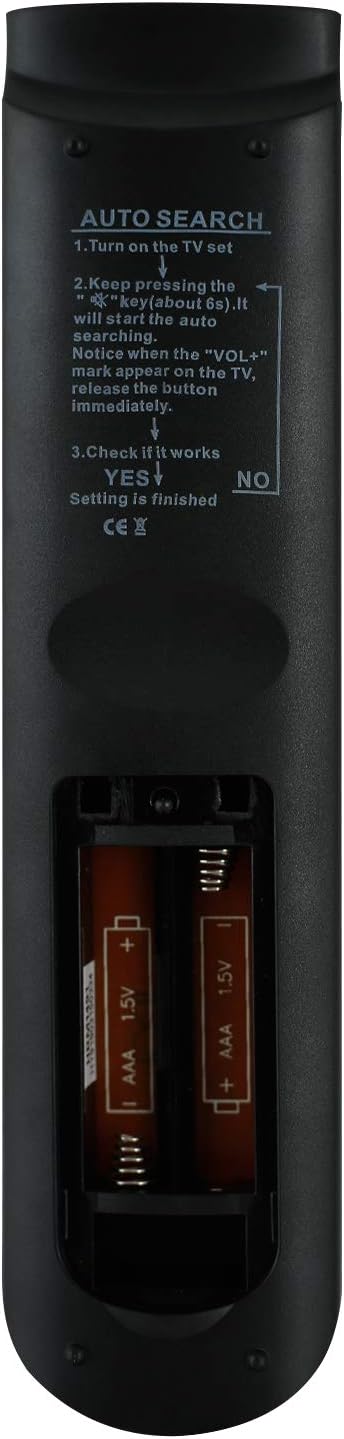
Image: Back view of the remote control with the battery compartment open, showing the slots for two AAA batteries with polarity markings.
Initial Pairing (Auto Search Function)
This remote control features an auto-search function for easy pairing with your TV. Follow these steps:
- Turn on your TV manually.
- Point the remote control towards the TV.
- Press and hold the "SET" button (if available, otherwise try holding the "POWER" button and "CH+" simultaneously for a few seconds) until the indicator light on the remote stays lit.
- While the indicator light is on, press and hold the "VOL+" button. The remote will begin searching for the correct code.
- Observe your TV screen. As soon as the volume bar appears, immediately release the "VOL+" button. This indicates the remote has found the correct code.
- Test other functions like power, channel, and menu. If all functions work correctly, the setup is complete. If not, repeat the auto-search process.

Image: Back view of the remote control, displaying printed "AUTO SEARCH" instructions for pairing the remote with a television.
Operating Instructions
Once paired, the remote control operates similarly to your original TV remote. Below are common button functions:
- Power Button (⏻): Turns the TV on or off.
- Mute Button (🔇): Mutes or unmutes the TV sound.
- Number Pad (0-9): Directly enters channel numbers.
- Volume Up/Down (VOL +/-): Adjusts the volume level.
- Channel Up/Down (CH +/-): Changes the TV channel.
- Navigation Buttons (Up, Down, Left, Right, OK): Navigates through TV menus and confirms selections.
- Source Button: Selects input sources (HDMI, AV, etc.).
- Menu Button: Opens the TV's main menu.
- Return Button: Goes back to the previous screen or menu.
- Exit Button: Exits the current menu or function.
- Smart TV Button: Direct access to Smart TV features.
- YouTube Button: Direct access to the YouTube application.
- F1, F2, F3, F4 Buttons: These are often programmable or have specific functions depending on the TV model (e.g., MTS, 3D, DEMO).
Note: Some keys may not function identically to your original remote, or may not be supported by all TV models.
Maintenance
- Cleaning: Use a soft, dry cloth to clean the remote control. Do not use liquid cleaners or abrasive materials.
- Battery Replacement: Replace batteries when the remote's response becomes sluggish or it stops working. Always replace both batteries at the same time with new ones of the same type (AAA 1.5V).
- Storage: If the remote will not be used for an extended period, remove the batteries to prevent leakage and damage. Store in a cool, dry place.
- Avoid Damage: Do not drop the remote, expose it to extreme temperatures, or immerse it in water.
Troubleshooting
| Problem | Possible Cause / Solution |
|---|---|
| Remote not working. |
|
| Some buttons do not work. |
|
| TV does not respond to remote. |
|
Specifications
- Brand: CHUNGHOP
- Model: TC-97E PLUS (Compatible with RC3000E01, RC3000E02, 08-RC3000E-RM201AA, TLC-925, RC200)
- Connectivity Technology: Infrared
- Compatible Devices: Television (T-CL, Thomson, ERISSON Smart TVs)
- Max Number of Supported Devices: 1
- Power Source: 2 x AAA 1.5V Batteries (not included)
- Operable Distance: More than 8 meters
- Product Dimensions: 5.12 x 1.57 x 0.59 inches
- Item Weight: 3.2 ounces
- Manufacturer: HUAYU
- Country of Origin: China
Warranty and Support
This product is manufactured by HUAYU under the CHUNGHOP brand. For specific warranty information or technical support, please refer to the seller's return policy or contact the seller directly through the platform where the product was purchased. The product description indicates a replacement remote control unit that should work as well as the originals.
If your TV model number is not explicitly listed as compatible, please contact the seller for verification before purchase or for assistance with pairing.