
1. Product Overview
The iGANK Smart Wristband T5 is a lightweight sports fitness bracelet designed to track daily activity. It features a 3D acceleration sensor for accurate movement capture, monitors walking distance, and calculates calories burned. The wristband displays time and date and has a long battery life.

Image 1.1: The iGANK T5 Smart Wristband in orange, displaying the current time. This image shows the sleek design and digital display of the device.
2. Setup
2.1 Charging the Device
The iGANK T5 Smart Wristband features a direct USB charging mechanism, eliminating the need for a separate charging cable.
- Gently remove one end of the wristband to reveal the integrated USB connector.
- Insert the USB connector directly into a standard USB port on a computer or a mobile power adapter. Ensure the connector is inserted in the correct orientation; if it does not charge, try flipping it over.
- The device will indicate charging status on its display. A full charge typically provides up to one week of battery life.

Image 2.1: The iGANK T5 Smart Wristband with one end detached, revealing the integrated USB connector for direct charging. This image illustrates how to access the charging port.
2.2 Initial Power On and Wearing
After charging, the device should power on automatically. Securely fasten the wristband on your wrist. Ensure it is snug but comfortable for accurate activity tracking.
3. Operating the Device
3.1 Button Functions
The iGANK T5 Smart Wristband operates with a single touch-sensitive button located on the front of the device.
- Single Press: A single press of the button will cycle through different display modes, including time, date, steps taken, distance covered, and calories burned.
- Long Press: A long press may activate specific functions or settings, depending on the current mode. Refer to the display for on-screen prompts.
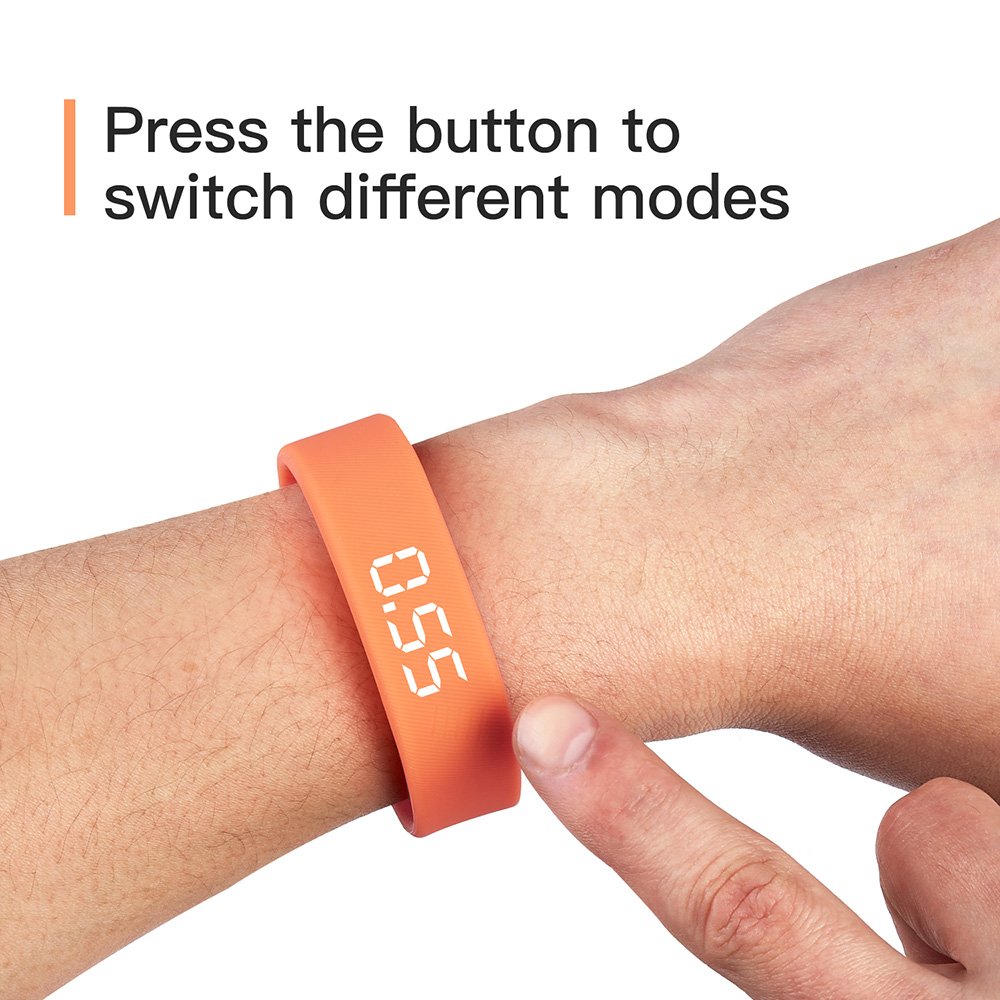
Image 3.1: A hand demonstrating how to press the button on the iGANK T5 Smart Wristband to switch between different display modes.
3.2 Activity Tracking
The wristband continuously monitors your activity throughout the day.
- Steps and Distance: The 3D acceleration sensor accurately records your steps and calculates the distance traveled.
- Calories Burned: Based on your activity, the device estimates the calories you have burned.
- Stationary Time: The wristband also tracks periods of inactivity.
3.3 Time and Date Display
Touch the button to view the current time and date. The format displayed is time/date.
4. Maintenance
4.1 Cleaning
To maintain hygiene and device longevity, regularly clean your wristband.
- Wipe the wristband and display with a soft, damp cloth.
- Avoid using harsh chemicals or abrasive cleaners, as these can damage the material and electronic components.
- Ensure the USB charging port is free from dust and debris.
4.2 Battery Care
The iGANK T5 Smart Wristband is equipped with a polymer battery designed for extended use.
- Charge the device fully when the battery indicator is low to prolong battery life.
- Avoid exposing the device to extreme temperatures, which can affect battery performance.
5. Troubleshooting
5.1 Charging Issues
- Device not charging: Ensure the USB connector is fully inserted into the USB port and in the correct orientation. Try a different USB port or power adapter.
- Slow charging: Ensure the power source provides sufficient current (e.g., a computer USB 3.0 port or a dedicated wall adapter).
5.2 Inaccurate Activity Tracking
- Steps or distance seem incorrect: Ensure the wristband is worn snugly on your wrist. Loose fitting can affect sensor accuracy.
- Device not responding: If the device becomes unresponsive, try fully discharging the battery and then recharging it.
6. Specifications
| Feature | Specification |
|---|---|
| Model | T5 |
| Brand | iGANK |
| Item Weight | 18 g |
| Battery Cell Composition | Polymer |
| Typical Battery Life | Up to 1 week |
| Wristband Length | 215 mm |
| Wristband Width | 17 mm |

Image 6.1: Views of the iGANK T5 Smart Wristband from the front and back, along with its key dimensions (length 215mm, width 17mm).