
Arctic-Pro 21599
Arctic-Pro Mini Desk Oscillating Tower Fan User Manual
Model: 21599
Introduction
This manual provides important information regarding the safe operation, installation, and maintenance of your Arctic-Pro Mini Desk Oscillating Tower Fan. Please read this manual thoroughly before using the product and retain it for future reference.
The Arctic-Pro Mini Desk Oscillating Tower Fan is designed to provide personal cooling with its compact size and quiet operation. It features two speed settings and a 75-degree oscillation function for effective air circulation in small spaces such as offices, bedrooms, and cubicles.
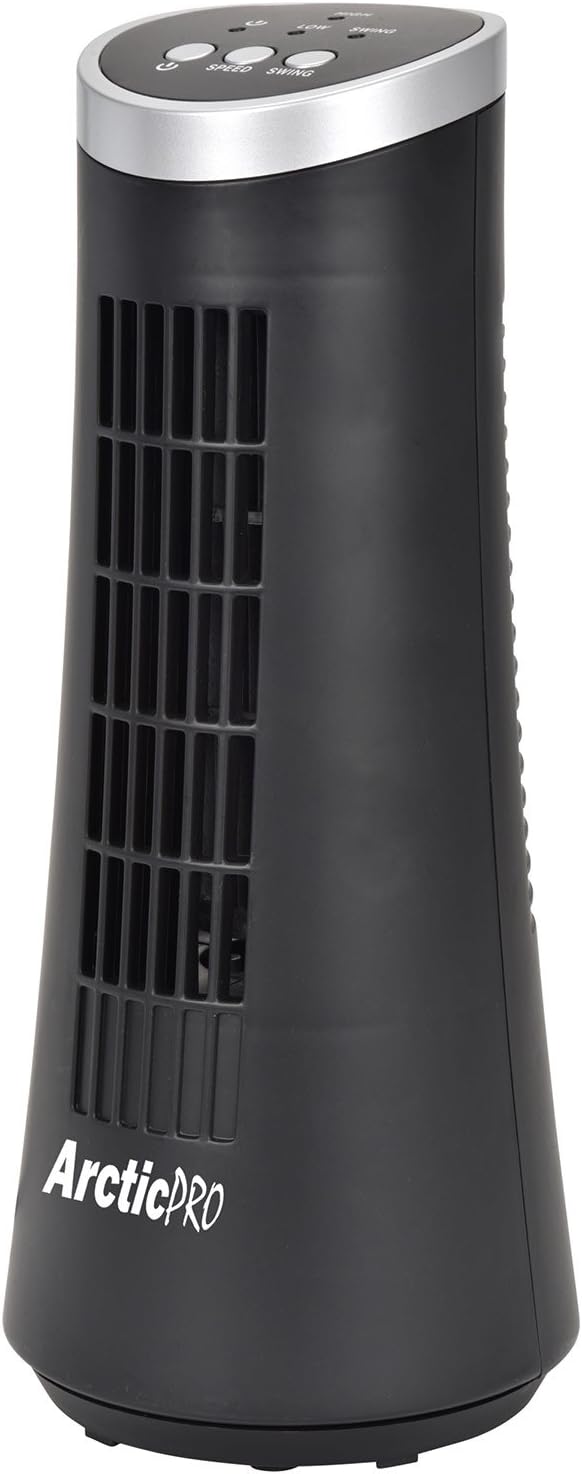
Figure 1: Arctic-Pro Mini Desk Oscillating Tower Fan, a compact black tower fan with a silver top panel.
Product Features and Components
Familiarize yourself with the key features and components of your fan for optimal use.
- Whisper Quiet Operation: Engineered to produce minimal operational noise, ensuring no distractions during work or sleep.
- Portable and Compact Design: Features a convenient carrying handle for easy transport between rooms. Ideal for desks, nightstands, and small spaces. Dimensions: 5 x 12 inches.
- Two Speed Settings: Adjustable airflow from Low to High wind via electronic touch controls with LED indicators.
- 75-Degree Oscillation: Provides wide-angle air distribution and circulation to cool your entire area effectively.
- Electronic Touch Controls: Intuitive controls located on the top panel for power, speed, and oscillation.

Figure 2: Overview of fan components, highlighting the user controls on top, the front grill, the handle on the back, and the oscillating base.
Setup
The Arctic-Pro Mini Desk Oscillating Tower Fan requires no assembly. Simply remove it from its packaging and place it on a stable, flat surface.
- Unpack the fan carefully from its box.
- Place the fan on a firm, level surface, ensuring adequate space around it for air circulation and oscillation.
- Plug the power cord into a standard electrical outlet (AC 120V, 60Hz).
Figure 3: The product packaging, indicating the fan is ready to use out of the box.
Operating Instructions
The fan is operated using the touch controls located on the top panel.

Figure 4: Detailed view of the fan's touch control panel, showing buttons for On/Off, Speed (Low/High), and Oscillation (Swing).
- Power On/Off: Press the Power button to turn the fan on or off. An LED indicator will illuminate when the fan is on.
- Adjusting Speed: Press the Speed button to cycle between Low and High speed settings. Corresponding LED indicators will show the selected speed.
- Oscillation Control: Press the Swing button to activate or deactivate the 75-degree oscillation function. When active, the fan will rotate from side to side to distribute air across a wider area.
Maintenance and Care
Regular cleaning and proper care will ensure the longevity and efficient operation of your fan.
- Cleaning:
- Always unplug the fan from the power outlet before cleaning.
- Use a soft, damp cloth to wipe the exterior surfaces of the fan. Do not use abrasive cleaners or solvents.
- To clean the fan grill, use a vacuum cleaner with a brush attachment to remove dust and debris. Do not attempt to disassemble the fan for cleaning.
- Storage:
- If storing the fan for an extended period, clean it thoroughly and place it back in its original packaging or a suitable box.
- Store the fan in a cool, dry place, away from direct sunlight and extreme temperatures.
Note: Do not immerse the fan in water or allow water to drip into the motor housing.
Troubleshooting
If you encounter any issues with your fan, please refer to the following common problems and solutions:
| Problem | Possible Cause | Solution |
|---|---|---|
| Fan does not turn on. | Not plugged in; power outlet not working; fan switch off. | Ensure the power cord is securely plugged into a working electrical outlet. Press the Power button. Test the outlet with another device. |
| Weak or no airflow. | Fan speed set to low; air intake/output blocked; excessive dust buildup. | Increase the fan speed using the Speed button. Ensure nothing is obstructing the front grill or rear air intake. Clean the fan grill to remove dust. |
| Fan is not oscillating. | Oscillation function is off. | Press the Swing button to activate the oscillation function. |
| Unusual noise during operation. | Fan not on a level surface; internal obstruction. | Place the fan on a stable, level surface. Unplug the fan and check for any visible obstructions in the grill. If the noise persists, discontinue use and contact customer support. |
Specifications
| Attribute | Detail |
|---|---|
| Brand | Arctic-Pro |
| Model Number | 21599 |
| Product Dimensions | 5"D x 5"W x 12"H (12.7 cm D x 12.7 cm W x 30.48 cm H) |
| Color | Black |
| Power Source | Corded Electric |
| Control Method | Touch |
| Special Features | Oscillating, Portable, Ultra-Quiet Operation |
| Item Weight | 2.45 Pounds (1.11 kg) |
| UPC | 815691021599 |

Figure 5: Dimensions of the fan, indicating a height of 12.5 inches (31.75 cm) and a base width of 5 inches (12.7 cm).
Important Safety Information
Please read and follow all safety instructions to prevent injury or damage.
- Do not operate any fan with a damaged cord or plug. Discard fan or return to an authorized service facility for examination and/or repair.
- Do not run cord under carpeting. Do not cover cord with throw rugs, runners, or similar coverings. Do not route cord under furniture or appliances. Arrange cord away from traffic area and where it will not be tripped over.
- To disconnect the fan, turn controls to OFF, then remove plug from outlet.
- Do not insert or allow fingers or foreign objects to enter any ventilation or exhaust opening as it may cause an electric shock or fire, or damage the fan.
- Do not block air intakes or exhaust in any manner. Do not use on soft surfaces, like a bed, where openings may become blocked.
- This fan is not intended for use in wet or damp locations.
- Always place the fan on a stable, flat surface during operation to prevent tipping.
- Close supervision is necessary when any appliance is used by or near children.
Customer Support
For any questions, concerns, or assistance with your Arctic-Pro Mini Desk Oscillating Tower Fan, please contact your retailer or the manufacturer's customer service. While specific warranty details are not provided in this manual, the product is backed by a 30-day full money-back guarantee from the point of purchase, as per product information.
Please retain your purchase receipt as proof of purchase for any support inquiries.
Related documents21599


Ask a question about this manual
Ask about setup, troubleshooting, compatibility, parts, safety, or missing instructions. Manuals+ will review the question and use this page’s manual context to help answer it.