
Product Overview
The AUSAYE Sensor LED Mushroom Night Light is designed to provide soft, ambient lighting with automatic operation. Featuring a built-in light sensor, it illuminates automatically in dark conditions and turns off when sufficient light is detected. This model offers a 7-color changing effect, enhancing the atmosphere of any room.
- Automatic Operation: Integrated light sensor detects ambient light, turning the night light on at dusk and off at dawn.
- 7-Color Changing: Cycles through a spectrum of colors to create a dynamic lighting effect.
- Soft Illumination: Provides a gentle glow, suitable for bedrooms, hallways, bathrooms, and living rooms.
- Energy Efficient: Utilizes LED technology for low power consumption.
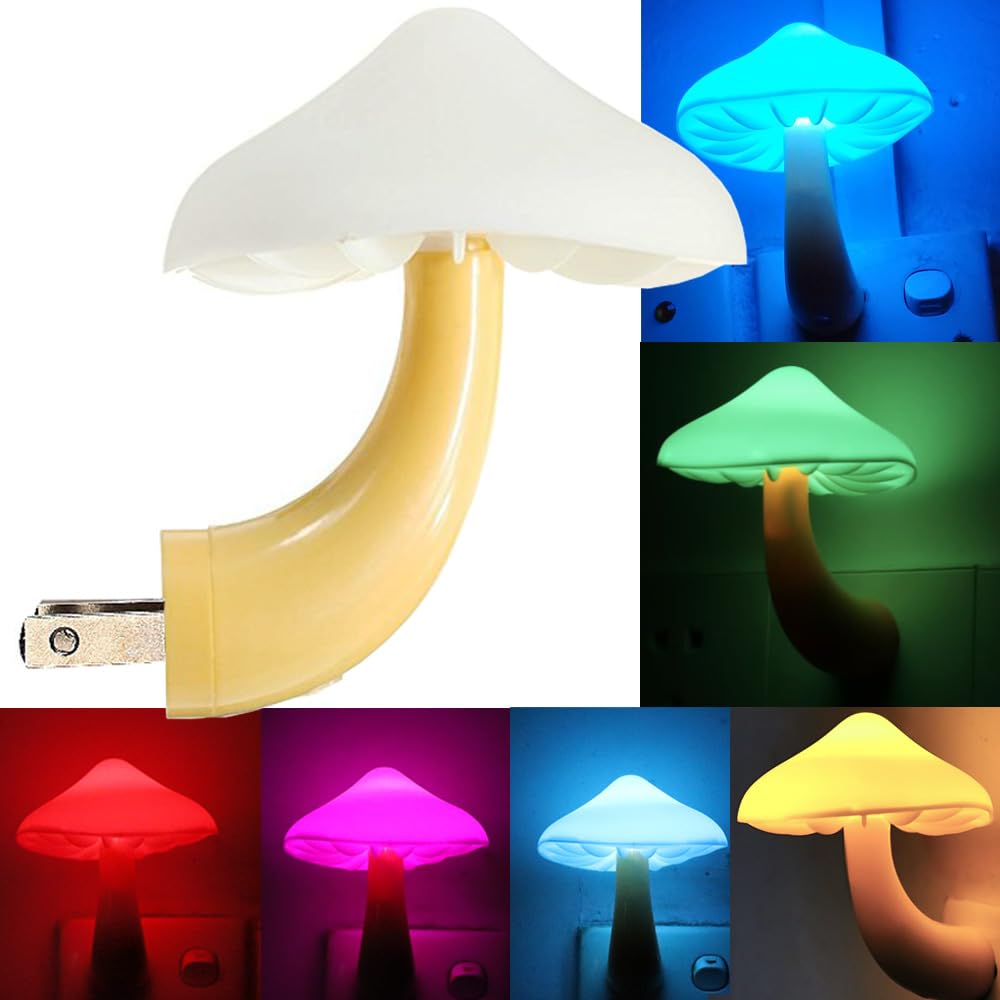
Image: The AUSAYE Sensor LED Mushroom Night Light, showcasing its compact design and mushroom shape.
Setup Instructions
Setting up your AUSAYE Sensor LED Mushroom Night Light is a simple process. Follow these steps for proper installation:
- Unpack: Carefully remove the night light components from the packaging. You will find the mushroom cap and the base with the plug.
- Assemble: Align the mushroom cap with the stem on the base. Gently push the cap onto the stem until it clicks securely into place. Ensure the cap is firmly attached.
- Plug In: Insert the night light directly into a standard 110V AC wall outlet. Ensure the outlet is easily accessible and not obstructed.
- Placement: For optimal performance of the light sensor, plug the night light into an outlet that is not directly exposed to bright light sources during the day, and not completely obscured from ambient light. Avoid placing it behind furniture or curtains that might block light detection.

Image: Step-by-step visual guide for assembling the mushroom night light, showing how to attach the cap to the base.
Operating Instructions
The AUSAYE Sensor LED Mushroom Night Light operates automatically using its built-in light sensor. No manual switching is required.
- Automatic On/Off: The night light will automatically turn on when the ambient light in the room falls below a certain threshold (e.g., at dusk or in a dark room). It will automatically turn off when sufficient light is detected (e.g., at dawn or when room lights are turned on).
- Color Changing: The night light features a continuous 7-color changing cycle. The colors will transition smoothly without user intervention. There is no option to select or fix a single color.
- Brightness: The light provides a soft, warm glow. It is designed for ambient lighting and not as a primary light source. The brightness is fixed and not adjustable by the user.

Image: Illustration showing the night light automatically turning off during the day and on at night, with examples of its color-changing capability.
Video: A demonstration of the AUSAYE Sensor LED Mushroom Night Light's automatic color-changing feature and how it illuminates a dark space.
Maintenance
To ensure the longevity and optimal performance of your night light, follow these simple maintenance guidelines:
- Cleaning: Disconnect the night light from the power outlet before cleaning. Use a soft, dry cloth to wipe the surface. Do not use abrasive cleaners, solvents, or excessive moisture, as these can damage the unit or its electronic components.
- Sensor Care: Keep the light sensor (located on the base) clean and free from dust or obstructions. A blocked sensor may prevent the light from turning on or off correctly.
- Storage: If storing the night light for an extended period, ensure it is clean and dry. Store it in a cool, dry place away from direct sunlight and extreme temperatures.
Troubleshooting
If you encounter any issues with your AUSAYE Sensor LED Mushroom Night Light, refer to the following common problems and solutions:
| Problem | Possible Cause | Solution |
|---|---|---|
| Night light does not turn on in the dark. |
|
|
| Night light does not turn off during the day. |
|
|
| Colors are not changing or light is dim. |
|
|
Product Specifications
| Brand | AUSAYE |
| Model Number | 001 |
| Product Dimensions | 0.16"D x 3.23"W x 3.7"H (approx. 0.4cm D x 8.2cm W x 9.4cm H) |
| Item Weight | 1.45 ounces (approx. 41 grams) |
| Material | Plastic |
| Light Source Type | LED |
| Light Color | 7-Color Changing |
| Brightness | 2 Lumens |
| Power Source | Plug-in Electric |
| Voltage | 110 Volts |
| Switch Type | Auto Switch (Light Sensor) |
| Indoor/Outdoor Usage | Indoor Only |
| Water Resistance Level | Not Water Resistant |
| UPC | 690910038431 |

Image: Detailed diagram illustrating the dimensions (3.15 inches / 8 cm width, 3.5 inches / 11 cm height) and the location of the built-in smart light sensor on the night light.
Warranty and Support
For warranty information or technical support regarding your AUSAYE Sensor LED Mushroom Night Light, please contact the manufacturer directly. Keep your purchase receipt as proof of purchase.
Manufacturer: AUSAYE
Refer to the product packaging or the retailer's website for the most current contact information.