
1. Introduction
This manual provides essential information for the proper setup, operation, and maintenance of your Thomas & Friends TrackMaster Dash Replacement Engine, model R9634. This engine is designed to replace the original engine included with the Thomas & Friends TrackMaster Dash at the Zip Line Bridge set (Item # R9634 & V7297). Please read these instructions carefully to ensure safe and optimal performance.
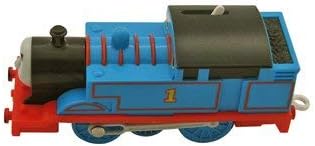
Image: The Thomas & Friends TrackMaster Dash Replacement Engine, featuring its distinctive blue body, black boiler, and red chassis, with the number '1' prominently displayed on its side.
2. Product Overview
The Thomas & Friends TrackMaster Dash Replacement Engine is a genuine component designed to integrate seamlessly with your existing TrackMaster set. Key features include:
- Replacement Engine: Specifically designed to replace the engine that originally comes with the Thomas & Friends TrackMaster Dash at the Zip Line Bridge set.
- Compatibility: For use with Thomas & Friends TrackMaster Dash at the Zip Line Bridge - Item # R9634 & V7297.
- Genuine Part: An authentic Thomas & Friends replacement component.
- Packaging: Supplied as a loose part directly from the manufacturer, not in retail packaging.
3. Setup Instructions
Follow these steps to prepare your replacement engine for operation:
- Unpack the Engine: Carefully remove the engine from its packaging.
- Inspect for Damage: Before use, visually inspect the engine for any signs of damage during transit.
- Battery Installation (if applicable): Although this specific model does not require batteries, if you are using a different TrackMaster engine that does, ensure fresh batteries are correctly installed according to the markings inside the battery compartment.
- Place on Track: Position the engine onto a clean, assembled TrackMaster track. Ensure all wheels are properly seated on the rails.
- Connect to Wagons (Optional): If desired, attach compatible TrackMaster wagons or tenders to the engine's coupling hook.
4. Operating Instructions
Operating your TrackMaster Dash Replacement Engine is straightforward:
- Power On: Locate the ON/OFF switch, typically found on the top or side of the engine. Slide the switch to the 'ON' position.
- Observe Movement: The engine should begin to move along the TrackMaster track.
- Power Off: To stop the engine, slide the switch back to the 'OFF' position.
5. Maintenance
Regular maintenance helps ensure the longevity and smooth operation of your engine:
- Cleaning: Use a soft, dry cloth to wipe down the engine's exterior. Avoid using harsh chemicals or abrasive cleaners.
- Wheel Cleaning: Periodically check the wheels for any accumulated dust, hair, or debris that might hinder movement. Gently remove any obstructions.
- Track Condition: Ensure the TrackMaster track is clean and free of obstacles for optimal engine performance.
- Storage: When not in use, store the engine in a clean, dry place away from direct sunlight and extreme temperatures.
6. Troubleshooting
If you encounter issues with your engine, refer to the following table:
| Problem | Possible Cause | Solution |
|---|---|---|
| Engine does not move. | ON/OFF switch is in 'OFF' position. | Slide switch to 'ON'. |
| Engine moves slowly or inconsistently. | Wheels are dirty or obstructed. | Clean wheels and remove any debris. |
| Engine derails frequently. | Track sections are not properly connected or track is uneven. | Ensure track sections are securely connected and laid on a flat surface. |
7. Specifications
Detailed specifications for the Thomas & Friends TrackMaster Dash Replacement Engine R9634:
- Model Number: R9634-9409
- Brand: THOMAS & FRIENDS
- Color: Blue and Black
- Batteries Required: No
- Batteries Included: No
- Manufacturer Recommended Age: 3 years and up
- Package Dimensions: Approximately 17.53 x 5.33 x 3.3 cm
- Item Weight: Approximately 91 g
- ASIN: B07D84Q4VP
- Date First Available: 23 May 2018
8. Warranty and Support
For information regarding warranty coverage or to seek further technical support, please refer to the official THOMAS & FRIENDS website or contact their customer service department. Keep your purchase records for any warranty claims.