
BONAI 5800mAh Portable Power Bank
BONAI 5800mAh Portable Power Bank User Manual
Model: Cylindrical 5800mAh Power Bank
Introduction
This manual provides essential instructions for the safe and efficient operation of your BONAI 5800mAh Portable Power Bank. Please read this manual thoroughly before using the product and retain it for future reference.
Package Contents
- 1 x BONAI 5800mAh Portable Power Bank (Sierra Blue)
- 1 x Charging Cable (USB to Lightning)
- 1 x User Manual
Product Features
- High Capacity: 5800mAh Lithium-polymer battery for extended power.
- Compact Design: Cylindrical shape for easy grip and portability. Dimensions: Approximately 4 inches (length) x 1.2 inches (diameter). Weight: 4.8 oz (136.1g).
- Universal Compatibility: Compatible with various devices including iPhone 11, 12, 13, 14, iPad, iPod, and other USB-powered devices.
- Fast Charging: USB output provides 5V/2.1A for efficient charging.
- LED Indicators: Four LED lights indicate remaining battery capacity (each light represents 0-25%).
- Safety Protection: Built-in smart chip protects against overcharge, over-discharge, overcurrent, and short circuit.

Image: The BONAI Portable Power Bank shown alongside a smartphone, highlighting its compact and cylindrical design for easy portability.

Image: The BONAI Portable Power Bank resting in the palm of a hand, demonstrating its lightweight nature (4.8 oz) and ergonomic design.
Setup: Initial Charging of the Power Bank
Before first use, fully charge your BONAI Portable Power Bank. This ensures optimal battery performance.
- Connect the provided charging cable (USB end) to a USB power adapter (not included) or a computer's USB port.
- Connect the Lightning end of the charging cable to the Input port on the power bank.
- The LED indicators will illuminate and blink, showing the charging progress. All four LEDs will be solid when fully charged.
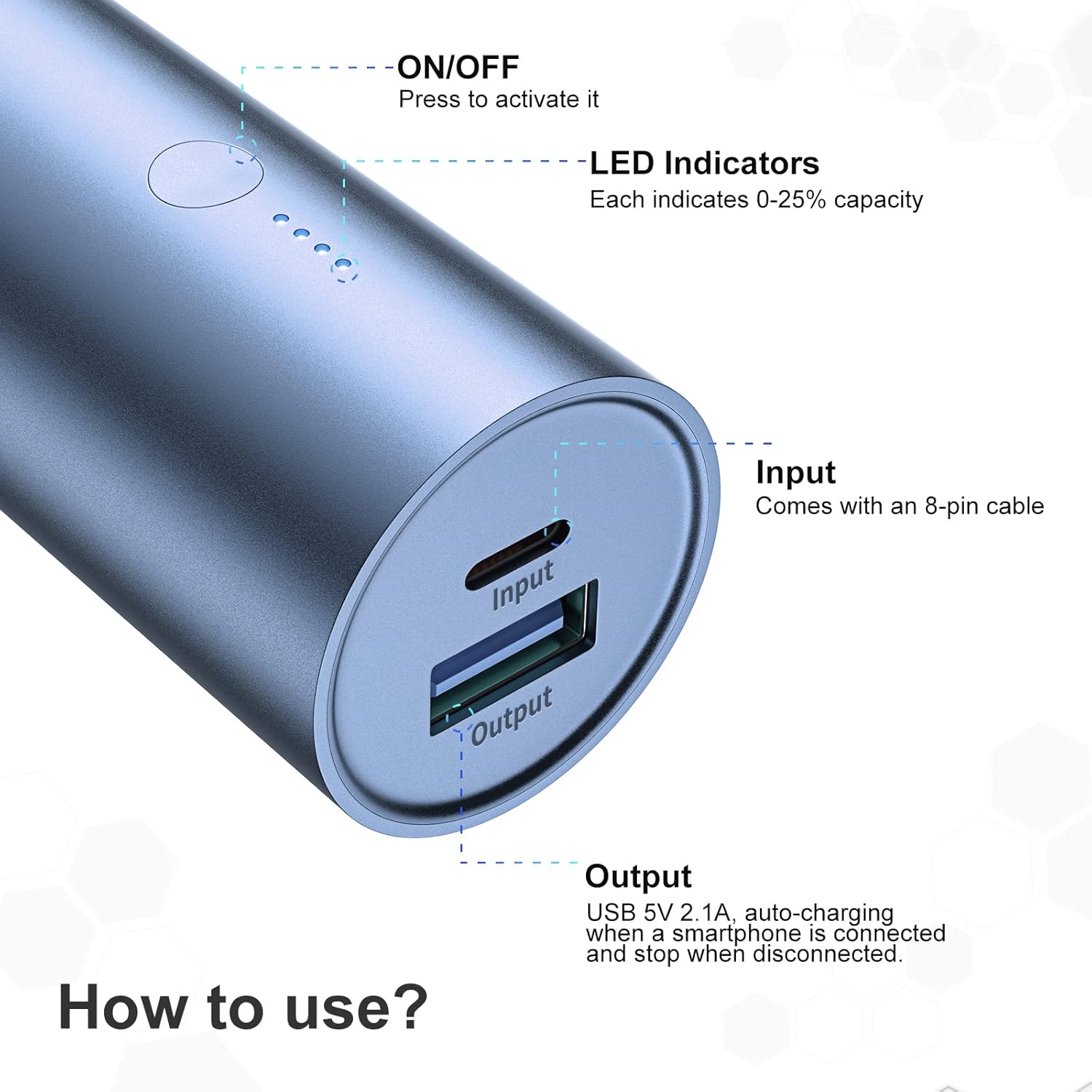
Image: A detailed view of the power bank's end, showing the 'Input' port (Lightning), 'Output' port (USB), the power button, and four LED indicator lights. Each LED represents 0-25% of the battery capacity.
Operating Instructions
1. Charging Your Device
- Connect your device's charging cable (USB end) to the Output port on the power bank.
- Connect the other end of your device's charging cable to your device.
- Press the power button on the power bank to activate charging. The LED indicators will light up to show the remaining power.
- The power bank will automatically begin charging your device. Charging will stop automatically when the device is disconnected or fully charged.
2. Checking Battery Level
Press the power button once to check the remaining battery capacity. The LED indicators will light up:
- 4 LEDs: 75% - 100% charged
- 3 LEDs: 50% - 75% charged
- 2 LEDs: 25% - 50% charged
- 1 LED: 0% - 25% charged (recharge the power bank soon)

Image: The BONAI Portable Power Bank connected via a cable to a smartphone, actively charging the device in a typical usage scenario.

Image: An illustration demonstrating the approximate number of charges the 5800mAh power bank can provide for various iPhone models: 1.1 charges for iPhone 12, 1.3 charges for iPhone X, and 1.8 charges for iPhone 8.
Maintenance
- Store the power bank in a cool, dry place away from direct sunlight and extreme temperatures.
- Avoid dropping or subjecting the power bank to strong impacts.
- Clean the exterior with a soft, dry cloth. Do not use harsh chemicals or abrasive cleaners.
- If not used for extended periods, charge the power bank at least once every three months to maintain battery health.
Troubleshooting
| Problem | Possible Cause | Solution |
|---|---|---|
| Power bank not charging | Charging cable is faulty or not properly connected. Power adapter is not working. | Ensure the charging cable is securely connected. Try a different USB cable or power adapter. |
| Device not charging from power bank | Power bank battery is depleted. Device's charging cable is faulty. Power button not pressed. | Recharge the power bank. Try a different charging cable for your device. Press the power button to activate output. |
| Slow charging | Device's charging cable is not optimal. Device requires higher input. | Ensure you are using a high-quality charging cable. Verify your device's charging requirements. |
Specifications
| Feature | Detail |
|---|---|
| Brand | BONAI |
| Model Name | Cylindrical Portable Power Bank |
| Battery Capacity | 5800 mAh |
| Battery Type | Lithium-polymer |
| Input Port | Lightning (5V/2A) |
| Output Port | USB (5V/2.1A) |
| Color | Sierra Blue |
| Weight | 136.1 g (4.8 oz) |
| Special Feature | Portable |
Safety Information
- Do not expose the power bank to water, moisture, or high humidity.
- Avoid exposing the power bank to fire or extreme heat.
- Do not disassemble, puncture, or modify the power bank.
- Keep out of reach of children.
- Dispose of the power bank according to local regulations for electronic waste.
- Do not use if the power bank is damaged or swollen.
Warranty and Support
BONAI products are designed for reliability and performance. For warranty information or technical support, please refer to the contact details provided on the product packaging or visit the official BONAI website. Please have your product model and purchase date available when contacting support.